live_tv
Livestream Starting Soon
00
Hours
:
00
Minutes
:
00
Seconds
Up next in 10

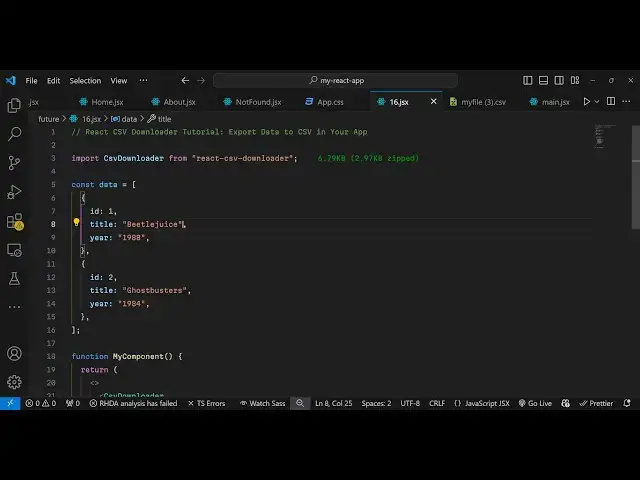
React CSV Downloader Tutorial Export Data to CSV in Your App Using react-csv-downloader Library
Jan 9, 2025

Buy the full source code of application here:
Show More Show Less View Video Transcript
0:00
uh hello guys welcome to this video so
0:02
in this video I will show you a react
0:05
specific CSV downloader package where
0:08
you can specify the data inside array of
0:12
objects and download it as a CSV file so
0:15
this is actually the package it doesn't
0:17
it does the same simple job we have a
0:19
download button if you click this
0:21
download button it will download your
0:23
CSV data comma separated value and it
0:26
will look something like this your CSV
0:28
file comma separated these are the
0:31
column names and these are the different
0:32
rows that you
0:34
specify and actually the package name is
0:37
uh react CSV
0:41
downloader so I've already installed
0:43
this package so I will show you a very
0:45
basic example and first of all we will
0:49
import this package by this name CSV
0:58
downloader and it basically comes from
1:00
this react CSV downloader this is
1:03
actually the package name we have
1:05
imported
1:07
this and now here we need to specify
1:10
which data we want to convert to CSV so
1:14
you'll have an array of objects and here
1:17
you can specify the column names you'll
1:19
have the ID then we have the
1:24
title and then we can have age as
1:28
well and then we can have country as
1:31
well so you can specify as many column
1:33
names as you
1:41
want so in this way you can
1:46
specify we have two objects right here
1:49
each object has four properties four
1:51
column names and
1:53
now inside this we can render this
1:57
component so it is called as CS fre
2:00
downloader and this actually takes some
2:03
arguments first is what file name that
2:05
you want to give so you can give any
2:08
file name and then you need to provide
2:09
the extension right here it will be
2:13
CSV and then it takes the separator so
2:17
commonly in comma separated value the
2:20
separator is comma but here you can
2:22
change the separator as well and rap
2:25
column character it specify which
2:28
character that you want to use to
2:30
specify the column name so I will write
2:32
here single
2:34
code and also you can specify your data
2:37
right here in the data
2:41
properties and then whatever text that
2:43
you want to give to the download button
2:45
download CSV
2:48
file so if you refresh your browser you
2:51
will see this button appearing download
2:53
CSV file so once you click this button
2:56
your CSV file will get downloaded and it
2:59
will have that data you will see that so
3:02
in this way you can export your CSV file
3:05
CSV data using this package and you can
3:09
change the separator right here if you
3:11
want this separator Dash then you can
3:14
change this so now what happens instead
3:18
of comma Dash will be there you'll
3:22
see so you can customize it accordingly
3:25
which character that you
3:26
want so this is actually the package
3:29
react CS fre
3:30
downloader so thank you very much for
3:33
watching this video and do
3:41
check audio video an image
#Web Services
#Web Design & Development