Up next in 10

Python Script to Extract Text From PDF Using PyMuPDF Library & Save it as TXT File
Jun 3, 2025

Buy the full source code of application here:
Show More Show Less View Video Transcript
0:00
uh hello guys welcome to this video So
0:03
in this video I will show you how to
0:05
extract
0:06
uh the data from a PDF file here So all
0:10
the text we will extract and save it
0:13
inside a txt file So this is actually a
0:16
sample PDF file which we will be working
0:18
here For this I have written a simple
0:20
Python script So once I run this Python
0:23
script you will see all my text will be
0:26
saved here to output.txt So once I open
0:30
this you will see all the text from the
0:33
PDF file has been extracted and saved
0:35
inside this txt file So now for building
0:39
this application we are using this uh
0:41
package So you just need to install this
0:44
uh pip install py mu pdf So this is
0:50
essentially this package here we are
0:51
using it py mu pdf So simply install
0:56
this package uh I have already installed
0:58
it and uh now I will show you step by
1:01
step how to do this So first of all you
1:04
just need to import this package py mu
1:08
pdf Then we just need to initialize this
1:11
package It contains this function which
1:13
is open which will actually open this
1:15
pdf file First of all just pass the
1:19
address of the where the pdf file is
1:22
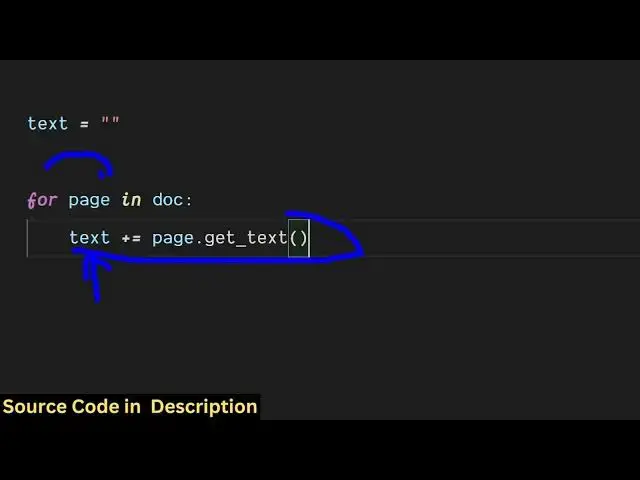
stored Then we declared a variable here
1:24
where we'll be storing all the text
1:26
which will be
1:28
extracted Then we loop through all the
1:31
pages in the PDF by this for loop and
1:35
then we actually store all the extracted
1:38
text So this actually contains this
1:40
function here get underscore text which
1:44
will actually extract all the text from
1:46
the PDF file and store it inside this
1:48
variable text So we are looping through
1:51
all the pages here in this for loop So
1:54
after extracting all the data now we
1:57
just need to
1:58
print the text in the command line and
2:01
also we need to save this inside a txt
2:06
file So if I run this now this script
2:09
here it will actually print this data
2:12
right here Now we just need to store it
2:14
inside a file For saving it we use the
2:18
open function in Python and we simply
2:21
provide the file name in which the data
2:25
will be stored So this will be in write
2:27
mode and here we'll be providing the
2:29
encoding type
2:32
UTF8 And then we simply use the write
2:35
function to write all the data So once I
2:38
now execute the script here you will see
2:40
it will also create a file in the left
2:42
hand
2:43
side So result.txt txt is created here
2:48
So if I open this you will see all the
2:50
text is successfully extracted from the
2:53
PDF file and save it as a txt file So in
2:56
this way this is actually the Python
2:58
package that you can use here
3:03
pymdf and also check out my website
3:06
freemediatools.com
3:08
uh which contains thousands of tools
#Programming
#Software
#Scripting Languages