live_tv
Livestream Starting Soon
00
Hours
:
00
Minutes
:
00
Seconds
Up next in 10

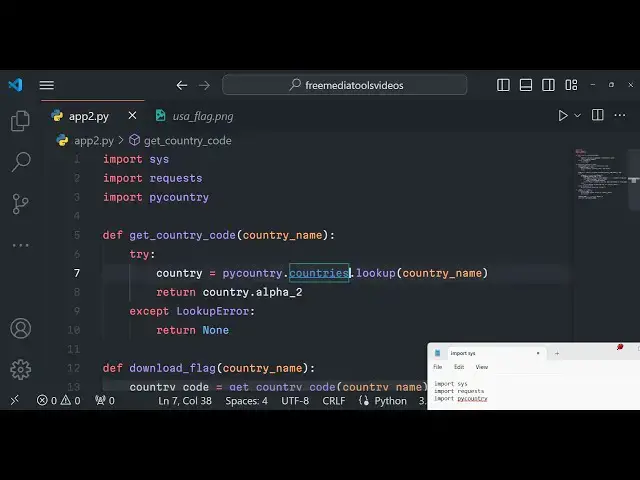
Python 3 Web Scraping to Download Country Flag as PNG Image Using pycountry Module
Jan 9, 2025

Official Website:
https://freemediatools.com
Show More Show Less View Video Transcript
0:00
uh Hello friends welcome to this live
0:02
stream so in this live stream we will
0:03
actually be talking about another very
0:05
handy python module which allows you to
0:08
actually download a
0:11
PNG image of a specific country flag so
0:15
here this is actually the python script
0:18
which actually downloads the flag of a
0:20
country here you need to pass the
0:22
country as a command line argument to
0:24
this python script so what it will does
0:26
it will actually go to that URL whatever
0:28
we web scraping that we are doing right
0:30
here it will actually go to that URL and
0:32
actually download the flag and you'll it
0:36
will download it as a PNG image so let
0:39
me just show you a short little demo of
0:42
this python script so as I write inside
0:45
the command line P Python app2 py and
0:48
followed by the country name whichever
0:50
flag that you want to download let me
0:52
say UK so you need to provide the full
0:55
name of the country as it is you'll see
0:58
we provide USA so so the flag is you can
1:01
see downloaded if I once again run it
1:03
with India and pass it you can see flag
1:06
of India has been
1:08
downloaded you can see that so it's a
1:11
very simple python script but it's very
1:13
powerful you can do it unlimited number
1:15
of
1:16
times need to provide the country
1:22
name you can see that
1:24
so you can basically download any
1:27
country flag by passing this as an
1:29
argument
1:35
so now let me show you guys How I build
1:38
this python script and which module that
1:40
we are using so we are actually using
1:42
this py country module which uh is
1:45
available if you just search in on this
1:48
website python modules website just type
1:51
P Country and this is actually the
1:53
command pip install Pi
1:56
country simply it basically get all the
1:59
country Cod s the flags all the
2:01
information about a particular country
2:04
so I'm using latest version of python at
2:07
time of recording this live stream
2:10
3.1.2 point2 and simply install this pip
2:14
install Pi country this is actual
2:16
command of this uh to install this
2:18
module I have already done that so now
2:21
let me just uh rewrite the python
2:26
script and start from scratch so first
2:29
first of all what we need to do right
2:31
here at the very top we need to import
2:33
the system module we need to import the
2:35
request module as well to actually
2:37
request to actually web scrip the URL
2:40
and then we also need to import the pi
2:42
country module as well so the source
2:44
code is given in the description of the
2:46
video you can go to the description and
2:48
purchase the full source code and right
2:51
here we will simply have the main
2:52
function right
2:55
here so here we will simply say if the
2:58
length we will have the length
3:01
function and here you'll simply check
3:04
that if the user pass arguments less
3:08
than two in that case we will simply
3:10
tell to the user that you need to also
3:12
pass the country name like this python
3:15
script. py followed by country
3:19
name like this and then we will exit the
3:23
program like this so here we will need
3:27
to get the country name
3:32
which is passed by the
3:36
user so system
3:41
argv so we need to basically pass the
3:44
country name so whatever country name
3:45
that you will pass we can simply print
3:48
this country name so let's suppose we
3:50
are
3:51
passing if I run this you will get error
3:55
message if you don't pass it you need to
3:57
pass the country name as well so if you
3:59
just type here like this it will say you
4:02
need to also pass the country name
4:04
so it will print out the country name
4:07
you'll see USA so you are printing it so
4:10
now what we need to do we need to
4:12
actually call a simple function which we
4:15
will make download flag and pass the
4:17
country name as an argument so now we
4:19
need to Define this uh function download
4:22
flag and country name will be passed as
4:24
an argument so right inside this
4:27
function what we need to do we need to
4:29
actually
4:32
use this module Pi country and it
4:35
contains this countes function and look
4:38
up you will look up for the country
4:40
which is passed right here country name
4:42
after passing it we will simply return
4:44
the country code so we'll simply say
4:47
country.
4:49
Alpha this is a twood digigit country
4:53
code that it will return so if you just
4:54
print out country.
4:58
Alpha 2 so if you just see uh we also
5:01
need to write here accept if any sort of
5:04
exception take
5:13
place so you will see it will actually
5:16
return the two little two letter digit
5:18
code which is us and if you type another
5:21
country which is I and India for I am so
5:24
we are returning this two-digit country
5:26
code using this module Pi country and
5:28
now using this country code we can
5:31
actually now download the flag
5:35
so so here we need to actually Define
5:38
this function so this function is equal
5:41
to uh get country code so just rename
5:45
this function get country code and here
5:47
we are passing the country
5:49
name country
5:53
name so here what we need to do we need
5:56
to Define this function download flag
5:58
country name
6:05
so inside this function we need to get
6:07
the first of all the country code so we
6:09
will
6:10
basically uh use this function that we
6:14
declared get country code and uh we will
6:18
pass the country name as an argument you
6:20
will see that we are calling this
6:22
function get country code we are
6:24
actually getting the country code here
6:26
after getting the country code we can
6:28
simply say if the country code
6:30
is not is none in that case we can
6:33
simply say that uh
6:36
country code not
6:41
found but if the country code is found
6:44
you can return from it if the country
6:45
code is found then in that case we can
6:48
Define the flag URL and this will be
6:53
https from this website we will download
6:55
the country code flag
6:58
cdn.com w 320 we are actually web
7:01
scraping it using the country code that
7:03
we got from PI country module so we are
7:07
basically using this country code do
7:12
lower.
7:13
PNG so this is actually the website guys
7:16
if you just
7:18
see if I just paste this in the URL type
7:24
here so it will actually give you this
7:27
uh we are actually call copying
7:31
this we need to convert this into you
7:34
will see you can get any flag right here
7:38
just you need to pass the two two letter
7:41
digit code of a specific country so Au n
7:44
z you'll see that so we are web scraping
7:47
it using python programmatically using
7:49
the request module so now we need to
7:51
Simply say try response we'll use the
7:54
request module to actually get this URL
7:57
flag URL and uh we will simply say if
8:00
response. status code is equal to 200 in
8:04
that case is success in that case we
8:06
will simply say file name
8:11
f country name.
8:17
replace so here we are simply defining
8:19
the file
8:23
l so you can see that we're defining the
8:26
file name and we can also have exess
8:33
section so after defining the file name
8:35
we now need to save this PNG file as an
8:39
local file so in our computer so for
8:42
saving it we'll open use the open
8:44
function as write binary for writing the
8:47
file inside the local file system as
8:50
file and then we'll say file. write
8:54
whatever response content response.
8:56
content that's all and then we can
8:58
simply have a print statement that flag
9:01
has been
9:04
downloaded so this is actually the
9:06
overall python script guys it first of
9:08
all fetches the country code two letter
9:10
digit country code using this module Pi
9:12
country and then it uses web scraping to
9:15
actually download the image of the flag
9:18
using this URL bu passing the country
9:21
code and saving it using the open
9:25
function so if you just type right here
9:28
call The Script
9:31
so flag has been downloaded if I see
9:33
right here the flag is downloaded you
9:35
will see that so if I pass another code
9:37
right here Sweden and you will see that
9:41
Sweden flag is
9:49
downloaded so if the country doesn't
9:51
exist then it will return error message
9:53
could not find a record for
10:06
you can see that so all the flags are
10:09
you can see fetched downloaded as a PNG
10:11
file guys thank you very much for
10:13
watching this video please hit that like
10:15
button subscribe the channel as well and
10:17
I will be seeing you in the next live
10:19
stream