Up next in 10

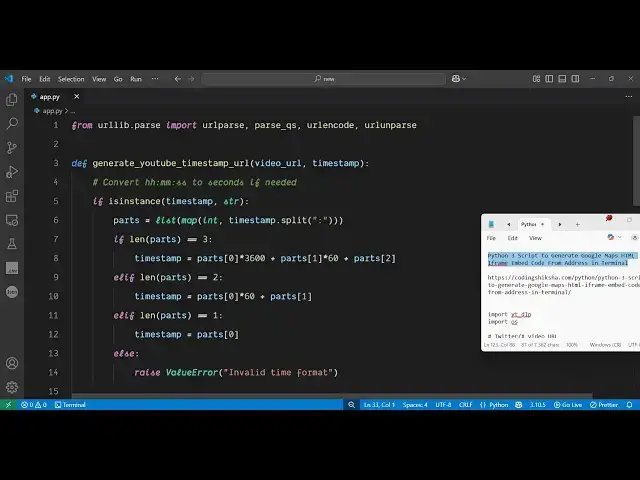
Python 3 Script to Generate YouTube Video Timestamp URL From Time Input in Terminal
Jun 3, 2025

Get the full source code of application here:
https://codingshiksha.com/python/python-3-script-to-generate-youtube-timestamp-url-from-time-input-in-terminal/
Show More Show Less View Video Transcript
0:00
uh hello guys uh welcome to this video
0:02
so in this video I will show you how to
0:05
build this application uh YouTube video
0:07
timestamp generator so whenever you are
0:10
watching any sort of YouTube
0:13
video so if you want to specifically
0:17
jump on a particular section you don't
0:19
need to uh you don't have the time to
0:21
watch the entire video then this
0:23
application comes into the picture you
0:25
input the URL and the minutes and the
0:27
second uh let me show you an example
0:33
uh let me open my any video right here
0:38
let me just type the channel
0:43
name let me take this video for example
0:46
so I built this tool in my website here
0:50
freemediatools.com this is my own
0:51
website which contains thousands of
0:53
tools so you input actually the time
0:56
period at which you need to so I need to
1:01
go to this time period 2
1:03
minute 3 second so it will actually
1:06
construct this timestamp so when someone
1:10
clicks on this they will redirect to
1:12
that specific portion in the video so
1:15
this actually saves a lot of time
1:18
because they don't want to watch the
1:20
entire video so this timestamp link will
1:25
automatically redirect the user to that
1:27
particular location so in this way I
1:29
will show you a Python script which will
1:32
actually do this process so for this I
1:36
have given this uh script in the
1:39
description of this video so now I will
1:42
show you how to do this so first of
1:46
all you just create a simple app py file
1:49
and then for this you need URL lib
1:53
library which is a built-in library
1:56
inside Python and from this you need to
1:58
import URL
2:00
parse parse QS
2:03
URL encode as
2:06
well URL encode and also URL unparse all
2:12
these packages we need to import and
2:14
after that we will define a function
2:17
which will generate the YouTube timeline
2:19
URL timestamp URL so here we will
2:22
specify which YouTube video you are
2:25
talking about so simply let me take this
2:28
example i copy this URL and paste
2:31
it and then here you need to submit the
2:34
time
2:35
input at what particular location so I
2:38
will
2:41
say so here this will be the time period
2:43
of the video 1 minute 23
2:46
second and using this time we will
2:49
construct the timestamp URL for this we
2:53
will construct this function which is
2:55
generate timestamp URL here we simply
3:00
pass the video URL and the actual time
3:02
input as two arguments so now we just
3:05
need to define this function which is
3:09
generate and now inside this function we
3:14
actually first of all check in this if
3:16
condition that
3:19
uh if the time stamp that is
3:26
passed so here we specifically check
3:29
here this is your time input let me call
3:31
this as time stamp
3:34
so now the very first thing we are doing
3:36
we are checking that if the time period
3:38
that is passed is actually a string or
3:42
not and then we extract the the time
3:47
period by using this simple logic
3:53
so we actually extract
3:57
everything like this the actual time
4:00
period that you
4:02
pass so like this we have so we are
4:06
actually extracting this 1 minute 23
4:09
second we are converting this to second
4:12
which comes out to be 83
4:15
second so this is actually the logic
4:17
here
4:20
after that we get the parsed time here
4:24
now we use the URL parse and parse the
4:28
video
4:29
URL and then use this to actually parse
4:33
the
4:35
query and then we use query
4:40
t this is little bit complicated but you
4:43
just need to write whatever I'm writing
4:47
and then we construct the timestamp
4:50
video URL based upon the time
4:53
period use this so we get this timestamp
4:58
URL so we just need to return this from
5:01
this function so we'll simply say return
5:04
new URL that's all uh if you run this
5:07
Python script now let me run
5:11
this so you just need to print this out
5:15
so I simply say print original URL and
5:19
then the timestamp URL
5:25
so go to the terminal and just execute
5:28
this you will see this is your original
5:30
URL and this is your timestamped
5:34
URL so it has converted to seconds here
5:37
which is 83 so we specified this 1
5:41
minute 23 seconds so it actually
5:43
converted them into a timestamp URL so
5:45
you can copy this URL and simply paste
5:48
it inside the browser so now what
5:51
happens it redirects you to the 83
5:54
second directly in the video so this
5:57
actually saves a lot of time you don't
5:59
need to watch the entire video you can
6:01
create these timestamps inside your
6:03
video descriptions to allow user to
6:06
quickly navigate to the directly to that
6:10
timestamp so this was the script the
6:13
full script is given in the description
6:14
of this video and also check out my
6:17
website free media tools.com and please
6:20
hit that like button and also comment on
6:23
this video as well