Up next in 10

Python 3 Google Text to Speech API to Export Text to MP3 Audio Using GTTS Module
Jan 9, 2025

Official Website:
https://freemediatools.com
Show More Show Less View Video Transcript
0:00
uh hello guys welcome to this video so
0:02
in this video we will actually be
0:04
looking at a very simple python script
0:06
which allows you to actually convert uh
0:09
your uh text to an MP3 file text to
0:14
speech we will be using the Google text
0:17
to speech it's a free module which is
0:19
available in Python which is called as
0:22
GTS so it is Google text to speech
0:25
engine this is a full form of this
0:28
library and uh when I basically run this
0:31
file right here so you will basically
0:33
see in the script right here I have
0:37
given basically this text out there
0:39
hello this is a sample text to convert
0:41
to speech so if I basically convert this
0:44
uh if I execute this python script on
0:46
the left hand side you will actually see
0:49
python app.py if I run this script right
0:52
here on the left hand side a MP3 file
0:54
will be created with the text which is
0:57
written right here if I execute it uh
1:00
I think sorry the name of the file is
1:03
pythona 1. py this is the name of the
1:06
Python script as I execute it you will
1:09
basically see output. MP3 file is saved
1:12
and it is successfully created on the
1:14
left hand side and if I not need to play
1:16
this file right here hello this is a
1:19
sample text to convert to speech so you
1:22
can see that guys a person is speaking
1:25
those words that I written right here
1:27
and it is in English language you can
1:29
even change the language as well so now
1:31
let me just show you the python script
1:33
so the actual module that we are using
1:35
for doing this is
1:37
GTS it's a very popular package in
1:41
Python uh the command is very simple pip
1:44
pip install GTS this is a command here
1:47
simply copy this command you should you
1:50
should have python installed on your
1:51
machine I am basically using the 3.1 2.2
1:55
latest version of python simply install
1:58
this module by exec in PIP install
2:02
GTS so I've already installed this
2:04
module so it will hardly Take 5 to 10
2:07
seconds and it will install this module
2:10
so now let me just show you the actual
2:13
code which is required for building this
2:14
python application in the command line
2:17
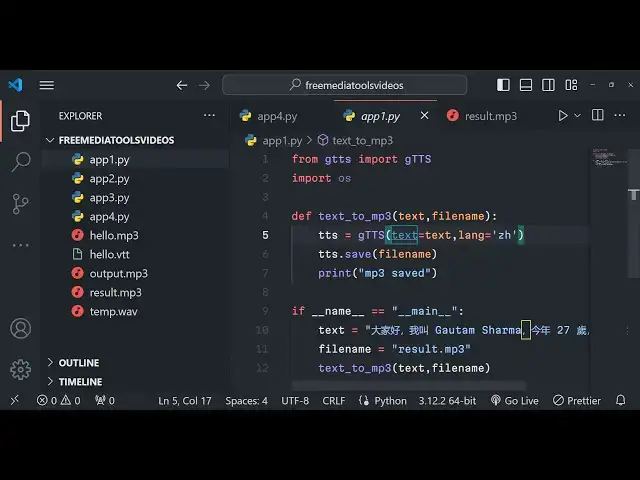
first of all you need to import the GTS
2:20
library from that we need to import
2:24
GTS Google to text to speech engine we
2:28
are actually importing it so at the very
2:30
top and then we also need to import the
2:33
operating system module to actually save
2:35
the MP3 file which will be created from
2:38
the text that we provide and now we will
2:40
be having in the main function in the
2:43
python script so if name is equal to
2:46
like this
2:47
main so inside the main function guys we
2:50
will actually be providing the raw text
2:53
you can provide the raw text right here
2:55
hello this is a sample text
3:01
or I can say hello my name is
3:05
God and I am
3:10
27 you can see I'm basically giving some
3:13
text right here this is a simple
3:16
settings that hello my name is goam and
3:19
you can see that
3:23
so this is a text that I given right
3:26
here now I just need to convert this
3:28
text into speech and
3:30
just create a MP3 file so there is
3:33
basically this
3:35
uh we will actually call a simple method
3:39
we will first of all give it a file name
3:42
which will be created so it will be
3:44
output. MP3 so this file will be created
3:46
in the root directory and we will
3:48
actually be making a method which is
3:51
convert the text into MP3 you will
3:54
basically provide the text and the
3:56
actual file name and uh you will
4:00
basically see now we need to actually
4:02
Define this function we will simply say
4:06
textor 2 to MP3 we will basically Define
4:09
this function text and then we will
4:12
actually be having the file name as a
4:14
second parameter and inside this we will
4:16
be initializing our Google 2 text speech
4:20
engine API you will see we are importing
4:22
this module instantiating a new
4:24
Constructor of it here we need to pass
4:26
the text property which is the actual
4:29
text which which is passed and the
4:31
second property is the actual Language
4:33
by default English is selected English
4:37
uh two twl code is en en n stands for
4:40
English so by default it will actually
4:43
convert the text into English language
4:45
and all the languages are supported let
4:47
me show you step by step now to actually
4:50
save this we have a save method also in
4:54
by default and we will pass the file
4:56
name whatever file name that is passed
4:58
right here and then we can actually
5:00
write a simple message on the command
5:02
line that your
5:04
mp3 saved this is actually a python
5:08
script guys very simple python script we
5:10
actually give the raw text in English
5:12
language now we need to convert this
5:13
into a MP3 file we call this function
5:16
and in this call function we are
5:18
initializing the Google text to speech
5:19
engine providing the text the language
5:22
and then we are saving it that's Sol so
5:25
if I uh delete this file and rerun this
5:29
and change change the output file name
5:30
to result. MP3 and again run this
5:37
file pythona 1.
5:41
py result. MP3 is created guys hello my
5:45
name is goam Sharma and I am 27 years
5:48
old and I am from India you can see that
5:51
guys exactly verbum the words are spoken
5:54
in a audio file it is created
5:56
automatically and the nice thing about
5:58
this guys you can
6:00
have as many words as you want let's
6:02
suppose you go to a Wikipedia page and
6:06
if you want to convert them into audio
6:08
file you can take any example any blog
6:12
post that you can take a text B blog
6:14
post you need to create a YouTube video
6:16
about that you have the text you can
6:18
copy paste that text just copy this and
6:22
write here paste
6:27
it exact paste that all that
6:35
text so just eliminate
6:41
that and now once again run this so
6:46
depending upon the text it will take
6:47
some more time because if the text is
6:50
larger you can see now the time will be
6:52
increased in the MP3 file it is round
6:54
about 51 seconds Long MP3 file
6:57
JavaScript is a highlevel programming
6:59
language that follows the ECM script
7:02
standard it was originally programming
7:05
language in commonly used in server side
7:08
programming through platform where the
7:09
base Pro so you can see that guys no API
7:12
key is required here it is completely
7:14
free module you can do unlimited number
7:16
of text to speech you can convert your
7:19
text into MP3 file in different
7:21
languages so it is actually using the
7:23
Google text to speech API in the
7:25
background if you don't know about
7:27
Google text to speech they have have
7:30
their own
7:33
API artificial intelligence API but this
7:36
module of python is actually using this
7:39
text to speech engine provided by Google
7:41
in the background and uh we are not
7:44
using any API key right here you can see
7:46
that so it is unlimited number of time
7:48
and you can change the language here to
7:51
Spanish Spanish code is es so if
7:55
I change the
8:02
so now let me change this language code
8:07
to es es stands for Spanish and if I
8:10
just run the same script right here you
8:12
will basically see slight difference in
8:14
the voice how the words are spoken in
8:17
Spanish hello my name is and I am years
8:22
old and I am from India you can see the
8:26
slight difference in t tune because the
8:28
language difference
8:30
you can uh as you know every language
8:33
has a twood digigit code right here you
8:35
can just search for
8:38
Google list of language codes so this
8:42
you need to provide the iso code for
8:44
every language you will
8:49
see two digit codes so you will
8:52
basically see this is for Africans Alban
8:57
you can copy that and test for each
8:59
language it works and if you want to
9:03
provide text in different language also
9:05
it will also work as
9:14
well so let's suppose if you provide
9:17
this text you you use Google Translate
9:21
and if you convert this text into any
9:25
language uh if I basically paste this
9:28
text and uh select any other language
9:31
let's suppose
9:33
uh Africans
9:35
language so just copy this text and now
9:39
you will basically see the paste that
9:42
africant text right here and now it will
9:44
actually speak those words in that
9:46
language so hello
9:57
my you can see it is speaking different
10:00
languages in different tunes and you can
10:02
basically convert any language text to a
10:04
MP3 file using this script python script
10:07
it is using the Google text to speech
10:08
engine and it is completely free we are
10:10
not using any Google API key or any sort
10:14
of thing you can convert to any
10:17
language let's suppose I convert this
10:21
into Hindi
10:23
language which is a popular language in
10:25
India so you can see that so I change
10:30
this language code to hi which stands
10:32
for Hindi so if I you can just test it
10:35
for your respective Regional
10:44
languages Namar so you can see that guys
10:48
uh you can test for your respective
10:49
countries
10:51
respective uh languages if I convert
10:54
this into Chinese you will basically see
10:59
it's a very special script that I showed
11:02
you in this module Chinese I
11:05
think the code
11:09
is 2 letter language code you can search
11:13
here for every
11:15
language zh
11:23
I I think it is z
11:37
so you can see that guys in this way you
11:39
can basically convert text to speech and
11:41
create MP3 file using Google to text to
11:44
speech a engine and it is not using any
11:47
API key it's a very good tool and
11:50
specifically for this purpose in my
11:52
website freeat tools.com I basically
11:54
made this tool readymade tool for you if
11:57
you want to test it out you can go to
11:58
free mediat tools.com text to speeech
12:01
and this is actually the tool rade it is
12:04
using the same library and actually I
12:06
coded this tool in nodejs express it is
12:09
using the same library and uh if you
12:12
test it out basically if you paste the
12:15
text right here in any
12:18
language inside the text area you need
12:21
to Simply select language of choice you
12:25
can select and click on download audio
12:27
file it will convert and download an
12:29
audio file you will see that so you can
12:31
play
12:36
that so you can see that guys you can
12:39
test this tool that I deployed on my
12:41
website free media tools text to speech
12:43
which I I'm using the same python script
12:46
as a backend server so thank you very
12:48
much for watching this video please hit
12:49
that like button subscribe the channel
12:51
and I will be seeing you in the next
12:53
video
#Intelligent Personal Assistants