Up next in 10

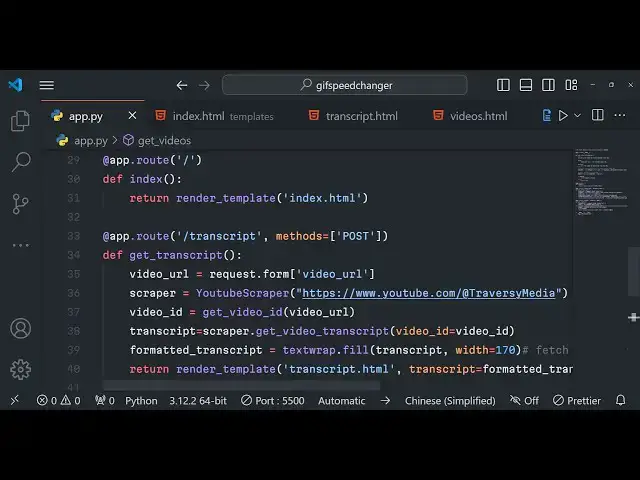
Python 3 Flask Youtube API to Fetch Video Transcript & Fetch Videos of Channel in Browser
Jan 9, 2025

Buy the full source code of the application here:
https://procodestore.com/index.php/product/python-3-flask-youtube-api-to-fetch-video-transcript-fetch-videos-of-channel-in-browser/
Official Website:
https://freemediatools.com
Show More Show Less View Video Transcript
0:04
uh hello guys welcome to this live
0:05
stream so in this live stream I will
0:08
basically build out a flask YouTube API
0:11
application which allows you to actually
0:15
get the transcript of your any YouTube
0:19
video so let me show you the demo right
0:23
here so this is actually the application
0:25
that you're seeing right here on your
0:27
screen which allows you to actually
0:30
fetch the transcript of any YouTube
0:33
video so whatever the person has spoken
0:36
the words it will actually convert this
0:39
into text video to text so it will
0:42
actually give you a full transcript of
0:45
the YouTube video and uh there is a
0:48
second application which allows you to
0:49
actually fetch the YouTube channel
0:52
videos you can actually just input how
0:56
many number of videos you want to fetch
0:59
so by default I am just fetching five
1:01
videos you can see in this input field
1:03
so let me show you the first of all the
1:06
transcript demo right here if I load the
1:08
application so we have developed this
1:10
inside python using a framework called
1:13
as flask flask is used to actually
1:16
create web applications in Python so we
1:18
are using flask so first of all you need
1:21
to input the YouTube video URL so you
1:25
can go to YouTube and search for your
1:27
favorite videos so let's suppose I I
1:30
search for any
1:32
video you can see that this is the video
1:35
I take right here copy link address and
1:38
I will simply plug this inside this
1:40
application and there is a button right
1:42
here get transcript so as I basically
1:45
hit this button what should happen guys
1:48
it will actually scrape the YouTube API
1:51
uh using this python script and you can
1:54
now see it will actually fetch this
1:56
transcript that you can see right here
1:58
guys so whatever the words have been
2:01
spoken you can cross check just open the
2:04
video and play it and you will see that
2:06
all these words are spoken in this video
2:08
so it has basically constructed this
2:10
transcript and it has given to you so
2:13
you can just copy this transcript store
2:15
it inside a a certain txt file because
2:19
transcripts are very much necessary if
2:21
you want to make uh annotations so
2:24
transcripts are very much useful for any
2:26
YouTube video that you want to do simply
2:29
you need to copy any link address and
2:32
then plug this URL click on this get
2:36
transcript and it will actually give you
2:38
the transcript of that YouTube video you
2:40
will see that so depending upon the
2:43
length of the video you can see that the
2:45
length of the video is 3 hours 38
2:48
minutes so that's why the transcript is
2:49
also very large you can see that so it's
2:53
a long transcript you can see that all
2:55
this it covers the entire video and uh
2:58
you can see that
3:01
you can copy
3:02
this so it's very helpful guys in the
3:06
cases if you want to get the
3:09
script of a particular YouTube video you
3:12
can actually transcript you
3:15
can use this application that I
3:17
constructed to you and the second
3:19
application is if you want to fetch the
3:22
videos of a particular Channel let's
3:24
suppose I take my own channel for
3:26
example and uh this is my you can see
3:30
that channel you I will simply plug the
3:33
URL right here of the channel copy this
3:37
and paste it the channel URL and if you
3:39
want to fetch the five videos only click
3:42
on just input five here click on get
3:45
Channel videos so as you click this
3:47
button right here it will fetch the five
3:50
videos of that channel latest videos you
3:53
can see one 2 3 4 5 you can actually
3:56
play this video in a video player you
3:57
can see all the videos are displayed the
4:00
videos that you mentioned let's suppose
4:01
I change this to 50 so I want to have
4:04
the latest 50 videos of this channel so
4:07
click on this button so now it will
4:09
actually fetch the latest 50 videos of
4:11
this channel so it will take some time
4:13
for actually loading the videos because
4:16
you have mentioned 50 here so now you
4:18
can see that all the 50 videos will be
4:22
loaded slowly in the
4:24
browser you can see
4:28
that so it's a great application guys
4:31
which allows you to fetch the
4:34
videos so you can see
4:37
that a total of 50 videos have been
4:40
successfully loaded right here so it's a
4:43
great application guys first of all it
4:44
actually allows you to get the
4:46
transcript of a particular YouTube video
4:48
and also it allows you to fetch uh
4:51
videos of a particular Channel you can
4:53
mention how many videos that you want
4:54
inside this input field 00 it can fetch
4:58
unlimited video
5:00
so you just need to mention the number
5:03
this is actual application we will be
5:04
constructed in flask if you need the
5:07
full source code guys of this
5:08
application we are not actually using
5:11
any YouTube API guys we are just
5:13
scraping this YouTube API in background
5:15
using this python script and this is the
5:18
overall directory structure you will get
5:20
uh you will get a zip file after you
5:22
make the payment the link is given in
5:24
the description of the video you can
5:26
purchase it from my website cod.com
5:28
after you purchase it you will actually
5:30
get this uh directory structure all this
5:32
HTML code python code will be there so
5:36
the link is given in the description
5:38
so now I will basically start building
5:41
this application from
5:43
scratch so I will first first of all
5:46
make a new directory or let me just do
5:49
it inside here
5:55
only so let me just delete all this code
6:01
and start from
6:05
scratch this is our app.py file and uh
6:09
you will basically see we have
6:10
initialized a new flask application for
6:13
doing this guys we do need to install
6:15
the flask P package pip install flask so
6:19
this will actually install flask inside
6:21
your machine so I have already done that
6:24
so basically we are running app.run you
6:27
will see that if I run this application
6:29
python app.py it will actually start
6:32
this application flask application on
6:35
Local Host 5000 if I try to open this it
6:39
will actually show this error to you not
6:41
found because we haven't uh binded a
6:44
template just create a templates folder
6:47
by default flask looks inside this
6:50
templates folder so just you need to
6:52
create your index. HTML
6:55
file and uh just give it a heading
7:10
so if you now need to bind this uh index
7:13
for HTML whenever you open the homepage
7:15
we now need to make a simple route so we
7:18
will simply say at theate app. Route
7:22
slash this will be a simple get request
7:24
by
7:25
default so we will Define a method which
7:28
is index
7:30
this is return we will return this
7:32
template return render template and we
7:34
will return this template which is
7:36
index. HTML this is actually the format
7:39
in which we actually assign the routes
7:41
inside our flask application if you
7:43
reload now you will actually see your
7:46
you just need to start your flask
7:52
application so you will see that it
7:54
actually uh outputs this index. HTML
7:57
file whenever you open the homepage so
8:00
this route is working and now we what
8:02
what we need to do right
8:04
here we now need to fetch the bootstrap
8:07
CDN we will use the bootstrap for
8:09
styling purposes just after the title
8:12
pay the
8:13
CDN and right
8:15
here we will have the container and the
8:19
mt5 class these are our bootstrap
8:25
classes so we will give it a text Center
8:29
class to
8:33
it mb4 margin 4 text Center it will
8:37
basically align this heading in the
8:39
center position you will see that and
8:41
now after this what we need to do right
8:43
here we actually need to construct the
8:47
form so div we will have a row class or
8:51
bootstrap and inside the column class
8:54
and here we will actually have the form
8:56
here the action will go to slash trans
8:59
script and this will be a simple post
9:02
request this
9:04
for and uh here we will actually have a
9:08
field right here margin bottom three and
9:11
the label will be for actually entering
9:13
the video URL so we will actually allow
9:15
the user to act enter the YouTube video
9:18
URL so we'll simply say enter YouTube
9:21
video
9:28
URL so so here we will have the input
9:31
type of text so we will actually give it
9:34
a name parameter to it so that we will
9:36
Target in the python code so name
9:38
parameter is very much necessary we have
9:41
given this name parameter as video URL
9:44
and after this we will also be giving
9:46
the bootstrap class which is form
9:48
control and it should be required for
9:51
the validation user must enter the
9:52
YouTube video URL so if you just refresh
9:56
now there will be this input field added
9:59
enter YouTube video
10:02
URL so this one will be
10:07
margin okay
10:09
yeah so this is the first one and uh
10:13
after this we will actually have a
10:15
button
10:18
for just after this div we will have a
10:21
button for actually getting the trans
10:27
transcript so button type will be of
10:30
type
10:31
submit and the class will be
10:35
BTN BTN
10:39
Prime so you will see that
10:43
so this is actually the first
10:47
form and right here we will Define the
10:50
second form here which will be again a
10:52
column
10:55
class and this one will actually be a
10:58
second form which will make a post
11:00
request to slash videos again this will
11:02
be a post request and margin bottom
11:05
three
11:07
again and here we will actually allow
11:09
the user to enter the channel URL for
11:12
fetching the videos of a particular
11:14
channel so we will simply say to the
11:17
user enter YouTube channel
11:21
URL and we also need to give it a label
11:24
a class we forgot to give it form label
11:27
this is actually a bootstrap class
11:30
and we forgot to give it here also so
11:33
just give
11:37
it so if you now see side by side these
11:40
forms will be appearing you will see
11:42
that this is the first form this will be
11:44
the second form so right here we will
11:47
actually be having
11:48
a input field where we will allow the
11:52
user to enter the input type text so the
11:54
name parameter here will be Channel URL
12:00
and uh class will be form
12:04
control and this one also is required
12:07
and
12:10
uh that's also we will have actually
12:13
have a channel URL field right here
12:15
where you can enter your channel URL the
12:18
second field will be for
12:25
your the second field will be for the
12:28
limit so there will be this second field
12:31
right here input type of number so in
12:34
this one we will actually
12:37
be entering allowing the user to enter
12:41
the how many videos you want to fetch so
12:44
name parameter will be limit it should
12:46
also be required the default value will
12:48
be five so if you just refresh now there
12:51
will be the second input field added
12:53
which is
12:54
uh we can even give it a label as well
12:57
if you want to
13:03
you can give it a
13:11
label enter number of videos to fetch
13:14
something like
13:24
this so you will see that this
13:27
is lastly we will actually have a simple
13:30
form sorry button to actually submit the
13:35
form so button is there button type will
13:38
be of
13:43
submit and class here will be BTN BTM
13:47
danger and we will simply say get
13:49
Channel
13:53
videos so if you just refresh now there
13:55
will be red color here which there are
13:58
two forms right here first for fetching
14:00
the transcript and then for getting the
14:02
Channel videos
14:04
and that's all for this index. HTML now
14:08
we just need to make these two post
14:09
request first one for the fetching the
14:12
transcript second one for getting the
14:13
Channel videos so first of all we will
14:16
actually Define the post request which
14:18
will be responsible for fetching the
14:22
transcript of a particular YouTube video
14:25
and uh we will Define this post request
14:27
app. route
14:29
slash
14:31
transcript and here we explicitly need
14:34
to mention the method which is methods
14:37
property which is this is actually a
14:40
post
14:41
method and here we need to define the
14:43
function which is get uncore transcript
14:47
so these functions name are you can
14:49
Define it by yourself this is not
14:52
mandatory that you need to Define it
14:54
like this and here we need to first of
14:56
all get the video URL Whatever video URL
14:59
that the user has submitted so here you
15:01
will actually use the
15:04
request do form and here you need to
15:07
give the name parameter that you have
15:08
given so if you see we have given this
15:11
name parameter which is video undor URL
15:14
so this same name URL we are fetching it
15:16
video uncore URL so after getting this
15:19
video URL we can actually Define the
15:22
scraper YouTube API scraper we can
15:25
initialize it I basically developed this
15:28
Library you you can basically get all
15:30
this source code you can purchase it the
15:32
link is given in description so I
15:34
developed this YouTube scraper which
15:35
actually goes to YouTube API and fetches
15:37
the YouTube transcript of a particular
15:39
YouTube video and here you need to give
15:41
the
15:44
URL so you can give any URL right here
15:48
just you need to initialize the YouTube
15:49
Scrapper I'm just giving this channel
15:51
URL after you give this we need to get
15:54
the video ID from the YouTube video URL
15:58
so
16:00
we will def actually Define a third
16:02
party function which will actually take
16:04
the YouTube video URL and return the
16:06
YouTube video ID so this function I will
16:09
Define
16:10
it at the top right
16:13
here get YouTube video ID from the
16:17
YouTube video
16:18
URL this actually uses the built-in
16:21
regular expression library of python to
16:24
actually fetch the YouTube video ID from
16:27
the URL so so I will simply copy this
16:30
function it is slightly
16:33
complicated so I will paste it this will
16:35
actually give me the YouTube video ID
16:38
from the
16:39
URL so so by using this YouTube video ID
16:44
you can actually get the transcript you
16:47
can declare a variable
16:50
transcript and uh this Library contains
16:54
this function which is scraper Dot
16:59
get video transcript and here you need
17:04
to provide the video ID it
17:06
takes that we fished which is video
17:09
ID so after this we can actually format
17:13
this
17:14
uh
17:16
transcript to actually show it in a
17:19
proper way so for this we can use the
17:22
built-in module of python text text it
17:25
contains a function which is filled and
17:28
we can fill this transcript split this
17:31
into multiple lines width I will simply
17:33
say 170 that's all so now we will
17:36
actually return this again render
17:41
template we can make a new file
17:43
transcript. HTML and we will basically
17:46
say transcript is equal to formatted
17:48
transcript so we are actually making
17:51
rendering a new template called as
17:53
transcript. HTML and we are basically
17:55
sending out a variable called as
17:56
transcript which is actually hold
17:58
holding this value which is stored
18:00
inside for matter transcript so now we
18:02
just need to actually make this new file
18:04
in the templates folder just make this
18:07
new template file transcript. HTML so
18:11
here we will actually show the
18:13
transcript of the
18:18
video so here also we do need to include
18:21
the bootstrap CDM
18:25
so just after the title paste it
18:31
change the
18:36
title and now
18:39
for these are our bootstrap
18:55
classes transcript
19:00
and inside the preag we will actually
19:02
give it a class of
19:04
transcript you can basically Define this
19:07
in custom CSS this
19:11
class you can basically give it
19:22
a don't give this class just eliminate
19:25
this
19:29
and inside double curly bracket we can
19:31
dynamically put this variable that we
19:34
got if you see we have sending this
19:36
variable transcript we are simply
19:38
rendering this variable in double curly
19:40
bracket which allows in flask in order
19:43
to dynamically put variables inside HTML
19:46
files this is actually the magic of
19:51
flask web framework so if you now input
19:55
actually
19:56
the YouTube video URL so just need to
19:59
restart the
20:01
application so input the URL of the
20:05
YouTube video and then now it will
20:06
actually show you the transcript on this
20:09
template you will see that so it is
20:12
actually showing the transcript well
20:14
formatted you can see that you can copy
20:17
this transcript store it in a certain
20:20
file so it's a very good application
20:22
guys you can pick any YouTube video on
20:24
internet and you can get the transcript
20:27
and now moving to the second application
20:30
which is for fetching the YouTube
20:31
channel videos we can Define the second
20:34
post request which allows you to fetch
20:40
videos so here you can Define the route
20:44
for getting the videos this again will
20:47
be a post
20:49
request and we can Define the method
20:52
which is get videos and we can actually
20:55
get the channel URL by again request.
20:58
form
20:59
the same name parameter that we have
21:01
given Channel URL and also we need to
21:03
fetch the number of videos that we need
21:05
to fetch so we need to convert this this
21:08
string into integer by using this
21:10
integer method in Python limit and then
21:14
we need to initialize the scraper Again
21:17
by using this channel URL that we got
21:20
you can see we have defining this
21:22
YouTube scraper by using the channel URL
21:24
and then we are fetching the videos by
21:26
using a method with which is there in
21:29
this uh library that I developed which
21:31
is get YouTube videos IDs and here we
21:34
need to provide the limit the limit that
21:37
we
21:41
got and then we just need to return this
21:45
template we need to make a new template
21:46
which is videos. HTML and we need to
21:50
send out a variable videos to this
21:53
template so again just go to templates
21:55
folder just Define this video
22:02
HTML and just you need to include the
22:05
CDN for bootstrap after the title
22:13
and
22:15
and now actually what it returns
22:18
actually if you see if you print this
22:21
videos it actually Returns the number of
22:25
video IDs
22:29
so we need to Loop through each video ID
22:32
if you enter basically the channel URL
22:34
get five if you see in the console it
22:37
Returns the channel IDs in an array like
22:39
structure this is the first ID second ID
22:41
third ID fourth ID fifth ID so what we
22:44
need to do is that we need to Loop
22:45
through each video ID and display the
22:47
YouTube video which is there inside this
22:49
videos. HTML so what we will do right
22:52
here we will actually Define the
22:54
container mt5 class of bootstrap
23:04
so we actually have this operator which
23:07
is uh percentage sign for for each video
23:12
ID in this videos array variable this is
23:16
actually the Syntax
23:17
for defining this for Loop in
23:26
flask so this is actually the for Loop
23:29
that we are running guys videos is
23:31
actually array so for each video ID what
23:34
we need to do right here we need to
23:36
display the YouTube video in a iframe
23:39
tag so
23:41
iframe we need to give it a width of
23:44
100% and a height of uh 3 315 you can
23:48
just adjust it accordingly and the
23:51
source is
23:52
htps www youtube.com/editor
23:58
inside double COI brackets actual video
24:14
ID so this is the thing we basically
24:17
given these bootstrap classes to
24:19
actually Center this video so if you
24:21
just now
24:26
refresh so click on this
24:29
button so you will see five videos will
24:32
be displayed you will see for this
24:33
channel you can get any channel for
24:35
example if I delete
24:38
this if I take my own channel and let's
24:41
suppose I want to fetch the 10 latest
24:43
videos of my channel click on this
24:45
button and the processing is really fast
24:48
you will see it will fetch the YouTube
24:50
API scrape it and the beauty of this is
24:53
that you don't require any API key it
24:55
basically does it unlimited number of
24:57
times once you purchase the source code
25:00
guys you will be able to perform
25:01
unlimited number of request and it's a
25:04
it works in the browser It fetches the
25:07
YouTube transcript of a particular
25:08
YouTube video it also fetches the
25:10
Channel videos for you if you're
25:12
interested the link is given in the
25:13
description of the video you can
25:14
directly purchase it from my website Pro
25:17
Cod store.com and please hit that like
25:20
button and subscribe the channel for
25:22
more videos like this and I will be
25:25
seeing you in the next live stream until
25:28
then thank you very much
#Flash-Based Entertainment
#Online Media
#TV & Video
#Online Video
#Programming
#Software
#Voice & Video Chat
#Photo & Video Sharing
#Podcasts
#Video Sharing