Up next in 10

Python 3 Amazon AWS Polly TTS Engine to Convert Text to MP3 Audio File in Different AI Voices
Jan 9, 2025

Official Website:
https://freemediatools.com
Show More Show Less View Video Transcript
0:00
uh hello guys welcome to this video so
0:02
in this video we will look at the TTS
0:04
engine which is provided by Amazon web
0:08
services AWS text to speech engine which
0:11
is provided in U which allows you to
0:14
convert your text into MP3 file in
0:17
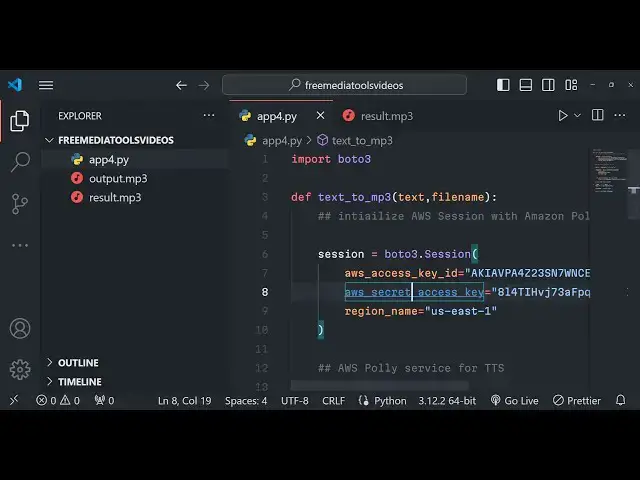
Python we will look at a simple python
0:19
script which actually converts your text
0:21
into an MP3 file using Amazon web
0:24
services TTS engine text to speech
0:26
engine and uh we will be using their uh
0:30
access key this is the secret access key
0:33
and the region all these three things
0:35
you need to provide and uh you can see
0:37
this is a text here we are providing in
0:40
and we are converting it to output. MP3
0:43
so just wait as I run this python script
0:45
right here in the command line I write
0:48
here python app 4. py so as I write this
0:53
just see on the left hand side the text
0:55
will be converted into a MP3 file so if
0:58
I try to play this file just hear the
1:00
quality of the voice Kane Williamson is
1:02
the captain of New
1:04
Zealand you can see it is a very subtle
1:06
voice and uh it is very unique as well
1:10
and it is very much similar to a human
1:13
voice as well so it is not sounding like
1:15
robotic voice that I like about Amazon
1:18
web services TTS engine and uh so it is
1:22
less robotic similar to human voice so
1:27
the quality looks so good so we will
1:29
look at an example Le right here so here
1:32
we need to install this module in boto 3
1:36
this is actual python module which is
1:39
available for Amazon web services TTS
1:41
engine just for search for this
1:46
B3 this is a
1:48
AWS STK which is for the spe specially
1:52
for Python 3 versions P install boto 3
1:55
this is actual command which is required
1:57
so at the time of recording this video
1:59
we are actually using the latest version
2:01
of python which is 3.1 2.2 so you just
2:05
need to install this module
2:08
B3 this is a Amazon AWS SDK for python
2:13
so once installed you will write our
2:16
code right here step by
2:21
step so right here guys first of all
2:24
what we need to do we need to import
2:25
this module at the very
2:28
top B o
2:31
T3 and then we will have our main
2:38
function so inside this main function
2:41
guys we will actually
2:42
be providing the text here right here so
2:46
whatever text that you want to convert
2:48
my name
2:51
is 7
2:56
years and I am
2:58
from you can see see we have provided
3:00
this text now we need to Simply convert
3:02
this into MP3 file we will basically
3:05
provide an file name parameter right
3:07
here which is output. MP3 and we will
3:11
simply call this function which we will
3:13
Define in the next stage text to MP3 and
3:17
we will basically provide the text and
3:19
the actual file name so now the job is
3:22
very simple we do need to Define this
3:25
function at the the very top text to MP3
3:30
we provide the text and the file name as
3:32
two arguments right here and then we
3:35
need to now initialize
3:38
AWS session with Amazon
3:43
poly so right here we'll simply Define a
3:46
session with using this module b23 and
3:50
we will have a session right
3:52
here and here we need to provide the AWS
3:55
access key
3:58
ID this the these are the parameters
4:00
that we need to provide here access ID
4:03
the second parameter is AWS secret
4:06
access key and the third one is region
4:09
name so these three things it will be
4:12
coming at your own
4:14
AWS Cloud console account you do need to
4:17
create a a AWS Cloud console account for
4:20
that and then you need to go to your
4:22
account go to security credentials this
4:25
is actual option after going to that you
4:28
need to create an access key right here
4:31
already created one you will see my
4:33
region code is us- e.1 by default I will
4:37
provide the region code like this and
4:41
then you have the we are using Amazon
4:44
poly service you will see that and then
4:46
this is our access ID so I will simply
4:49
paste the access
4:51
ID and this these information you don't
4:54
need need to share guys with anyone so
4:57
just make sure that you don't share this
4:59
you can create a new access key by
5:01
clicking this option create access key
5:04
and uh like this you can create
5:08
this so I will delete everything guys
5:11
after this video so don't copy my
5:15
information so access key will be this
5:18
so this information will be diff
5:20
different for you so I will copy the
5:22
access key ID as well so that's all so
5:27
after defining all these options guys
5:29
now we can actually use the Amazon poly
5:33
service AWS poly service to for
5:39
TTS we can Define Poly and session.
5:47
client and the client is
5:50
poly and we will basically request the
5:52
speech synthesis and we will Define the
5:56
poly here and it contains a method here
5:58
which is synthesis
6:03
speech this is a method it
6:07
contains here need to provide the text
6:09
right
6:12
here text is equal to text and the
6:15
output format this is the second
6:17
property here which format that you want
6:19
to need the audio file you will provide
6:21
MP3 and the voice
6:23
ID there are various voices which are
6:26
available in AWS Amazon poly service
6:30
TTS engine so I will use this voice Jona
6:34
voice and then we need to save this so
6:37
we need to save this
6:39
voice save this MP3 file so you'll use
6:42
the open function and provide file name
6:45
and read binary write binary and we will
6:48
actually write this file in the local
6:50
file system by using the write function
6:53
and response whatever is the response
6:56
coming in audio
6:57
stream we will read this like this read
7:01
function and then we can simply write a
7:03
simple statement that MP3 file
7:06
saved that's all that's all that you
7:10
need to do guys and if you just see if I
7:12
change the to result. MP3 just see
7:18
python app 4.
7:22
py so you will see result. MP3 will be
7:25
created if I play this my name is gam
7:27
Sharma and I am 27 years old and I am
7:29
from from
7:30
India so you can see guys this is the
7:33
actual result which comes and it is
7:35
quite good in terms of audio quality in
7:39
terms of voice and you can use a chat GP
7:43
to get all the voices let's suppose I
7:45
write a prompt simple prompt change for
7:49
more
7:52
voices it will provide you all the
7:54
voices here which Amazon poly supports
7:58
so English voices are Jonah these are
8:01
female voice Matthew you can even
8:03
provide here ammy Brian all these voices
8:07
you can
8:10
provide you can see that so once again
8:12
run
8:15
this my name is gam Sharman and I am 27
8:18
years old and I am from
8:20
India you can see the difference and
8:23
this is again a Sim another female voice
8:27
which is there so
8:29
voices are there my name is gam sh and I
8:31
am 27 years old and I am from
8:34
India and this is Brian here you'll see
8:37
that
8:39
so different languages English
8:43
versions my name is goutam sha and I am
8:46
27 years old and I am from India this is
8:50
the Hindi voices which are there for
8:52
different languages if you want to this
8:54
is Indian female voice right here
9:00
my name is goam Sharma and I'm 27 years
9:04
old and I am from India this is
9:14
Arabic my name Isam sh and I am 27 years
9:18
old and I am from
9:24
Indie so you can even basically provide
9:27
Hindi Hindi text as well in different
9:29
languages in different nitic languages
9:31
you can to a use a tool called as Google
9:34
Translate to
9:36
actually convert your text into
9:38
different languages so let me take an
9:40
example right here of Hindi
9:42
language
9:49
so you can see that
9:55
so you can play with this Library guys
9:57
in Python and I I think no need it is
10:00
unlimited number of times you can
10:01
perform that you just need your own
10:03
access key ID access key secret key and
10:06
region name you can use the Amazon poly
10:08
service for TTS and you can see the
10:11
result is
10:13
dot various voices are there you can
10:15
have various languages also these much
10:18
of voices are
10:19
supported so you can see so thank you
10:22
very much guys for watching this video
10:24
please hit the like button subscribe the
10:26
channel and share my Channel with your
10:27
friends and I will be seeing you in the
10:29
next next video
#Software
#Email & Messaging
#Voice & Video Chat
#Intelligent Personal Assistants