Up next in 10


Hi Join the official discord server to resolve doubts here:
https://discord.gg/cRnjhk6nzW
Visit my Online Free Media Tool Website
https://freemediatools.com/
Buy Premium Scripts and Apps Here:
https://procodestore.com/
Show More Show Less View Video Transcript
0:00
[Music]
0:00
uh hi guys welcome to this video so in
0:02
this video I will show you a free
0:04
alternative to GitHub co-pilot and uh
0:07
inside your vs code so if you ever used
0:10
GitHub co-pilot it has a very big
0:14
problem that it is a paid solution so no
0:18
everyone can't afford it you can see the
0:20
pricing here the smallest plan start
0:23
from $10 then $19 $39 so it's a paid
0:26
solution I will show you a free
0:28
alternative to gith up cop it in this
0:30
video so that you can use it inside your
0:32
vs code so the free alternative is AMA
0:37
model so AMA is basically this is
0:40
actually their website ama.com and it
0:44
actually uses AI models for specifically
0:47
for coding so you can actually generate
0:50
code code right inside your vs code so
0:52
let me basically show you so first first
0:56
of all I will simply go to the my
0:58
projects directory and here I will say
1:00
simply create a
1:01
directory
1:07
uh and I will simply open it so here you
1:11
need to first of all install this
1:13
extension go to the manage section go to
1:15
this extension extensions Tab and just
1:19
search for this extension which is
1:22
AMA just search it and the very first
1:25
extension which comes it which is olama
1:27
auto coder and it has 14,000 ,000
1:30
downloads it's a very pretty new
1:32
solution in the market so simply install
1:36
this so let me just zoom out so you can
1:39
see it
1:41
actually does the process right here you
1:44
actually write it and it will create it
1:46
so simply click on install and uh you
1:50
can see the extension is enabled
1:52
globally so now this to work you need to
1:56
actually install this uh
2:00
go to ama.com
2:03
this is actually the website or you can
2:05
directly write here on google.com just
2:08
write AMA and the very first link which
2:11
comes in simply you need to download
2:14
this first of all actually this is
2:16
actually a setup file it's available for
2:19
Mac Linux windows it's a crossplatform
2:21
solution simply click on download and it
2:23
will actually download it as a exe file
2:28
so it is the size of it is a 299 MB
2:32
so so once it is successfully installed
2:35
so it is just installing it so just wait
2:38
so it actually contains all the AI
2:40
models which GitHub co-pilot uses and it
2:44
is actually installing it locally inside
2:46
your system so so that you can work it
2:48
inside vs code so once it is completed
2:52
now we can actually run the setup file
3:01
so you can see ama Windows let us get
3:04
get up running simply click this install
3:07
option so it will now install
3:10
this AMA model inside your system so in
3:15
the mean time what we can do uh we can
3:17
simply create a file right here uh let
3:21
me say
3:23
script.js and uh if you
3:31
just search for it
3:35
ama auto autoc complete with AMA so you
3:38
will see that it is saying
3:43
that turn off notifications manage
3:46
extension go to manage extension and
3:50
uh you it is you can see that it is
3:53
telling that for installation for AMA
3:55
visit this AMA must have the model
3:57
applied in settings installed the
4:00
current default is this
4:03
one so it is saying
4:06
that okay you can actually write a
4:09
comment right here like this uh write a
4:13
program to add two
4:19
numbers you can see that it is actually
4:22
giving me this uh if you press tab
4:26
keyboard tab you will see that it is
4:29
automatically suggesting
4:39
me you can see that so as I'm just
4:41
typing right here if I'm navigating it
4:43
you will see that it actually gives me
4:47
the overall function right
4:49
here this is actually a function which
4:52
adds two numbers we just written a
4:54
simple comment right here at the very
4:56
top write a program to add two numbers
4:58
and it actually G me this function right
5:00
here which add numbers number one number
5:02
two so it is not AMA guys it's again a
5:05
second extension which is I installed it
5:08
inside my vs code which is tab 9 tab 9
5:11
is again extension which automatically I
5:15
installed it you'll see that it works
5:17
with all the languages tab
5:20
9 so I just installed this extension
5:23
that's why it was it again it's AI code
5:26
in so if you just search it for t 9 it's
5:30
also a AI code assistant which is again
5:34
an alternative to GitHub co-pilot but
5:36
again it's a pricing you will see that
5:38
it is again a paid solution so you do
5:41
need to it's free for 90 days but again
5:43
you need to pay $12 per month after that
5:47
so again it's not a good solution we
5:48
need a complete Free Solution so for
5:51
that we are actually using AMA you will
5:53
see that so once AMA is installed you
5:56
can launch this application and uh
6:01
inside this application we have various
6:03
models that we can
6:05
install so if you just open command
6:10
line just write AMA and basically you
6:13
will see that so AMA actually is now
6:16
installed so now you can
6:18
actually uh download any sort of model
6:21
or remove it inside your machine
6:24
globally so for this to work let me
6:26
first of all uninstall this extension
6:30
tab n so what we can
6:34
do if you see let me write a comment
6:37
right here write a program to add two
6:43
numbers so now you can see it is not
6:45
working because tab 9 is UN uninstalled
6:49
so just write just type control shift p
6:52
inside your keyboard and uh just search
6:57
AMA encountered an error
7:04
manage extension and uh right
7:09
here if you see
7:19
uh uh sorry guys this was not the
7:22
extension this isama is the name of the
7:24
company which will fetch model simply
7:27
uninstall this extension the name is
7:29
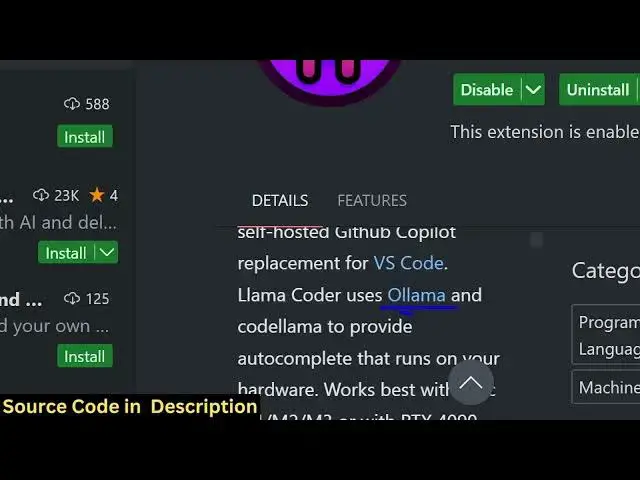
llama Auto Cod again go to your
7:32
extensions tab just type dou l a m a
7:37
llama Cod this is actually the
7:39
extension which is developed by
7:42
Steve Cora Cove this is actually the
7:45
extension that you need to install Lama
7:47
coder it has almost 35,000 downloads
7:51
this is the extension click on install
7:53
and now it will actually install this
7:56
extension and uh you will see that it
7:59
actually uses AMA as to actually
8:03
autocomplete and you can simply go to
8:06
the extension settings this is their
8:09
extension settings so basically the
8:10
server endpoint it will run this on this
8:13
endpoint where AMA uses you will see
8:16
that you can actually select uh
8:19
different kinds of models it has you can
8:22
see that 33 billion 6.7
8:25
billion so the default model is 3
8:28
billion you will see that it is more
8:29
than sufficient for our coding tasks we
8:33
will simply select that default model
8:36
that it uses that's all or just don't
8:40
change the settings
8:42
now if you basically write any comment
8:45
right here if you see it is you can see
8:48
automatically it is telling models table
8:50
is not downloaded do you want to
8:52
download this
8:54
so you can simply say yes now it will in
8:57
the background it will actually install
8:59
the model for
9:02
you you can see that if you see the
9:06
notification it is downloading this
9:10
model so once the model downloading is
9:14
complete we can actually generate uh
9:17
code inside our vs code as we basically
9:20
give suggestions our code will
9:23
automatically get generated it is a
9:25
complete uh alternative to GitHub
9:28
co-pilot tab GPT specifically for coders
9:32
because it is completely free it is open
9:34
source AMA is actually a
9:37
model so here it is actually downloading
9:40
it inside your own local system and make
9:43
sure guys your computer is little bit
9:45
fast while you work with the Llama coder
9:48
um I think they tell you that you should
9:52
at least have 8 gab of RAM and your PC
9:56
should be fast so mine actually has 16
10:01
gab of ram so it is more than
10:04
sufficient and it's a large file this
10:07
model file that is actually downloaded
10:09
if you visit AMA
10:13
website so it has various models if you
10:16
go to the library section so you can see
10:19
it
10:20
has 70 billion parameter size 45 billion
10:25
these are different models that the uses
10:27
in to actually
10:30
get the
10:33
codings you can see that so you can read
10:35
more about it by going to the website
10:38
AMA so you can see now it is installed
10:41
guys you actually get a notification
10:42
Lama coder and now we can simply
10:50
write we can actually write a comment WR
10:53
here which is uh write a program to add
10:59
two
11:00
numbers so if you just write this it
11:02
will suggest
11:04
you the
11:06
code you can see
11:08
that so
11:14
now so write a program to add two
11:17
numbers you can just change this write a
11:22
function write a function to add two
11:25
numbers so what it will actually now do
11:28
it will actually create a function it is
11:30
automatically you will see suggesting it
11:33
you will see that now we can say call
11:36
this you will see that now I will say
11:39
you can just write any code guys you can
11:41
make sure python code let's suppose I
11:44
want to say
11:46
write a function to multiply two numbers
11:52
multiply three numbers
11:54
sorry so now you can see
11:57
that it will just you need to press tab
12:01
keyword as it will give suggestions to
12:03
you go to the next
12:06
line you can see
12:15
that so you just need to
12:24
have sorry let me just
12:33
you can even write uh a function let's
12:35
suppose I can simply say make a
12:39
calculator in
12:43
JavaScript so now it will actually give
12:46
you the
12:49
calculator just need to be descriptive
12:52
make a function to
12:56
calculate or let's suppose I give here
13:00
write a
13:02
function to connect to mongod
13:13
DB or I think what I can do make a
13:16
simple Express server so make a simple
13:20
Express
13:22
server
13:24
listening on Port 5,000
13:49
nodejs need to write write a program
13:51
write a function to add two numbers I
13:55
think this is this one is working
13:58
perfectly so you need to write
14:00
descriptive lines right here whatever
14:02
you want to do this is actually a
14:04
Javascript file so if you make a PHP
14:07
file I think it works with PHP also if
14:11
you see
14:17
uh I can simply say
14:21
here write a PHP function to upload a
14:26
file to server
14:45
um it is free guys but it is uh I think
14:50
uh it is not that bad but GitHub copilot
14:54
is a little bit better than this because
14:57
I think it only support JavaScript let
15:00
means just I'm just giving you
15:03
honest
15:05
uh
15:07
python what is the extension sorry yeah
15:10
app.py so I'm just trying out all the
15:12
languages live right here so in Python
15:16
you basically write write
15:19
a function to add two numbers
15:36
write a
15:38
function to
15:40
subtract two
15:52
numbers write a
15:54
promise function to add two numbers so I
15:58
think guys it only works in perfect
16:01
JavaScript you'll see that it is
16:03
perfectly working in
16:05
JavaScript uh this is also not correct
16:08
because we added add two numbers it is
16:10
giving us hello world program so you can
16:13
just see guys it is not that good uh I
16:16
thought it was good but uh you'll see
16:19
that it has got various models you if
16:23
you want to have different
16:25
models uh if you just
16:29
want to try out different
16:32
models then you can
16:37
actually install
16:40
it you can pause the Lama coder or start
16:44
it by clicking this options right here
16:48
so I think this is actually the
16:53
thing write a function
16:58
to make a
17:23
calculator was okay I think you need to
17:26
give
17:34
okay the comment has been made
18:03
[Music]
18:05
so you can see that guys you need to
18:07
have practice right here uh it is a free
18:11
solution but I would not say it is a
18:13
better
18:15
alternative uh the better alternative is
18:17
tabony you can install this extension
18:20
that we already discussed
18:23
uh you can go and install that extension
18:26
tab n it is free for 90 days and I think
18:30
it it is better solution to
18:34
AMA so I would not use this because I
18:39
don't know why it is I will not use this
18:42
so I will uninstall
18:46
this Double L okay yeah this one I will
18:50
not use it because I think tab 9 is the
18:54
better solution so if you now use tab 9
18:57
instead of Ama if you just write write a
19:00
program to add two
19:09
numbers so just need to search for tab
19:15
KN so you just need to sign in to
19:18
actually start tab nine so just you need
19:20
to Grant
19:22
access so AI code you need to create
19:25
account here uh just you can start with
19:29
your Google account right here
19:32
so just grant access and once you
19:37
actually Grant access will create your
19:40
account and you are all set so what you
19:43
can do uh you can see your currently log
19:48
does
19:51
so you can see that so automatically it
19:55
has given me this uh program to add two
19:57
numbers so let's suppose if I change
20:00
this write a function to add two numbers
20:06
you can see it is also suggesting the
20:08
comments as well Tab and
20:10
I
20:14
so so it has given me this function
20:17
right
20:19
here now you can test this function as
20:22
well like this so you can see it's a
20:24
very good the tab line is a pretty good
20:26
solution guys you will see that uh if
20:30
you want to test out with other
20:32
languages uh inside it so write a
20:36
function to add two
20:40
numbers you can see that it also works
20:42
with python as well you can test out the
20:45
function you can see it basically gives
20:47
you all the values 3 5 2 you can see
20:50
outputs as well it gives you the output
20:52
as well so if you want to test it out
20:55
with PHP and if I write write a program
20:58
to add two
21:02
numbers you can add this you can see
21:08
that you can see
21:12
that you can test it out with various
21:14
numbers you will see that the function
21:17
is add numbers
21:21
sorry so it works with all the languages
21:24
guys and I
21:26
think if I just just make a Express
21:32
server and listen on Port
21:37
5,000 so you can see that it will give
21:39
you this Express server as well and
21:50
uh so it will actually give you this
21:52
Express server or I can write here a
21:56
listen on Port
21:59
5,000 so it will actually give you this
22:02
lesson you will see that so what you
22:04
just need to write comments and the code
22:06
will automatically get generated so this
22:09
is a two plugin SK I actually tested out
22:13
AMA versus tab9 and the result is that
22:16
tabon is a great solution and llama is a
22:20
free solution but uh it is not that
22:22
effective so it is totally up to you
22:25
which one you want to use it and tab9 as
22:28
I already told you is it's a paid
22:30
solution so it will be free for 90 days
22:33
you you can go to you can upgrade to the
22:37
pro solution as well they have their
22:39
pricing right
22:41
here you'll see that so all these
22:44
features you can try out and uh the free
22:48
version is there of
22:51
tabai so GitHub copilot is a paid
22:55
solution so I can't try it without
22:58
buying it so I will not buy it but I
23:00
haven't tried GitHub co-pilot
23:03
so it is again a pretty good solution so
23:07
thank you very much guys for watching
23:08
this uh comparison video and please hit
23:11
that like button subscribe the channel
23:12
as well and I will be seeing you in the
23:14
next video
#Programming
#Development Tools
#Freeware & Shareware
#Intelligent Personal Assistants