Up next in 10

Node.js Tutorial to Parse Excel File to JSON & Export to CSV File Using json2csv Module
Jan 9, 2025

Official Website:
https://freemediatools.com
Show More Show Less View Video Transcript
0:00
uh hello guys welcome to this video so
0:02
in this video we will once again look at
0:04
a topic which is very much interested
0:07
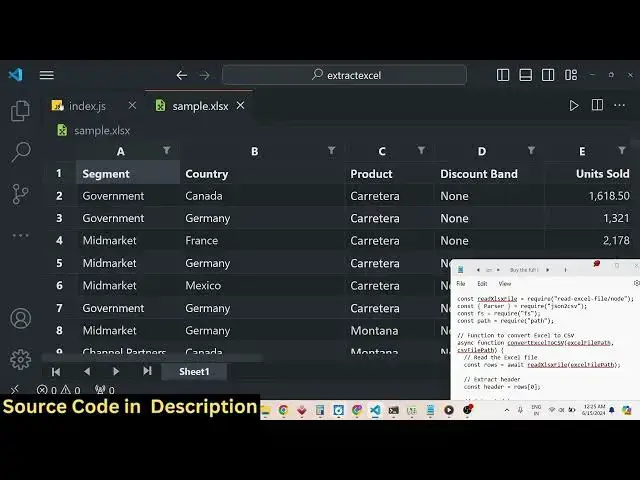
which is converting an Excel file
0:09
Microsoft Excel file and extracting all
0:12
this data and exporting it to a CSV file
0:17
which is comma separated value file for
0:19
this specific purpose we will be using
0:22
two modules in nodejs first one it will
0:25
allow us to actually read or pass all
0:28
these data that you see the header row
0:31
these columns we will use this read
0:34
Excel file module in nodejs the second
0:36
module we will use all the data which we
0:39
read in the form of Json we need to
0:41
convert this into CSV for that specific
0:44
purpose we will be using this second
0:46
module called as Json 2 CSV so with the
0:49
help of these two modules guys we will
0:51
be AC accomplishing this task of
0:53
converting Microsoft Excel file to CSV
0:55
file so if I just show show you running
0:58
the script I developed a script nodejs
1:02
script so just see in the left hand side
1:05
as I execute this a file will be created
1:08
Excel file has been converted to CSV and
1:10
you will basically see output. CSV has
1:12
been created if I open this file you
1:15
will see these values will be separated
1:18
by comma this is actually the header row
1:21
segment country that you
1:23
see product so all this data that you
1:26
see guys has been successfully converted
1:29
you will see that
1:31
so in this way we will actually be using
1:34
these two modules to actually convert
1:36
Excel file to CSV file let me first of
1:39
all show you which modules we are using
1:41
just go to npmjs.com node package
1:44
manager website just search for this
1:47
package read Excel file this is actual
1:50
first package we are using this it's a
1:53
very simple module which allows you to
1:55
actually read your Excel files the data
1:59
and uh this is actually command npmi
2:01
read Excel file very simple command to
2:04
actually install this so it's
2:07
over 2,000 weekly downloads a very
2:10
popular module then we have to use our
2:14
Json to CSV so with the name itself it
2:18
converts your Json files to CSV files
2:21
directly so it also has million
2:24
downloads weekly down it's a very
2:26
popular module so mpmi Json to CSV just
2:30
make a nodejs project install these two
2:32
packages read Excel file and uh the
2:37
second package is Json to CSV so just
2:41
install these two packages I've already
2:43
installed it so after installing it let
2:45
me just now write the code step by step
2:48
let me uh just delete this file output.
2:51
CSV so we have this index.js F so first
2:55
of all we will be having declaring this
2:59
variable
3:00
we need to require this module read
3:03
Excel file and uh we need to use the
3:06
node version so we will slash node it
3:09
can even be used in the browser side as
3:11
well common CH we will be using the node
3:14
version of it and then we also need
3:19
to just require the parsel method which
3:22
is present inside this module Json to
3:27
CSV and also we need to require the
3:29
built in file system module which will
3:31
allow us to actually read and write
3:33
files and also we need to require the
3:36
path module as well so just require
3:38
these four modules at the very top we'll
3:41
see that we are requiring
3:43
it and now we need to define the paths
3:46
guys for input and output
3:50
file so we will be defining the Excel
3:54
file so here we'll use the path module
3:57
do resolve
3:59
and from the current
4:01
directory we it is present sample. XLS
4:05
it is present in the same directory so
4:07
we will simply make sample. C then we
4:10
need to give the CSV file path as well
4:13
so path.
4:16
resolve and here we need to give the
4:18
output file name which is output. CSV
4:20
that's all so now we need to define a
4:25
function which will actually carry out
4:28
this process let me me Define it as
4:31
convert Excel to CSV you will provide
4:35
Excel file and the CSV file path has two
4:39
arguments now we need to Define this
4:41
function it will be a Asing function
4:44
Asing function
4:48
convert so inside this Asing function
4:51
guys we will have these two arguments
4:53
which is Excel file and CSV
4:57
file so right here first of all we need
5:00
to read the Excel
5:03
file so for reading the Excel file we
5:06
will use a wait keyword because it's a
5:08
asnc function and uh we'll use this read
5:12
Excel file module that we imported right
5:15
here read Excel file and it's a
5:18
Constructor it basically need to pass
5:21
our Excel file as argument in and it
5:26
basically reads the Excel file and then
5:28
it return the number number of rows
5:30
right here if you can console log it
5:32
just to cross check if you run your
5:35
application so all the data will be
5:38
returned to you in the form of arrays
5:40
you will see that now using this uh
5:42
array we can
5:45
basically first of all extract our first
5:48
row which is actually the header row
5:50
this is the actual header row that you
5:51
see segment country product discount
5:54
right so if I just console log this this
5:57
will be the header row
6:02
you will see that so this is actually a
6:04
array each containing our header row so
6:08
now we need to Simply extract our data
6:11
rows for doing this we'll simply run a
6:14
simple for Loop so you need to slice
6:18
it we'll say that row.
6:22
slice the first
6:26
one and then we need to map
6:33
row we will simply say row
6:38
data the slice function basically means
6:41
that we don't want the first row we
6:43
don't want this we only need to start it
6:47
from the second value which is the
6:49
actual data we don't want the first row
6:53
because it's a column that's why we
6:55
using slice and passing it one right
6:57
here and then we Define row data to be
6:59
object and then Row for each we'll use
7:02
the for each
7:04
row for each
7:06
and here we will pass our cell and the
7:09
index
7:17
number so here you can say row
7:25
data is equal to s
7:29
that's all that we need to do and after
7:31
that we just need to return the row data
7:34
from this so this data will be there uh
7:37
assign it so now we can
7:40
simply console log it simply to check if
7:45
they got all the data inside of a Json
7:47
so if you just uh run this you will
7:50
basically see it is saying cell is not
7:53
defined okay I think I made some kind of
7:55
mistake right here
8:03
uh
8:10
sell now run
8:14
it you will basically see now it
8:16
actually converted that array into a
8:18
array of object each object is holding
8:21
this information which is the column
8:22
name this is the country product
8:25
discount sale you will see that so each
8:28
object is holding this information and
8:30
now we need to convert this Json object
8:32
Json array of Json objects to scsv file
8:35
for doing this we will use this Json to
8:38
CSV parser so this parser that we
8:43
imported early on at the Top If you
8:46
see from The Base Library of Json to CSV
8:50
we using this parser method and here we
8:52
need to pass
8:54
our uh for option of header we to true
8:59
so header will be true CSV data and now
9:03
this contains this method which is pass
9:06
you will pass the data after passing it
9:09
we will get it inside the CSV format and
9:12
then we need to write this data at the
9:14
CSV file
9:18
path can just show you the data CSV data
9:21
in console
9:24
log so all this data that you see in
9:27
double quotes each value separated by
9:29
comma and you will see this uh if you
9:32
change the file name output
9:38
triple2 so once again this file will get
9:40
created
9:42
output so we will see all that Excel
9:45
data has been converted to a CSV file
9:47
first of all we converted this data to
9:50
array of Json object then we use this
9:52
Json to CSV library to actually convert
9:54
the Json data to CSV file very simple
9:57
you will see the format it is converted
9:59
successfully to a CSV file so thank you
10:03
very much guys for watching this video
10:05
please hit that like button subscribe
10:06
the channel and share this Channel with
10:08
your friends and I will be seeing you in
10:10
the next video
#Computers & Electronics
#Programming
#Software