Up next in 10

Node.js Tutorial to Export Markdown With Text & Images to PDF Document Using markdown-pdf Module
Jan 9, 2025

Buy Premium Scripts and Apps Here:
https://procodestore.com/
Show More Show Less View Video Transcript
0:02
uh hello guys welcome to this video so
0:04
in this uh live stream we will actually
0:06
talk about a special module which allows
0:09
you to convert your marked on fi files
0:13
to PDF document so in this specific
0:16
tutorial we will actually use this uh
0:19
nodejs module so just go to npmjs.com
0:22
and search for markdown dpdf so this is
0:26
actually a very special module which
0:29
actually this is very first module which
0:31
comes right here mark down to PDF
0:33
converter simply click this and you will
0:36
get to the documentation about this
0:38
plugin so 6,000 weekly downloads there
0:41
so it does very simple you can even
0:43
download it globally as well by using
0:46
this dasg flag simple commands there
0:49
npmi markdown dpdf
0:52
so I have already made this nodejs
0:55
project so npmi Mark down- PDF this is
0:59
the name of the modu you so now in this
1:02
application you will basically see I
1:04
have this markdown file sample. MD MD
1:08
stands for markdown this is a very
1:10
simple markdown file with formatting it
1:13
contains text images all that stuff is
1:16
there with formatting uh source code you
1:19
can even inite source code as well in
1:21
markdown file so this is actual markdown
1:24
file and if I look at what it done if I
1:28
open the output. p PDF so when I run
1:31
this nodejs program it converts the
1:33
markdown file into PDF document so you
1:36
will see all the images that I mentioned
1:38
right here this is all the text you can
1:40
zoom in right here this is a text here
1:43
formatting you will see the sample text
1:45
is in bold corrector this is the heading
1:47
this is the image this is uh unordered
1:51
list italic strike through subheading
1:54
this is my blog quote unordered list
1:57
ordered list with numbering and you can
2:00
even invert code as well so I inverted
2:02
JavaScript code with the syntax
2:05
highlighting so you will see it has
2:06
created this
2:08
two uh Pages PDF document from simple
2:12
markdown syntax so we have this markdown
2:14
file it has converted them into a PDF
2:17
document so now I will show you step by
2:19
step how I did this so uh what I will do
2:22
is that I will simply delete everything
2:24
from here and coming back to the
2:26
markdown markdown files as you all know
2:29
it's used an
2:31
interview making
2:34
your this is actual markdown file this
2:37
is for heading this is you can see a
2:39
simple text so here we are using a local
2:43
image you can see that this is my image
2:45
right here so in order to invite images
2:48
and markdown you this is actually the
2:49
syntax right here you need to provide
2:52
the path of the image profile. jpg so
2:55
this can even be a URL if you want to
2:57
invert external URLs this is a Sub sub
3:00
adding this is text
3:02
formatting this is my markdown file you
3:05
will also see uh code JavaScript code
3:09
right here JavaScript code we embeding
3:12
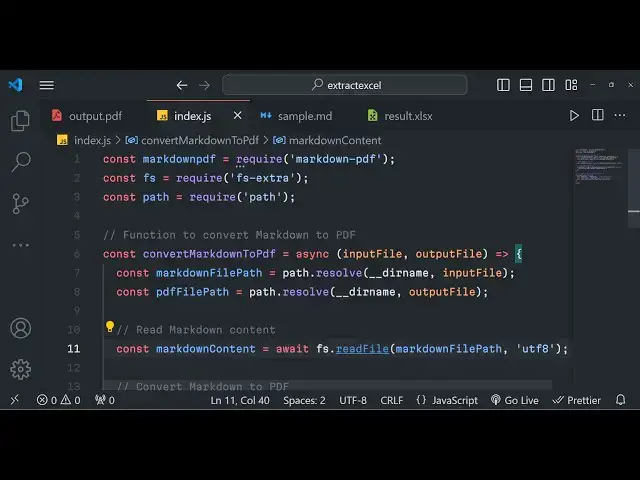
code block so the task is very simple we
3:15
need to convert this markdown file into
3:17
PDF using nodejs so what I will do I
3:20
will start writing my code so right here
3:23
I will simply make a require this module
3:25
at the very top which we installed
3:27
markdown D PDF after that we also need
3:31
to require the file system module and
3:34
this time we are using file system extra
3:37
which contains lot more features than
3:40
the ordinary file system module search
3:43
for this module file system extra so the
3:46
very first package which comes right
3:48
here simply install this package so this
3:51
actually is a very handy package 96
3:53
million downloads are there weekly
3:55
downloads simply install that and after
3:57
that we also need to import the part
3:59
module which is a
4:01
built-in package of nodejs so right here
4:05
guys what we need to do we need to make
4:06
a simple function which will actually
4:09
convert the markdown to PDF so this will
4:13
be a Asing function and here we will be
4:15
expecting the input file and the output
4:18
file to be passed as two arguments this
4:21
will be a arrow function so now we have
4:24
defined this function now we simply need
4:26
to call this function so we will make a
4:29
simple main function where we will
4:30
actually call this function
4:32
Asim so here we will provide the input
4:35
file so input file is present in the
4:37
same directory sample. markdown and the
4:40
output file needs to be created in the
4:42
same directory so you will create this
4:45
call this as result. PDF and now in asyn
4:49
function we can use await keyword so we
4:51
can simply write await and we can call
4:54
this function convert markdown to PDF
4:56
and we will simply pass the input file
4:59
comma out put file so we are basically
5:01
invoking this function right here that
5:03
we defined right here at the top so we
5:06
do need to call the main function right
5:08
here so this main function will be
5:10
called first of all and then we will
5:11
call this function right here so now to
5:14
Define this function it's very simple
5:16
you need to first of all read the
5:18
markdown
5:19
file read the
5:22
markdown file as string so for doing
5:25
this we need to create markdown file
5:28
path and we need to use the path module
5:31
path. resolve it contains and from the
5:34
current directory it is present in the
5:35
current directory we will see that this
5:37
file sample. markdown so we are actually
5:40
using the path module path. resolve in
5:42
the current directory we need to ined
5:45
this this is the input file which is
5:46
passed right here so we will actually
5:48
get the markdown file path and then we
5:51
need to construct the PDF file path
5:55
similarly so we'll simply say path.
5:58
resolve for from the current directory
6:00
we need to save it right here so now we
6:03
got our markdown file path and PDF file
6:06
path so now job is very simple now we
6:09
need to read the markdown file as string
6:12
we'll declare a variable and await and
6:15
we will simply use the file system extra
6:17
module it contains read file method it
6:19
will read this file from the path uh the
6:22
second argument is encoding type so this
6:25
time it will be utf8 encoding type now
6:29
the job is very simple we need to
6:31
convert this markdown string to
6:33
PDF all this uh data that you see in the
6:37
markdown we need to format that and
6:39
convert to PDF so this module will come
6:43
into the picture which is markdown PDF
6:47
so right here this contains a function
6:51
which is
6:53
from and Dot string and here we can pass
6:58
the markdown content that we write here
7:00
if you see and here it contains this two
7:04
function so to which file you need to
7:07
convert so we need to convert to PDF
7:09
file
7:11
part
7:15
so after that it contains a call back
7:18
function when it is over when it's
7:20
completed so when it is completed we can
7:22
simply log a simple message to the user
7:24
that PDF file created from markdown so
7:29
what it will do it will create this
7:30
result. PDF whenever the task is
7:32
completed it will show this message to
7:34
the user so what I will do I will simply
7:36
delete every file so you will see no PDF
7:40
file is present so now if I try to run
7:42
this application from the command line
7:44
so what you will see I will say node
7:47
index.js so just see in the left hand
7:50
side it will take some time depending
7:51
upon the length of the markdown file and
7:54
then it will create this result. PDF if
7:56
you
7:57
see if you open this
8:03
PDF file created from markdown so we got
8:06
this
8:08
message so it contains two pages so all
8:11
that stuff that we me mentioned inside
8:14
the markdown file it has converted it to
8:17
a PDF document so in this way guys you
8:19
can actually use this package to
8:21
actually construct PDF documents from
8:23
markdown files it's a very handy package
8:27
and I showed you step by step how to do
8:29
this first please hit that like button
8:30
subscribe the channel and I will be
8:33
seeing you in the next video
#Programming
#Software
#Web Services