live_tv
Livestream Starting Soon
00
Hours
:
00
Minutes
:
00
Seconds
Up next in 10

Node.js Remarkable Tutorial to Parse & Render Markdown to HTML & PDF Using html-pdf-node Library
Jan 9, 2025

Buy Premium Scripts and Apps Here:
https://procodestore.com/
Show More Show Less View Video Transcript
0:01
uh hello guys welcome to this uh live
0:03
stream so in this live stream we will
0:05
actually talk about a library which
0:08
allows you to actually pass your
0:11
markdown
0:13
files into HTML and PDF so we will look
0:17
at a very simple example right here and
0:21
you can see that I just prepared this
0:24
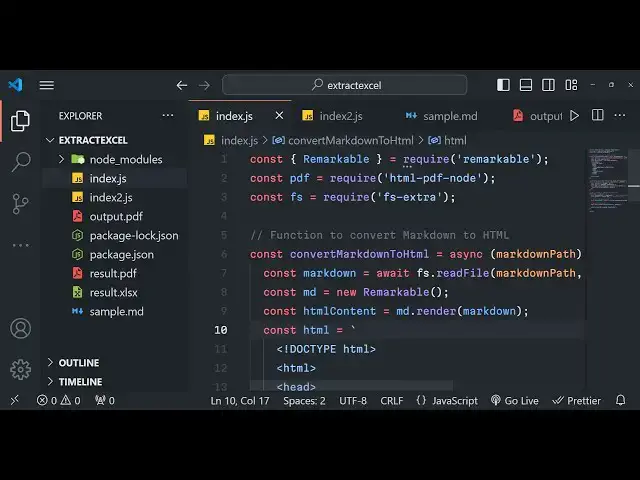
nodejs script right here it uses
0:27
remarkable library and HTML Das PDF Dash
0:30
node so this is actually the code right
0:32
here and we have this sample. markdown
0:35
file right here this is my markdown file
0:38
right here it contains text with
0:40
formatting this unordered list ordered
0:43
list we can even embed code as well this
0:47
is the markdown file so what I will do
0:49
right here I will simply run this file
0:52
and you will see on the left hand side a
0:54
first of all it convert to HTML and then
0:57
it converts HTML to PDF so on the left
1:00
hand side the PDF file will be created
1:03
from markdown so it is compiling this
1:04
markdown file with handlebars so PDF
1:07
created output.pdf so you will see that
1:09
the output file is created this is a PDF
1:13
file so this was a markdown file and it
1:15
basically pass this markdown file and
1:17
convert it to PDF you can see this is
1:20
actually the result that has taken place
1:22
I can open this PDF file in the browser
1:25
this is actually the heading this is
1:26
actually the subheading this is text
1:29
format in this is unordered list all
1:31
these formatting is there you can even
1:33
embed the code as well right here so
1:37
basically we are actually using
1:39
remarkable Library which is actually a
1:42
markdown parcel if you just go to
1:44
npmjs.com and just search for
1:48
remarkable the very first Library which
1:51
comes it's a markdown
1:53
passer uh almost 644,000 weekly
1:56
downloads a very popular package in node
1:59
ch
2:00
so it allows you to par your markdown
2:03
files and convert them to HTML and now
2:06
to convert them from HTML to PDF we are
2:09
actually using this module which allows
2:11
to actually convert your HTML files to
2:14
PDF files so this one HTML dpdf D node
2:18
the very first package which comes right
2:20
here so it actually converts any HTML
2:23
content to PDF so 29,000 weekly
2:26
downloads are there so we are actually
2:28
using these two packages first of all we
2:30
are actually using markdown files and
2:32
converting them to HTML using remarkable
2:35
and then we are actually converting the
2:37
HTML string to PDF using this Library
2:39
HTML PDF node so let's start building
2:42
this uh tutorial uh this application so
2:47
simply inside your command line simply
2:49
install these both these libraries
2:51
remarkable and HTML Das PDF Das node so
2:55
these are two packages that we are using
2:57
right here so what I will do is that I I
3:02
will need to include this
3:06
remarkable from the package that we
3:08
installed
3:18
remarkable so we have successfully
3:20
required the library now we also need to
3:24
require HTML PDF note
3:30
and then we also need to require file
3:32
system
3:34
extra to actually save and read files so
3:37
here we will actually Define a function
3:39
which will
3:41
convert the markdown to HTML so this
3:45
function will be responsible for
3:47
converting the markdown
3:49
files to HTML so we will be expecting a
3:53
argument to be passed to this function
3:55
which will be the actual markdown file
3:57
so here first of all what we need to do
4:00
we need to
4:02
actually make a main function this will
4:05
be a Asing function and right inside
4:07
this main function we will be providing
4:10
the markdown file path so it the
4:12
markdown file is present in the same
4:14
directory where I'm building the
4:15
application so sample do markdown so I
4:18
will simply give the path right here
4:21
after that I will also need to give the
4:24
PDF path where I need to create this so
4:26
result. PDF so I will be creating it in
4:28
the same directory so result. PDF the
4:31
output file name so now we need to first
4:33
of all convert the markdown to HTML for
4:36
doing that we need to invoke this
4:39
function which we created at convert
4:42
markdown
4:43
to so we will actually call this
4:46
function and pass our markdown file
4:49
path so we are actually passing this
4:51
path as an argument right here so now
4:54
inside this function now we need to
4:56
write this function so it's very easy in
4:59
order to convert markdown to HTML so we
5:02
will use a wait keyword right here and
5:04
again we'll use the file system module
5:06
to actually read the file we will read
5:09
the file on markdown pass the path and
5:12
the encoding type
5:13
utf8 as the second argument so we'll
5:16
read all the content of the markdown
5:18
file and now to convert to HTML you will
5:21
simply use the markdown if you see we uh
5:27
basically using remarkable right here so
5:31
first of all we need to instantiate this
5:35
instance we need to new
5:38
remarkable so we are instantiating a new
5:40
instance of remarkable and storing it
5:42
inside the MD variable and now this MD
5:45
object contains a method called as
5:47
render so we will render this markdown
5:51
pass the markdown whatever we got we
5:54
will pass it to HTML so we will create
5:56
HTML variable right here back Teck
5:59
symbol to write multiple lines of HTML
6:01
code you will simply write this basic
6:03
HTML
6:06
syntax HTML
6:13
tag so this is basic HTML if you know
6:16
guys so we are basically converting the
6:19
mark down to HTML so in between the body
6:22
TXS what I will
6:27
do so in between the body Ty we will
6:30
simply be embedding this HTML content
6:33
that we got like this this is actually
6:37
we got the HTML now we simply need to
6:39
return this HTML from this function
6:41
that's all that's all that we need to do
6:43
guys in order to convert the mark down
6:45
to HTML so inside this HTML content if
6:49
you just console log
6:56
it so if you run this application now it
6:59
will actually convert your markdown file
7:01
to
7:06
HTML so we need to Simply call the main
7:09
function sorry we forgot to call the
7:11
main function so now once again do this
7:14
you will basically see it will actually
7:17
convert your uh uh this markdown file
7:20
you can see
7:22
that this this is converted to paragraph
7:26
This is converted to heading H1 tag so
7:29
all these things are passed right here
7:31
using remarkable Library so this is
7:34
actually the markdown file that you see
7:35
right here it is converted to HTML right
7:37
here so now what we need to do we need
7:39
to now convert this HTML that we got
7:42
into H PDF document like this so for
7:45
doing that we will use this package that
7:47
we imported HTML dpdf D node so now the
7:51
second function is responsible for
7:53
converting that HTML that we got to PDF
7:57
so for for that we actually need to call
8:01
another
8:03
function so this time we will be calling
8:06
this function convert HTML to PDF we
8:10
will be passing this HTML content as the
8:12
first argument and the PDF path as the
8:14
second argument now we need to make this
8:17
function so convert HTML to PDF it will
8:22
be a async function you will be getting
8:25
this path of HTML content and the PDF
8:28
path as two arguments it's Arrow
8:31
function so right inside this function
8:34
guys what we need to
8:36
do we need to make basically make the
8:39
options we need to St the format of the
8:42
document so format will be A4 size
8:45
document and then the file whatever you
8:49
need to be inserting the content here
8:50
will be HTML content which is
8:53
passed and then we need to generate the
8:56
PDF so right inside if you see we
8:59
imported this as PDF so this contains a
9:03
method which is generate
9:06
PDF we'll use this method we will pass
9:09
the file name actual file that we need
9:11
to do and the options so this returns a
9:14
promise we can handle this using do then
9:19
and buffer will be there and then we can
9:21
save this file using file system right
9:23
file
9:24
Sim we can pass the PDF path whereever
9:27
we need to save it and then the actual
9:30
data which is stored in buffer that's
9:33
all so this is all that we need to do
9:35
guys inside this application first of
9:36
all it we are calling it to convert the
9:38
markdown to HTML then we are converting
9:41
the HTML to PDF so if you now run this
9:44
application now if I just delete
9:47
this if I
9:50
start node index.js so just see on the
9:54
left hand side it is compiling the HTML
9:58
and the result PDF is created and you
10:01
will basically see the PDF file is
10:04
created so you can just take any
10:06
markdown file and first of all it
10:08
convert to HTML and then it will compile
10:10
that HTML to PDF using these two
10:13
packages remarkable and HTML dpdf D
10:16
notes so thank you very much guys for
10:18
watching this video If you like this
10:20
video then please hit that like button
10:21
subscribe the channel and I will be
10:23
seeing you in the next live stream
#Programming