Up next in 10

Node.js Project to Export Any Webpage to PDF, EPUB ,HTML & Markdown Files Using PDF-LIB & Puppeteer
Jan 9, 2025

Buy the full source code of the application here:
https://procodestore.com/index.php/product/node-js-project-to-export-any-webpage-to-pdfebookhtml-markdown-files-using-pdf-lib-puppeteer/
Buy Premium Scripts and Apps Here:
https://procodestore.com/
Show More Show Less View Video Transcript
0:03
uh welcome guys uh in this live stream I
0:05
will basically talk about uh a nodejs
0:08
project that I developed using Puppeteer
0:11
and uh the PDF lib Library so this
0:14
project allows you to export any web
0:16
page to PDF document or you can export
0:19
it to ebook format Epub file HTML file
0:23
or you can export it to markon file file
0:27
this is actually the project guys all
0:29
the project file are available right
0:30
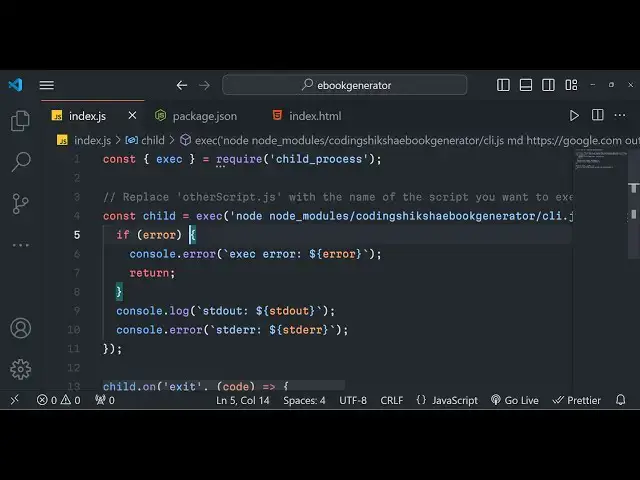
here so index.js so let me run this
0:33
project here and uh you just need to
0:36
Simply paste whatever URL that you want
0:39
to export so it will actually take the
0:42
screenshot let's suppose I want to go to
0:47
a block and I want to convert a simple
0:50
block to a I basically take this example
0:55
let's suppose I take
0:57
uh this one so this is a simple blog
1:00
guys let
1:02
me take an example here this one this is
1:05
a simple blog with instructions with
1:08
which contains source code this is a
1:10
simple blog and now I need to basically
1:12
export this to PDF document so I will
1:15
simply copy this URL and simply inside
1:17
my nodejs script simply paste this URL
1:21
right here so I I I will simply paste
1:23
this URL and now if I launch this script
1:27
right here simply I need to Simply say
1:29
here node
1:31
index.js so as I do this you will see in
1:34
the left hand side a file will be
1:36
created it will actually take the
1:38
screenshot of this and it will now
1:40
export all the content which is
1:43
available
1:49
so it is taking that
1:54
screenshot you will now see basically
1:57
guys you can see it has taken the
1:58
screenshot
2:00
all this URL here and it has basically
2:03
converted this to PDF and now if I try
2:06
to open this PDF here you will basically
2:09
see it will contain all the text of the
2:11
blog right here with screenshots images
2:14
will also be present right here so
2:15
whatever images was was used inside the
2:18
P was used inside the blog it actually
2:21
converted with the code Snippets as well
2:24
you can see the formatting it has done
2:26
so this is a great script guys if you
2:28
want to create a e book very fast with
2:32
the content which is available in the
2:33
blog so you will basically see it has
2:35
scraped all the content which is
2:37
available in the blog and it has created
2:39
this PDF document it has created all the
2:42
pages
2:43
automatically we'll see 19 Pages have
2:45
been automatically created based upon
2:47
the length of the block if I drop down
2:49
you will basically
2:52
see all the quote snippits have been
2:54
successfully copied right here you will
2:56
see that the quality looks great you
2:59
will see the code snipp it right here
3:02
this is PDF page numbers have
3:04
automatically added you will see that
3:07
and in this simple we will say that this
3:09
is a title of the blog this is a
3:11
description this is a date all all these
3:14
things are well formatted and in this
3:17
way guys you can basically convert any
3:18
blog to PDF and let's suppose I the same
3:22
file let me want to now convert to a
3:25
markdown file so here I will simply
3:28
mention the format which is m MD for
3:30
markdown files and simply here I will
3:33
change this extension to output. MD so
3:36
what it will do now it will now actually
3:39
take the screenshot as markdown file and
3:42
now it will save this it will now create
3:44
this markdown file of this block and now
3:48
you can see
3:49
that it has taken the you can see it has
3:52
generated the mark down for this uh
3:55
actual
3:56
block this is marked down and now if you
4:00
want to create a eBook there is a format
4:02
which is called as eup we can simply say
4:05
eup we can change this to eup and here
4:08
the format I can change to e p u this is
4:12
a EP ePub format and again you will do
4:15
the same thing execute the script so
4:18
what it will do now it will generate the
4:20
eup file you will see automatically it
4:23
has generated that file eup
4:28
file so if if you have a ePub reader
4:31
right here you can directly open this
4:32
file so it will open it inside a ePub is
4:37
basically a extension for PDF it is
4:41
specifically used
4:43
for showing ebooks if you are developing
4:46
ebooks then this is a great format to
4:48
actually uh make ebooks so this is you
4:52
can see that how a single block post can
4:54
be converted to PDF ebug markdown and
4:57
lastly you can even convert this to to a
5:00
HTML file as well so we can just mention
5:03
the format here
5:05
HTML and uh then we can replace this to
5:08
HTML so now what it will do in the
5:11
background guys it is opening a browser
5:14
using puppet here and it is basically
5:16
exporting all the content using PDF lib
5:19
we are basically using two modules in
5:21
the background Puppeteer and PDF lib you
5:23
will see now it has converted all this
5:26
text to HTML so all the source code you
5:28
will see that so this is normal but the
5:31
three formats that I showed you ePub
5:34
markdown file and PDF it can actually
5:38
generate any blog post that you can say
5:43
here so I basically make this module the
5:46
module name is coding sixa ebook
5:48
generator and basically after you
5:51
purchase the source code guys the link
5:53
is given in the description of the video
5:55
you will actually get a zip file from
5:56
Google Drive after you purchase it then
5:59
you you will need to extract the content
6:02
and then you can simply run this project
6:04
by node index.js simply you just need to
6:08
uh replace whatever URL that you want to
6:11
export to PDF ebook so you just need to
6:15
replace the URL whatever URL that you
6:17
want to do we can basically take
6:20
anything let's suppose I take uh a
6:23
vikkipedia article let's suppose I say
6:28
here uh
6:32
any Wikipedia page that you want to
6:35
convert to ebook if you're writing a
6:37
eBook so what you will do simply copy
6:40
this URL and uh simply paste it this is
6:45
the Wikipedia Ur and we will change to
6:48
PDF here I want to generate the PDF so
6:51
it will now generate all the
6:55
pages so if you basically run this
6:57
project
6:58
now
7:03
it typically takes some more time
7:05
depending upon the length of the blog
7:08
length of the page web page that you are
7:09
exporting so with this help of you can
7:11
export any web page to PDF ebook uh
7:14
markdown file or HTML you can see it has
7:17
generated the PDF file it contains 42
7:20
Pages alongside with images it's a very
7:22
good alternative script guys for ebook
7:25
generation content generation in bulk
7:28
you will basically see all these things
7:30
are successfully generated with the uh
7:33
image this is a URL title this is
7:38
description and you will basically see
7:40
the text is automatically well formatted
7:43
you will see
7:45
that the image is also being formatted
7:47
the image is also showing the page
7:49
number is also showing the link is given
7:51
guys you can directly purchase the full
7:53
source code of the script after
7:54
purchasing it you will actually get the
7:56
full documentation with the full source
7:58
code you can allow us to you can
8:00
basically uh just uh use the script and
8:04
make awesome tools which allows you to
8:06
generate these ebooks in various formats
8:09
which is PDF you will see the tables are
8:12
also well formatted it has taken the
8:15
data from the Wikipedia and basically it
8:17
converted to PDF format and you can see
8:21
that the table structure you will see
8:23
that you can zoom in basically look at
8:26
the quality of the PDF generated
8:30
it automatically does that guys you just
8:33
need this script after that you will be
8:36
able
8:37
to make apis paid apis which do this
8:40
process users will be interested to do
8:43
this process very easily you can take
8:46
any article on the internet and Export
8:48
this
8:49
to
8:51
uh anything so this is the thing here in
8:55
this you just need to replace markdown
8:58
anything
9:00
any file markdown let me
9:03
see and run this so now it will actually
9:06
generate the markdown file for
9:13
you Tim you can see Tima the. MD is it
9:18
is generated and if you open this
9:23
now automatically you will see
9:28
that the uh markdown file will be
9:31
generated you will see
9:34
that I think the
9:36
main things are the pup file and the PDF
9:40
file which is you'll be interested
9:41
because many of the times user needs to
9:44
generate the e e ebook files which are
9:48
typically ePub and PDF files which are
9:51
very nice thing about this project it
9:53
automatically scrapes all the things and
9:55
put this alongside with images and text
9:59
as well
10:02
so you will now
10:08
see you can open this
10:15
now so these are all the
10:19
images that it has you can see so e epub
10:24
files you can also create PDF files from
10:27
the single script guys so you can see
10:30
that it has basically scraped all the
10:32
things and put that inside our ebook
10:35
ebook so you can basically create short
10:38
ebooks guys with this help of the script
10:40
guys it automatically formats the text
10:43
for you and also you can see it also
10:45
contains the table right here very good
10:47
table if you want to view this
10:51
file you can Bas if you don't have ePub
10:53
you can basically ePub reader online you
10:56
can just view these files online as well
10:59
you can go to this website and open a
11:09
eBook so let me show
11:15
you let me open it online inside this
11:19
viewer just to show you if it is working
11:21
or not you can see that so this is a
11:24
eBook guys which we constructed using
11:26
this Wikipedia page that I showed you
11:29
and all this information you can see
11:32
well formatted information and you can
11:35
basically print this ebook anywhere you
11:38
can store
11:39
this so in this way you can basically
11:42
take any example of a web
11:55
page let's suppose we go to
11:58
w3schools.com
12:00
W3 schools website is a very good
12:03
website for learning things you can
12:06
basically take any example here let's
12:08
suppose
12:10
uh I basically want to export all these
12:13
things I can simply take copy this URL
12:16
and go into my script and I want to
12:19
create a eBook here so I can simply
12:21
replace this
12:28
URL I Chang this format to PDF so what
12:32
it will do it will go to this URL and it
12:34
will create a mini ebook in PDF format
12:39
and you can see output.pdf it will
12:44
create so python you will see
12:49
that so depending upon the
12:57
length so you can see that so depending
13:00
upon the length here it will create
13:06
uh like this so this was the script guys
13:10
if you are
13:13
interested you can basically purchase
13:16
the script any URL any article that you
13:21
want to export this to a mini
13:25
book you can see if you are interested
13:28
to export this medium article just need
13:31
to go to the script paste the URL and
13:45
uh so it is made up using guys you will
13:50
see that all these dependencies we have
13:51
used for doing this we have you can see
13:54
we have used PDF lib and puppet here
13:57
these are two libraries open source libr
13:59
that we have used for this
14:02
project you can see that this uh PDF is
14:06
generated alongside with images as well
14:09
you can see that all these screenshots
14:11
have been successfully created using
14:12
this ebook Creator you will see that how
14:16
formatted you can see all the
14:18
instructions are showing right here in
14:19
the ebook and you can basically sell
14:21
this ebook guys for money as well you
14:24
can basically create these manyi ebooks
14:26
you will see how the formatting looks
14:28
great guys using the script and you can
14:30
see
14:31
that all the article from medium.com is
14:34
successfully scraped into a single PDF
14:37
ebook so that you can sell this ebook to
14:39
your subscribers to your visitors so
14:42
they will not know that you have used
14:44
the script to actually created this so
14:46
this is the ebook created script guys
14:48
that I'm giving you in nodejs which uses
14:51
these two libraries which is PDF lib and
14:54
PDF lib as you all know it's a open
14:56
source library for JavaScript for
14:58
creating PDF documents and also we are
15:00
using Puppeteer which is a web scraping
15:02
Library automation library for
15:04
automating things so we are using these
15:07
two things if you are interested the
15:08
link is given guys you can directly
15:10
purchase it and I will be seeing you
15:12
guys in the next video Until then thank
15:14
you very
15:17
much
#Web Services
#Scripting Languages