Up next in 10

Node.js Express TikTok API Project to Build Video Downloader From URL in Browser Using Javascript
Jan 9, 2025

Buy the full source code of the application here:
https://procodestore.com/index.php/product/node-js-express-tiktok-api-project-to-build-video-downloader-from-url-in-browser-using-javascript/
Buy Premium Scripts and Apps Here:
https://procodestore.com/
Show More Show Less View Video Transcript
0:04
uh hello guys welcome to this video so
0:07
in this video I will basically show you
0:09
an application that I developed on my
0:11
website freem mediat tools.com which
0:13
allows you to actually download Tik Tok
0:16
videos from URL so it's a Tik Tok video
0:19
downloader so if you visit with freedi
0:21
tools.com this is a latest tool that I
0:24
added on my website Tik Tok video
0:27
downloader if you go to this tool you
0:29
simply need to paste the URL of your Tik
0:33
Tok video so if you go to Tik tok.com
0:35
and simply copy the URL of the video
0:38
right here if you click on any
0:39
individual video right here you will see
0:43
that so for every video there is a URL
0:46
right here and simply copy this URL and
0:49
plug this URL in this tool right here
0:51
simply paste it and there is a download
0:53
video option and if you click this
0:56
option you will see that it will allow
0:58
you to actually download this video or
1:00
if you only want the audio file there is
1:03
Al also a button out there to actually
1:05
download the only audio file let's
1:08
suppose if I click download video button
1:10
there is this video will open in a new
1:12
tab and now you can see the same video
1:14
is playing with sound if I turn on the
1:17
sound as well if
1:20
you you can see that so now the video is
1:23
playing you can simply download this
1:24
inside your local machine you can play
1:26
this in the video player offline
1:31
you can see the overall video has been
1:33
downloaded you can just choose your own
1:42
favorite you can repeat this
1:46
process just you need to plug the URL
1:49
click on download video it will
1:50
basically use the Tik Tok API in the
1:52
background we have developed a module in
1:55
nodejs Express which
1:57
actually automate this process and you
1:59
you can see that the video is playing
2:02
you can simply now download this video
2:04
you can see that it's very simple tool
2:07
guys the link is given in the
2:08
description you can try out this uh tool
2:11
that I added uh before purchasing the
2:13
full source code you can try out this
2:15
live demo is available on my website if
2:18
you only want the download audio file
2:20
there is also this button so there will
2:22
be this audio file if you only need the
2:24
audio of the video don't need the
2:26
overall video you can also download the
2:28
audio file as well so it will be
2:30
downloaded as a MP3 file not as a
2:35
MP4 so this is overall application guys
2:39
we are actually developing this project
2:41
inside nodejs Express so if you are
2:44
interested uh the link is given you can
2:47
try out the demo and then the link is
2:49
given you can directly purchase the full
2:51
source code of this project so after you
2:53
purchase it you will be redirected to
2:55
Google Drive where you can actually
2:56
download the zip file of this overall
2:58
project and and uh I developed this
3:01
special module for you which is coding
3:03
sixa Tik Tok downloaded this is a custom
3:05
module that I developed in nodejs
3:07
Express which talks with the Tik toop
3:09
API in the background to actually fetch
3:11
these download links of the video and
3:13
the audio and you will get this module
3:17
after you purchase the source code the
3:18
link is given and this will be the zip
3:21
file which will get downloaded so now I
3:23
will first of all uh show you let me
3:26
delete all this source code and start
3:28
from scratch so the first of all guys
3:30
what we need to do we do need to
3:32
instantiate a new expressjs project and
3:35
install these two modules Express in EGS
3:39
so simply install this and now we can
3:42
start our backend server so the very
3:46
first thing we will do right here we
3:47
will simply start the
3:50
express server so just go to index.js
3:54
file and uh we will simply start our
3:56
Express JS server we will make a simple
4:01
app variable and simply call the listen
4:04
function to actually listen on Port
4:07
5,000 and uh we will simply add a
4:09
console log line that app is listening
4:12
on Port
4:14
5000 and now also we need to set the
4:16
view engine so we can say that view
4:18
engine which will be invited JavaScript
4:21
template we have installed this EGS and
4:24
now we will be going to the Home Route
4:27
whenever someone opens the homepage of
4:29
the application we will be rendering
4:31
this index. ejs template so by default
4:35
all the templates are stored inside the
4:37
views folder so just create a views
4:39
folder inside your root directory just
4:40
make a index. EGS file so this will
4:43
actually contain the HTML code for our
4:45
application so I can simply change the
4:47
title here to Tik Tok video
4:50
downloader so right here we can are
4:54
actually using bootstrap CDN so what you
4:58
will do simply copy the CDN for
5:00
bootstrap after the title and then we
5:04
will be actually be using the container
5:06
class of bootstrap and margin top five
5:09
and we will be giving a heading in the
5:11
center position which is Tik Tok video
5:18
downloader so if you just open this uh
5:21
Local Host 5,000 if you go to this
5:24
address you will see that so this will
5:27
be appearing so after this we will be
5:30
actually be having a form the form will
5:32
go to
5:34
action so action will be equal to Tik
5:37
Tok video downloader you can just make
5:40
it anything the method here will be post
5:43
method so we will be submitting the data
5:45
as a post request and right inside this
5:48
we will be having margin bottom three
5:51
these are all bootstrap classes and here
5:53
we will allow the user to actually enter
5:55
the Tik Tok URL we will simply give it a
5:59
class of form
6:00
label and here you will say enter Tik
6:05
Tok video
6:09
URL and here inside the input field
6:12
input type text this will be required
6:15
and the placeholder will be enter Tik
6:19
Tok video
6:22
URL and we also will be need to give it
6:26
a name attribute guys so that we can get
6:28
the value inside Express JS app backend
6:30
server so I will simply give it video
6:33
URL that's all and also we just need to
6:36
give it form control class of bootstrap
6:39
which is
6:40
required for styling purposes if you
6:43
refresh you will basically see a input
6:45
field will be added after you do this we
6:48
will need to Simply add a simple button
6:51
this button will simply say to the user
6:53
download video so once the user press
6:55
this button we will actually make this
6:57
post request BTN betrium primary so
7:01
there will be a blue button add it
7:02
download video so after you do this we
7:07
now need to make this post request Tik
7:09
Tok video downloader so we will simply
7:12
go to the app. poost SL Tik Tok video
7:18
downloader so this will be a async
7:20
request async request
7:27
response and now guys we will actually
7:29
be including the module that I developed
7:33
especially for you guys which allows you
7:35
to actually download Tik Tok videos from
7:37
their official API which interacts with
7:39
this so we will be requiring our special
7:41
module which is coding sshot Tik Tok
7:45
downloader so just require it it
7:47
contains this method which Tik Tok tick
7:50
down which stands for Tik Tok
7:52
downloading so here we will actually
7:54
first of all get the URL that the user
7:57
has submitted
7:59
by using request. body. video URL this
8:03
is the name parameter that we are
8:05
getting guys inside this file if you see
8:07
we have given specifically this name
8:10
parameter which is video URL so this
8:12
same name attribute we are using it to
8:14
actually get the
8:15
value and here we can simply
8:18
say console log or we'll basically call
8:24
this inside the TR catch block if any
8:27
sort of error take place we can console
8:30
log
8:31
it and now we'll actually be using that
8:33
function to actually get the data which
8:37
is take down and passing the video URL
8:40
as an argument to actually download this
8:43
video file using the URL that is
8:45
provided so after you see if you want to
8:48
see the response you'll say data dot
8:51
data so this will actually return a Json
8:54
response to us so if I try to refresh
8:57
the application and submit the URL of
9:00
the Tik Tok video copy this and paste it
9:03
inside my application click on download
9:06
video so it is saying that cannot read
9:09
properties video URL request
9:13
body uh let me see video okay sorry guys
9:16
we for doing this we do need to include
9:18
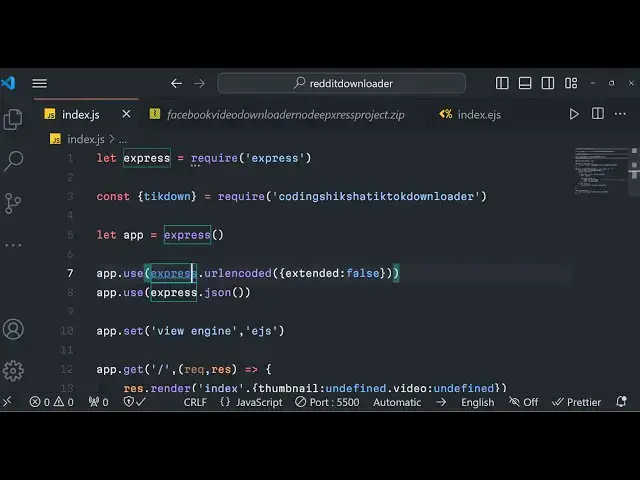
body pass middleware so just include
9:21
these two middleware lines Express URL
9:23
encoded extended to false so if you
9:26
don't include these two lines you will
9:28
get an error so just ude this Express
9:31
Json so this is called as body passer
9:33
middleware so whenever you are working
9:35
with forms to actually get the data that
9:38
you submit in the input field you do
9:40
need to include this so it is saying
9:45
undefined it comes out to be
9:51
undefined if I see the video URL is
9:54
there video URL
10:07
so video URL is definitely printing rise
10:10
you will see
10:13
that uh there is a function out there
10:16
coding sshot Tik Tok
10:22
downloader uh let me cross check the
10:25
name coding sixa Tik Tok downloader this
10:28
is actual module guys that we are
10:30
actually
10:32
using so you can cross check the name
10:35
right here and if you if I check the
10:38
spelling
10:40
here take down let me see right take
10:47
down oh sorry we are doing a very silly
10:51
mistake we are missing this AIT keyword
10:54
because this is a Asing function so we
10:56
do need to add this await keyword to
10:58
actually carry out the
11:00
process so click on this and now you
11:04
will basically see it will return this
11:06
uh Json
11:09
response so this will return all this
11:12
information related to this video number
11:14
of views number of comments number of
11:16
players share download the duration of
11:19
the video which is 55 second the title
11:21
of the video which is fun time this is
11:24
actual URL of the video If you simply
11:27
copy this URL and directly paste it in
11:29
the
11:30
browser paste it you will actually see
11:33
this is actual video
11:35
URL and uh this is the audio URL that
11:39
you seeing right here this is the audio
11:41
URL if you copy this this is MP3 so it
11:45
is automatically generated using the Tik
11:47
Tok API we'll see that
11:50
so we are now need to Simply do it
11:54
programmatically how we can simply
11:56
download this so we can simply rerender
11:59
the template again and this time we will
12:02
pass some information first is the video
12:05
so url. dat. video and the actual audio
12:08
file which will be data sorry data
12:13
dot data.
12:15
audio because we here call this as
12:19
data so here is data so simply data.
12:23
dat. video so there are two properties
12:26
out there that we saw which is a video a
12:29
file and the audio file if you want to
12:31
basically display all this information
12:32
which is the title of the video Avatar
12:34
URL you can even display this
12:36
information as well so we are actually
12:37
getting all this Json information from
12:40
the official Tik Tok API that I
12:42
developed this awesome model module for
12:44
you in nodejs Express so now if you want
12:48
to display this information in the
12:49
browser just add this uh video to be
12:54
undefined this is required just add this
12:57
if you don't add this you will get an
13:00
so add if you are this if you are
13:04
opening this uh template for the very
13:06
first time these two variables will be
13:07
undefined now we are rendering this
13:10
template and passing this two variables
13:13
data so right we will having a if
13:17
condition in our index. ejs file just
13:20
after the form is ending we will have
13:23
this e uh if condition in EGS code if
13:27
the video and audio Vari able exist in
13:30
that
13:34
case you can see that so these are the
13:37
brackets which are there for
13:52
EGS so right here
13:59
so we will have a href here and for here
14:02
displaying the video here we will
14:03
display the first of all
14:06
video like this and here you'll simply
14:09
give it a bootstrap class of BTN BTN
14:12
success and here you simply say download
14:15
video and simply we will repeat this
14:18
process one more time after two break
14:21
tags this time for the audio so here you
14:24
will replace audio and download audio
14:29
so now the application is complete so if
14:31
you try to now copy this URL of the Tik
14:35
Tok video and paste it inside my tool
14:37
website
14:39
tool paste it click on download and
14:44
there will be two links available either
14:46
you can download the video or download
14:48
the audio if you click download video so
14:51
the video will open you can simply click
14:53
download and download the video file as
14:55
a mp4 file inside your computer and play
14:58
it and there is a audio file as well you
15:00
can download the audio file as a MP3
15:02
file and download this inside your
15:04
machine as a MP3 file so this is
15:07
actually the project guys in nodejs
15:09
Express if you are interested in
15:11
purchasing the full source code of this
15:13
project the link is given in the
15:15
description and it's a uh lifetime
15:18
access that I'm giving you after payment
15:20
you will get full commercial right to
15:21
actually deploy this application on your
15:23
own website to actually earn this or you
15:26
can sell this code to anyone else so
15:28
it's a Tik Tok video and audio
15:30
downloader which is communicating with
15:32
the official API that I developed this
15:34
awesome module you can first of all try
15:37
out the free demo you can visit my
15:40
website freem mediat tools.com and I
15:42
deployed this tool Tik Tok video
15:44
downloader you can try out the live demo
15:46
before you purchasing the source code
15:48
and then you can go to the description
15:50
of and purchase of source code from
15:53
procore.com the link is given in the
15:55
description of the live stream so thank
15:58
you very much for watching this video
16:00
and I will be seeing you in the next
16:02
live stream