Up next in 10

Node.js Express Geocoding API to Track Mobile Number and Find Sim Card,Country & TimeZone in Browser
Jan 9, 2025

Buy the full source code of the application here:
https://procodestore.com/index.php/product/node-js-express-geocoding-api-to-track-mobile-number-and-find-sim-card-timezone-in-browser/
See the Live Demo of the tool here:
https://freemediatools.com/trackmobilenumber
Show More Show Less View Video Transcript
0:00
uh hello guys welcome to this video so
0:02
in this video I will show you a tool how
0:05
I developed which allows you to track
0:07
your mobile number and SIM card details
0:10
so this is a tool that I uh developed
0:13
guys and it is available on my website
0:15
free mediat tools.com
0:17
trackmobile number and I've given the
0:19
link in the description of the video you
0:21
can check out the live demo and what
0:23
this tool does guys basically you can
0:25
input any number if you have around the
0:29
world
0:31
and uh there is a input field out there
0:34
you need to enter the mobile number with
0:36
the country code with your if you're
0:37
living at America which will be plus one
0:40
I'm I am just living in India so mine is
0:44
plus 91 and Then followed by the number
0:47
so as I input my number here this is my
0:50
number and it will give you my location
0:52
which is India and SIM card which is ATL
0:55
which is correct and time zone as well
0:57
so time zone information it will also
0:59
calculate so we are using actually a
1:01
python script which is a completely free
1:03
script and we are using that python
1:05
script to calculate this information and
1:07
display this information using nodejs
1:09
and express and this is a complete web
1:11
application so now let me enter a
1:14
different number with a different
1:16
country code so plus
1:18
264 and if I click get info you will see
1:21
country is na nabia SIM card is MTC time
1:25
zone is this one and if you want to
1:27
cross check with Google just type here
1:29
Plus plus 264 which is country code for
1:33
which country which
1:35
is nabbi I will see that so if I now
1:39
input a different number plus 234 I
1:42
think which is for Nigeria for country
1:44
code get info you will see country will
1:46
be Nigeria SIM card MTN time
1:50
zone and if I enter this country plus
1:55
229 you can enter any mobile number guys
1:58
with this tool you will be able to track
2:00
the mobile number and different details
2:02
such as SIM card and time zone country
2:04
is by Benin you will see that let me
2:06
input this
2:08
number plus 593 which is a country code
2:12
which is I think Ecuador this is a
2:14
country SIM card you will see that so
2:17
all the countries are supported you just
2:19
need to input the number here mobile
2:20
number with country code and we will try
2:23
to build this application if you need
2:24
the full source code guys the link is
2:26
given you can directly purchase it you
2:27
will get a zip file after the payment
2:29
from go Google Drive and which will get
2:31
all the source code so now I will code
2:33
this application you will see it's uh
2:35
empty by default and now I will start
2:38
the application npm in it- F so this
2:40
will actually create a empt package.json
2:42
file you will see that and now we just
2:45
need to install some packages for this
2:48
application first will be Express we
2:51
need this package npmi express we need
2:54
this package simply install this
2:57
package so once it's it once once it is
3:00
installed we will actually make a
3:02
index.js
3:04
file and here we will simply require our
3:07
Express package right here at the very
3:09
top and then we will make our express
3:13
application and we will be running this
3:15
application on Port 5000 and in the call
3:18
back function we will simply console log
3:20
a simple
3:22
Line app is listing on Port
3:26
5,000 and here we will simply make a get
3:29
request or we can make a public
3:31
directory app.use we will say
3:36
Express do static we make that static
3:40
directory which is
3:42
public we just make a public directory
3:44
right here public folder and right here
3:47
we will store our index. HTML
3:50
file so automatically once someone goes
3:52
to the homepage uh we will this
3:55
index.html file will be served we will
3:58
basically change the title here which
3:59
which will be
4:02
Track mobile number and SIM card
4:11
details so if you just start this
4:14
application just say node more index.js
4:17
the app will start on Port 5,000 if you
4:20
just search Local
4:23
Host so now you can see that hello world
4:25
is sprinting out so now what we need to
4:28
do we need to now construct the
4:29
interface for constructing the interface
4:32
we need the
4:33
bootstrap CDN for the uh UI so just go
4:37
to w3schools.com and simply you need to
4:41
copy the CDN only for the CSS simply
4:44
copy this after the title paste the CDM
4:47
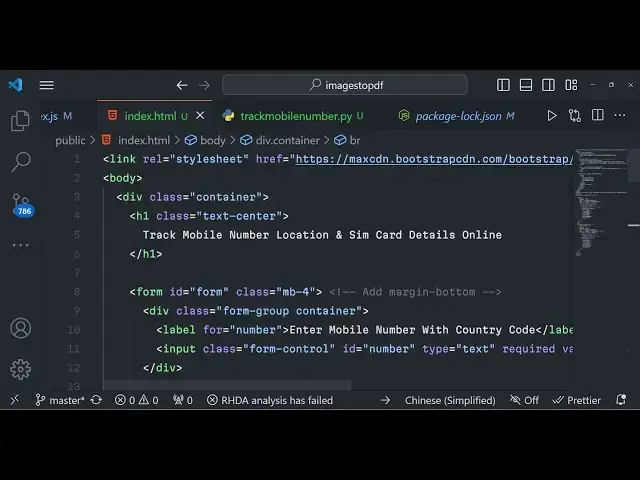
and uh after this we will now be using a
4:51
container class of the bootstrap and we
4:54
will have a heading in the center
4:55
position that is Track mobile number
5:02
location and SIM card
5:07
details this is a tool that we are
5:09
developing so now inside the form here
5:12
we will give it an ID to the form right
5:14
here just give it an ID and so that we
5:17
can Target it in JavaScript we'll give
5:19
it a bootstrap class of
5:22
mb4 and we will have the form group and
5:25
the container class given to the div
5:28
right here we will have have a simple
5:30
label where we will allow the user to
5:32
enter the mobile number so here we will
5:34
simply say to the user enter mobile
5:36
number with country
5:39
code so after this label we will
5:42
actually have a
5:45
input type text where the user can enter
5:49
the number we'll give it an ID of number
5:51
so that we can Target in JavaScript and
5:53
we will give it a class of form
5:55
control so if you just refresh now we
5:58
will have a a simple input field where
6:01
the user can enter the
6:03
number and uh we will basically give it
6:07
a place holder to the user just to tell
6:10
them what they will need to write write
6:12
in this field enter your mobile number
6:16
and basically it will be required so
6:18
it's a required field user must write
6:21
this and uh after this we will actually
6:25
have a
6:28
another form group container div and
6:32
right here we will have this button to
6:34
actually track
6:37
info and we will give it a class of BTN
6:41
BTN danger BTN block it will have the
6:45
full size red button you will see the
6:47
track
6:53
info you can see that so just give it a
6:56
Break Tag just to make sure the button
7:00
is
7:00
appearing have some spacing right here
7:03
you will see that now it looks good the
7:05
interface something like look like this
7:07
so now what we need to do is that as we
7:10
click the button right here we now need
7:13
to display this information in a tabular
7:15
like structure and uh for doing this we
7:18
also need the J cury for actually making
7:20
the request so just after the body past
7:23
the CDN for jQuery and we will also be
7:26
writing our JavaScript code right here
7:28
so script source script.js so just make
7:32
in the public folder
7:34
script.js here we will actually write
7:36
our JavaScript code so right in the
7:41
JavaScript code guys you will have the
7:42
document. ready
7:45
function of jQuery
7:49
document ready function so this function
7:52
will execute after all the Dom elements
7:56
are
7:58
loaded this is the jQuery
8:02
function so right here guys if I just
8:04
say hello world just to check if it is
8:07
working or not just refresh your
8:09
application and you will basically see
8:11
this hello world will take place now
8:13
this code is working so now what we need
8:15
to do is that we need to make a simple
8:18
Ajax request to the backend
8:21
server now to make that request we will
8:24
say dollar. Ajax and here we will simply
8:27
say method method will be post a simple
8:30
post request and the URL will
8:33
be/ Track mobile
8:36
number and we need to make this request
8:38
at the back end so the data what we will
8:41
be passing right here we will passing a
8:44
simple object which will contain a
8:46
single property which is the mobile
8:48
number actual mobile number so here we
8:52
will pass the number right here whatever
8:54
number that we need to
8:57
pass so
9:00
you can basically get the number that
9:02
you selected right here if you
9:04
see we have given the ID here to the
9:07
number so what we can do we can
9:09
basically select
9:12
uh the
9:15
number document. get element by ID which
9:19
is number you can get the value of the
9:22
number like this and simply pass the
9:27
number and uh
9:30
after we pass this we will basically
9:33
have a success call back as well so when
9:36
the data comes from the backend server
9:38
we will simply console log the data just
9:40
check right here
9:44
just I will now first of all go to
9:47
index.js in
9:50
the we need to make this post request
9:53
but doing this we will say app. poost SL
9:56
Track mobile number and right here we
10:00
will say request
10:02
response and uh now to get that number
10:05
we will simply use the express uh URL
10:09
encoded body passer middleware so
10:11
extended to false and express Json so
10:14
you need these two middleware lines guys
10:17
because we are getting data from the
10:18
HTML form in the backend server so we
10:21
need these two lines of code which is
10:22
the body pass middleware which is a
10:24
built in in Express in the latest
10:27
version of Express so you need to write
10:28
these two lines of code now in order to
10:31
get the number we will simply print out
10:33
the number using uh console log request.
10:37
body. number so
10:41
whichever uh whatever you written WR
10:44
this request. body it will come right
10:47
here so now let me just
10:49
refresh if I basically pass this number
10:52
click on track
10:54
info so nothing is come right here if
10:57
you see in the inspect element we are uh
11:00
we need to first of all prevent the auto
11:03
submission of the form as well right
11:05
here whenever we make this so there will
11:07
be e parameter right here we need to say
11:10
that e do prevent do autod
11:13
default and
11:15
also we need to make uh the submission
11:18
of the form so whenever we submit the
11:21
form uh there will be this we need to
11:24
first of all get the reference of the
11:25
form document. get element by ID we have
11:28
given the form and ID if you see we have
11:30
given the form and ID which is form and
11:33
now we need to bind an event listener to
11:35
the form so sorry just give it a number
11:39
so we need to bind the event listener so
11:41
form. add event listener
11:44
submit we can even do do this like this
11:47
in jQuery because we don't need to have
11:49
this we can delete that all this we can
11:52
use dollar symbol we can simply say here
11:56
dollar and put an ID which is form and
11:59
then say submit it a submit event
12:02
handler built-in function and right here
12:06
we will simply prevent the auto
12:07
submission of the form and then we will
12:11
basically uh shift this code in the like
12:16
this just paste this code right here and
12:18
now we are simply making a simple uh
12:21
Ajax request whenever we submit the form
12:24
we are passing the number to this end
12:26
point Track mobile number and then if
12:30
just refresh your application
12:32
now pass the number and uh if you
12:36
console log it you will basically see
12:40
uh if I show you it is saying that
12:45
maximum call stack size
12:49
exceeded Track mobile
12:57
number uh track mobile
13:03
number let me see uh Track mobile let me
13:08
change this to
13:12
track
13:20
mobile and now let me okay I need to
13:26
Simply request. body do
13:45
number uh just wait guys let me see what
13:47
is the
13:48
problem uh sorry guys I just uh find out
13:52
I just made a very silly mistake you
13:54
will see the this number that I'm
13:56
referencing in this code writer at l 11
13:59
doesn't exist because we deleted that so
14:03
we just need to get the value so we will
14:05
basically say dollar and we will put the
14:07
ID that we have given through the number
14:09
input field in the index. HTML if you
14:11
see we have given this ID here now to
14:14
get this value in JQ you will simply use
14:16
the Val function Val it will actually
14:18
get the value by using it ID so whatever
14:21
number that you write you will pass this
14:23
number in the back end so if you just
14:25
refresh your application and whatever
14:27
number I write click on track info I
14:30
will make this Ajax request and now if
14:32
you see we are getting this number in
14:34
the back end and we are displaying it
14:36
right here so now as we are getting this
14:40
number now we need to Simply call a
14:42
python script which will actually find
14:45
out information related to this number
14:48
and now to execute python script in our
14:50
nodejs application we will actually use
14:53
a function execute and it is coming
14:56
through child process which is a
14:58
built-in module
14:59
and right uh using this function you
15:02
will execute a python script so we'll
15:04
say python you will simply make a the
15:08
script track Mobile number. py in our
15:11
root directory and we'll pass the number
15:13
to this python script which is this
15:15
number which is coming we will store
15:18
this request body.
15:20
number so we are basically calling this
15:23
python script we are passing this number
15:25
as an argument and this will simply
15:28
return error standard output and
15:30
standard error as call back function so
15:33
now we need to Simply make this python
15:35
script in the root directory so we'll
15:37
say
15:38
track mobile number
15:42
py so this python script guys which uh
15:46
basically here we need to install a
15:49
module for python you need to have
15:51
python installed pip install four
15:54
numbers this is a package guys which we
15:57
are actually using to actually get all
15:59
this information of a phone number tip
16:02
install phone numbers you need to
16:04
install this package after you install
16:07
this package we will simply say from
16:09
phone numbers we need to import the Geo
16:14
coder
16:15
carrier and time zone all this methods
16:19
we will import and then we will import
16:23
the phone numbers as well import the
16:25
system
16:26
module and then we will simply say
16:28
number number one we will uh extract
16:33
the country code
16:36
information system. AR GV whatever code
16:41
that we pass whatever the number that we
16:42
have passed we are storing this number
16:44
like this alongside with the country
16:45
code and right here we will use the
16:48
phone numbers module and it contains the
16:51
pass module to actually pass this number
16:53
we will basically pass the number one
16:55
like this after this we will extract
16:59
information which is the
17:02
country SIM card and uh time zone all
17:06
this information will extracted us using
17:08
this phone number so for for extracting
17:11
the country we will use the geocoder
17:13
module description for number and we'll
17:17
pass the number one and whatever
17:19
language that you want so I want this
17:21
information in English we will pass
17:23
English and then the SIM card it also
17:28
carrier
17:29
it contains a method name for number
17:33
pass the number one and the language is
17:36
English third is the time
17:40
zone we will have the time zone it
17:43
contains the time zones for number we'll
17:47
pass the number one like this so all
17:51
this information now we just need to
17:54
extract sorry print this information so
17:57
we will simply say here
18:00
country is equal
18:03
to the
18:04
country and the SIM
18:09
card will be equal to the SIM card that
18:12
we got and the actual time
18:19
zone and time
18:21
zone
18:23
info
18:26
zero we can also have if the time zone
18:31
info else time
18:37
zone time zone information not available
18:41
so we are basically writing a case in
18:43
which the time zone is not available in
18:46
that case we will print out this message
18:48
that's
18:49
all so if I try to run this python
18:52
script just from the command line python
18:55
Track mobile number we need to give the
18:58
forone number here with country code
19:00
plus 9198 2125
19:03
4649 you will basically see it will
19:05
print out this information in the
19:07
command line country is India SIM card
19:09
AEL time zone Asia calcula now we need
19:11
to display this information in the
19:13
browser how we can do that so basically
19:16
we are calling this python script from
19:18
our nodejs code so now the information
19:21
we need to transfer this information to
19:23
the browser site so how we can do
19:26
that right here we will simply compare
19:30
that uh if any sort of error take place
19:33
in that case we need to Simply console
19:35
log the message error take
19:39
place and we need to return the
19:42
message with the status code of 500 and
19:47
we will say that Json respon
19:50
that an error
19:54
occurred so if all goes well if no error
19:57
take place in that case we will
19:59
basically extract the information which
20:02
is country SIM
20:04
card and uh time zone we will construct
20:08
this array from the standard output dot
20:11
we will split the lines split with the
20:14
new line corrector like
20:16
this after this you will basically send
20:19
out this information to the browser
20:22
response status code of 200 we will pass
20:24
a Json response which will contain three
20:26
properties the country the SIM
20:32
card and the time zone so like this so
20:37
it has three properties guys this Json
20:39
object country SIM card time zone we are
20:41
returning this response 200 to the
20:43
browser now in the index.js file
20:47
script.js in the backend code if I now
20:50
write this number and uh start this
20:54
application first of
20:57
all
20:59
enter the number click on track info and
21:01
check my in console you will basically
21:04
see we'll return this object which is
21:09
country SIM card time zone so we are
21:12
returning this information in the
21:14
browser as a Json response now to
21:17
display this information it's very easy
21:20
uh so right here what we will do we will
21:23
actually construct a table in the
21:25
index.html just after the form we will
21:28
have a bootstrap table table table
21:33
striped we will have table
21:36
head three columns will be there first
21:39
for the
21:41
location second will be for the SIM
21:45
card and third will be for time
21:51
zone table body and we'll basically give
21:54
it an ID here of
21:57
result so that that's all so we have
22:00
given basically an ID here if you see
22:03
table table striped and we are having
22:05
three columns location SIM card time
22:07
zone now in script.js after we got this
22:10
data we will now
22:13
be
22:18
uh if you see basically uh we also need
22:21
to we have given this ID to the table
22:24
body tag which is result so using this
22:27
ID we will basically append all the data
22:30
which is coming this data so we'll use
22:33
jQuery using its ID which is result we
22:37
will empty all the results previously
22:40
and then we will append
22:42
it result
22:45
append we can basically say
22:51
here TR and
22:55
uh you can do like this so we can append
23:02
this I can just paste this code right
23:05
here so what it is doing it is basically
23:08
appending uh the country data. country
23:11
data. SIM card data. time zone so we
23:14
have a data object right here which is
23:15
coming so it contains three properties
23:17
country SIM card time zone so we are
23:19
displaying these three properties in the
23:21
table structure like this
23:24
so if you just refresh your application
23:27
now
23:28
we have location SIM card time zone if I
23:31
input the number you will see country is
23:34
India SIM card Asel you will see
23:38
that you can basically change the number
23:40
to any number which is plus
23:49
264 so country NAIA SIM card MTC time
23:52
zone you can check out the servic is
23:55
deployed on the website I've given the
23:57
link you can try out the live demo and
23:59
if you are interested you can directly
24:01
purchase the full source code guys which
24:03
will be containing the documentation
24:05
Full Source Code will be there if you
24:07
have any sort of doubt you can purchase
24:09
it and please hit that like button
24:11
subscribe the channel and I will be
24:13
seeing you in the next video
#Mobile Phones
#Other
#Other