Up next in 10


Buy the full source code of application here:
Show More Show Less View Video Transcript
0:00
uh hello guys welcome to this video so
0:02
in this video we'll talk about another
0:04
storage inside JavaScript which is
0:06
called as local storage local storage is
0:09
actually different from session storage
0:11
that we discussed in the last video so
0:14
it has
0:15
accessible over multiple sessions so
0:18
either when you close the browser as
0:20
well it also persist so unlike session
0:24
storage whenever you close the browser
0:26
the storage vanishes but in local
0:28
storage whenever you decare data it
0:32
actually stores in the
0:34
browser across multiple sessions
0:38
so let me take a very simple example so
0:42
inside local storage you can first of
0:45
all access this keyword by this local
0:48
whenever you write
0:50
this you can access it using this
0:53
keyword which is local storage
0:56
directly in the browser you don't need
0:58
any special library for this it's
1:00
already built in the browser and then
1:03
there is these methods available for it
1:06
get item set item remove item and clear
1:10
so these four methods are available if
1:12
you want to
1:13
set uh add a item in local storage you
1:17
you use this method set item if you want
1:19
to retrieve data from the local storage
1:21
you use get
1:23
item and then if you want to remove a
1:26
specific item from the local storage you
1:28
use this method which is remove item and
1:30
if you want to wipe everything delete
1:33
everything from local storage you use
1:35
the clear method so it will delete
1:37
everything from local storage so these
1:39
are the four methods available on this
1:41
local storage object so first of all let
1:44
me add some thing set item I will use
1:48
this and let me add a username so you
1:53
will know uh so it actually works key
1:55
value so here you actually provide a key
1:58
and then a value the these two things
2:00
can be anything so key basically uh
2:03
refers to the information that you're
2:05
storing so in this case let me store a
2:07
username and the value here let me call
2:10
it John so now we have successfully
2:13
added one piece of information which is
2:16
username inside our local storage now if
2:20
you want to retrieve this information
2:22
from the local storage and show it in
2:24
the
2:25
browser we can use the other method
2:28
which is
2:30
get item so here you need to specify the
2:33
key again so in this case we need to
2:35
retrieve the username that we stored
2:37
earlier so we are simply telling it show
2:40
this information get
2:43
item and now we need to store it so we
2:46
can simply store it in a username
2:50
variable and then we can show it in the
2:53
screen console log
2:58
username so so if you try to look it in
3:01
the browser let me go to inspect element
3:04
and go to the console area and you will
3:06
actually see this information printed
3:08
out which is John and the information uh
3:12
if you also want to see it in the you
3:14
need to go to more tabs and then go to
3:17
application and then you have various
3:19
kinds of storage right here local
3:22
storage so if you click on that and you
3:24
will actually see this uh username which
3:28
is there which is
3:31
John so in this way guys you will
3:34
actually see this information printed
3:38
out you can store multiple information
3:41
as as well so if I add one more
3:43
information which is
3:48
H so now if you see there are two types
3:51
information is there which is username
3:55
age John
3:57
25 and the thing about local storage is
4:00
that let me show
4:01
you a date as well let me store it a
4:07
date uh set item which is uh let me
4:11
store the
4:13
current
4:28
time let me store information which is
4:35
access let me ask a question to chat GPD
4:38
uh store
4:39
a time in local
4:43
storage so that we can
4:46
see if we close browser it
4:52
stays so we will store the current time
4:55
in local storage so that we can save it
4:58
as a time stamp
5:00
so even if we close the browser it will
5:03
stay in the browser so we can clearly
5:05
see so for that what we will do we will
5:09
actually get the current time and then
5:11
store it in the local
5:14
storage so this will clearly show that
5:17
uh local
5:21
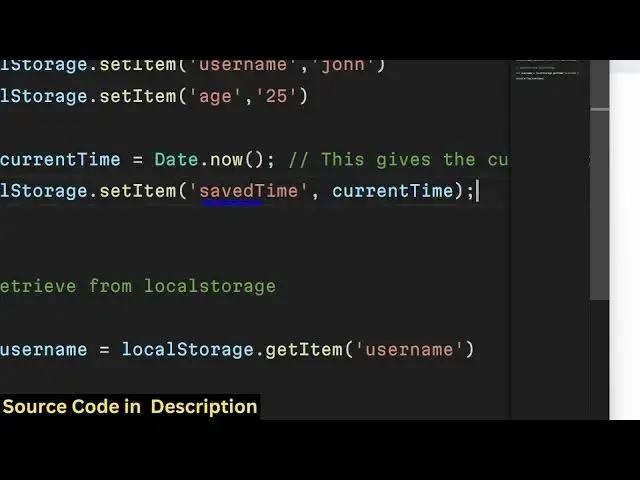
storage so what I will do uh we will
5:25
store the current time in the local
5:27
storage by using date. now and we
5:30
storing it in a key parameter save time
5:33
if you see this time is
5:38
uh you can see that so even if I close
5:46
this even if I close
5:50
this again open
5:58
it so
6:00
again go to
6:05
App application and if I go to he will
6:09
see all three information have been
6:14
there if I open a new browser window
6:16
let's suppose
6:32
so you will actually see it doesn't
6:35
depend upon whether you close the
6:37
browser or open a new tab it actually
6:40
this information
6:41
stays just make sure that you are using
6:44
the same browser so that's why you'll
6:46
see this information is also available
6:48
here also because these are two
6:51
different Windows if you see these are
6:52
two different windows but still this
6:55
information stays right
6:57
here the same value if you just
7:02
match so the this is the same time stamp
7:05
that we stored in both the windows so it
7:08
actually proves that local
7:10
storage is uh accessible in different
7:13
tabs in different browser sessions it
7:16
doesn't depend upon uh whether you close
7:18
the browser window or not it stays
7:20
information whe whenever you save it so
7:24
if you even if you close the browser and
7:26
reopen it it states this is the
7:28
advantage of using local storage over
7:31
session
7:32
storage one advantage and let's suppose
7:37
if you want to save an object instead of
7:42
variable user object so in many cases
7:45
you will not store information in
7:47
variables you will store information in
7:49
objects so you will have a user object
7:54
so user data and we'll have an object
7:57
here of username and you will have
8:00
various properties related to the
8:05
user we have three properties username
8:08
Age Country so now if you want to store
8:10
this in local storage first of all you
8:12
need to convert this object into string
8:15
because
8:17
uh as you all know it stores strings not
8:21
objects so for that we need to
8:25
actually first of all convert this into
8:30
string object by using json. stringy
8:35
file and then user
8:39
data so this converts your object into a
8:42
string so now it can actually be stored
8:44
inside local
8:57
storage so if you now see uh
9:02
uh so now it has stored all this three
9:05
attributes username Age Country so this
9:08
is actually stored in a string not a
9:11
object this is actually a string now to
9:14
retrieve this and show it in the browser
9:17
you need to first of all convert this
9:19
into an object this string into an
9:22
object for that we will convert this
9:25
using
9:27
uh Json so we will use these two methods
9:31
first of all to convert this object into
9:33
a string we use json. stringy file and
9:36
then to
9:40
actually convert that string into an
9:45
object so after you do
9:49
this now to retrieve this
9:53
object retrieve the
9:55
string so we convert this into a Json
10:00
object by using json.
10:03
pars and we use local storage. get
10:09
item so the item will be the key
10:11
parameter right here so we have used
10:13
user data so this needs to be
10:17
same this will be your object which will
10:20
be coming so Json object and if I
10:23
console log it you will see this
10:25
property username John ag25 country
10:29
Australia so you
10:33
can print out the
10:41
name the age and
10:50
Country I think this is
10:54
username so in this way guys you can uh
10:57
save objects ret object from local
11:00
storage and uh using these methods which
11:04
is Json pass if you want to retrieve
11:06
this string from local storage and
11:09
convert this into an object and then if
11:11
you want to store this object into the
11:13
local storage first of all you do need
11:14
to convert this into a string using
11:17
these json. stringify so these two
11:20
methods are used simultaneously Json
11:22
stringify and json. pars so this was a
11:25
short tutorial about local storage guys
11:29
and and uh if you do want to wipe
11:32
everything data out you already have
11:34
known this method which is uh clear so
11:38
it will clear out everything from the
11:40
local storage and now if you want to
11:43
access this
11:44
data you can't access it so if I try to
11:48
access this
11:57
data so it will come out to be null
12:00
because that data is not available
12:02
because we clearly wiped everything out
12:04
from the data if you go to the
12:06
application Tab and go to local storage
12:09
you will see no data is present so if
12:13
you do want to wipe everything out you
12:15
use this method uh clear method which
12:17
will clear everything out so this was a
12:20
short mini course about local storage if
12:22
you do like this video then please hit
12:24
that like Buton subscribe the channel
12:26
and do check out my website as well free
12:28
media tools.com which contains uh tools
12:31
about audio video and MH and I will be
12:35
seeing you in the next video
#Software