Up next in 10

Marked.js Markdown Parser Tutorial to Compile MD to HTML & PDF Using PDFMake.js in Javascript
Jan 9, 2025

Get the full source code of application here:
https://gist.github.com/gauti123456/64d4d35fea7b17d0e6624a7b3f84a017
Show More Show Less View Video Transcript
0:00
uh hello guys welcome to this video so
0:02
in this video we'll be looking at
0:03
another markdown parsel Library which is
0:07
marked dogs so we'll be looking at a
0:10
simple application which will be
0:12
converted markdown into HTML and then
0:15
that HTML will be converted to PDF so
0:17
it's a online converter so here you can
0:21
actually paste the
0:23
markdown so I've already have this
0:25
sample marked down here so I will simply
0:27
paste it in the text area and then we
0:29
have a button out there so if I click
0:31
this button you will actually see the
0:33
markdown will be converted to PDF and
0:35
for doing this purpose we are using a
0:37
new library which I found marked. JS so
0:42
it's a markdown comp parser and
0:45
compiler open source this is their
0:47
GitHub repo and this is their very I
0:51
think it
0:52
say
0:54
uh this is the official website mark.
0:58
j.org it's a very popular parser library
1:02
of markdown you can EAS also install it
1:06
globally inside the command line as well
1:08
this is a command you can use also use
1:10
it as a Command nodejs
1:15
Module and it actually parses the
1:18
markdown and converts into HTML but it
1:21
doesn't sanitize the output
1:23
HTML and uh let me show you a very basic
1:27
example and we will be using the the CDN
1:30
right here in order to use it directly
1:32
in the browser so we'll be using the CDN
1:36
so we have this example right here all
1:39
the source code that I will use in this
1:41
video is given in the description so
1:44
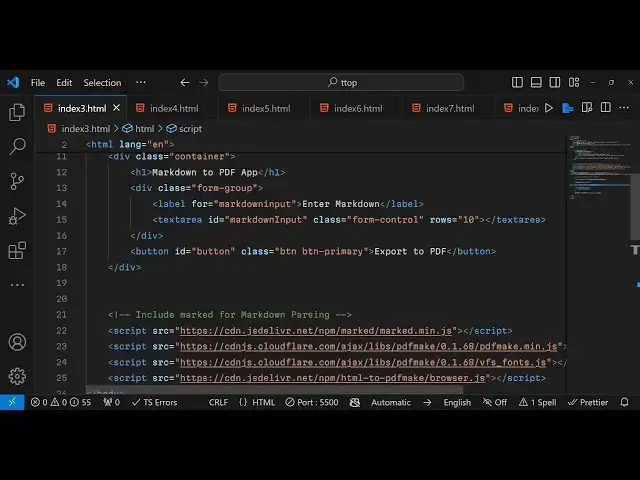
first of all what I have done I included
1:46
the CDN of mark. min.js and then we are
1:51
using a library which is PDF make if you
1:54
want to convert HTML to PDF this is a
1:57
very simple Library client side PDF
2:00
generation library in JavaScript so we
2:03
are also using this Library as well and
2:06
also this package as well HTML to PDF
2:09
make if you directly want to convert
2:12
your HTML to
2:14
PDF use this
2:17
package which is having 63,000 downloads
2:21
we'll be using it as a
2:26
CDM which actually does this process so
2:29
now let's get
2:30
started so now I will simply delete
2:34
everything and start from scratch after
2:36
including the
2:38
CDN
2:40
so first of all for making the interface
2:43
we will be using the container class of
2:46
for
2:48
bootstrap and here we'll be having a
2:50
heading that is markdown to
2:53
PDF
2:55
app then we will having a form group
2:57
class of bootstrap and here will be
2:59
allowing the user to enter the
3:03
markdown so it simply be telling the
3:06
user enter
3:08
markdown and here we will be having the
3:11
text area and we'll be giving an ID to
3:13
it of markdown
3:15
input and uh also we need to
3:20
give bootstrap class which is form
3:24
control and rows I will give it as 10
3:29
so here the user will enter the markdown
3:32
you'll see it will look something like
3:34
this and we also need a simple button to
3:38
submit the form so you'll simply say
3:40
that export to PDF will be giving an ID
3:44
to this button and a bootstrap class of
3:47
BTM BTM
3:50
primary so it will look something like
3:52
this and now in the JavaScript
3:56
code so first of all we need to
4:00
bind a onclick listener to the button so
4:03
we have given the button the ID so we
4:06
can Target this in the JavaScript by
4:08
using get element by ID followed by the
4:12
ID that we have given and add event
4:14
listener so when you click the button
4:16
this call back function will execute now
4:19
we need to get the markdown input which
4:22
the user writes in the text area so we
4:24
have given the ID to the markdown input
4:27
field so we can get the value by using
4:29
dot value so after getting the marked
4:32
down we can use the
4:37
marked JS parser
4:41
Library so we can simply
4:45
say it actually contains a function
4:48
which is pass this library and here you
4:51
need to pass the markdown input as
4:54
argument and then it will give you this
4:57
uh HTML content we can cross check here
5:01
so we have a sample markdown file right
5:05
here if I copy
5:09
this and paste it in the text area click
5:12
on this button you will see in the
5:14
console it actually gives you this uh
5:17
HTML right here it passes all this
5:20
markdown into
5:24
HTML so after you get this HTML the job
5:28
is really easy you need to Simply
5:30
convert this HTML to PDF and for that we
5:33
will be using that html2 PDF make
5:38
package that I already showed
5:41
you and it actually converts the HTML to
5:49
PDF and now we can download the PDF
5:52
document by instantiating a document
5:56
definition object and inside that
5:59
content property will make it to the PDF
6:02
content and then for downloading the PDF
6:05
document in PDF make Library there is a
6:08
function which is create PDF and here
6:11
you pass your doc definition and then
6:13
call the open
6:14
function this will download the PDF
6:18
document and if you refresh paste your
6:22
markdown click on this button and now
6:24
you can see that your markdown is
6:26
successfully converted to the PDF
6:28
document so first of all that markdown
6:31
is first of all converted to HTML and
6:34
then the HTML is converted to PDF using
6:37
PDF make Library so we are essentially
6:40
using three libraries in this one
6:42
application first for converting the
6:44
markdown we are using one package the
6:46
second package is actually converting
6:48
that HTML to PDF and the third one is
6:51
actually generating the PDF Library so
6:53
essentially three three libraries are
6:55
used in this
6:58
so we are are used markdown parer which
7:01
is marked JS so essentially this video
7:04
is about this markdown parsel
7:07
Library so it's a very popular markdown
7:11
paror and compiler which compiles your
7:14
markdown into
7:16
HTML so also do check out my free media
7:19
tools website guys which contains
7:22
thousands of free tools related to audio
7:25
video and image and please hit that like
7:28
button subscribe the channel and I will
7:30
be seeing you in the next video
#Educational Software
#Open Source
#Computer Education