Up next in 10

jsPDF Tutorial to Add Text Watermark in PDF Document Using Javascript in Browser
Jan 9, 2025

Get the full source code of application here:
https://gist.github.com/gauti123456/a02c435572e2c504a6e92f6e842e2c99
Show More Show Less View Video Transcript
0:00
uh Hello friends welcome to this video
0:02
so in this video we will talk about that
0:04
how to add a text Watermark to your PDF
0:07
document using jspdf Library so we have
0:10
this application we have a button right
0:12
here if I click this button a PDF file
0:14
will get downloaded and you will
0:15
actually see this nice little Watermark
0:18
being added to this page here it can
0:21
have multiple Pages as well so you can
0:23
add these Watermark to all the pages
0:25
using a simple for Loop so I will show
0:28
you how to add this watermark it's in a
0:30
gray color and rotate it at a 45° angle
0:33
so that it is showing it in a nice
0:35
little manner so all the sours code will
0:38
be present in the description of this
0:39
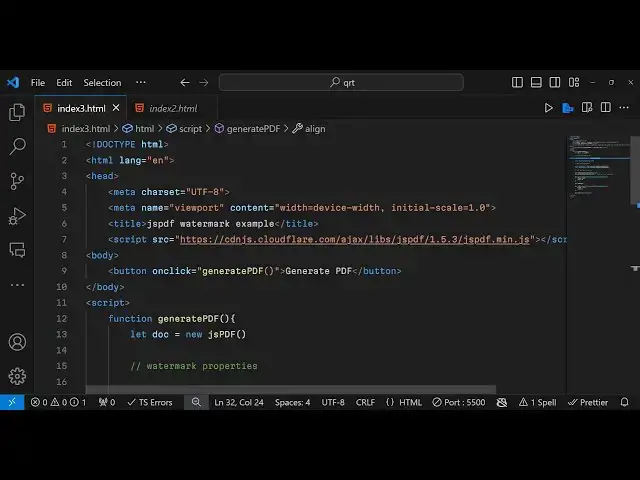
video so let's get started so now to get
0:42
started we just need to initialize a
0:45
basic HTML document and just write here
0:48
jspdf Watermark
0:50
example and for doing this we just do
0:53
need to include the CDN
0:55
for CDN actually allows us to use this
0:59
library in the browser directly so we
1:01
are using CDN from cloud
1:05
fair.com
1:08
kx/ lips
1:12
jspdf
1:14
1.5.3
1:18
version so this is actually the version
1:22
that we are
1:25
using so after this we can have a simple
1:28
button which will simply we say to us
1:31
that generate PDF we will bind a onclick
1:34
listener to it so when we click this
1:36
button this function will execute which
1:38
is generate
1:40
PDF so now we just need to Define this
1:42
function generate PDF so inside this we
1:46
will instantiate a new instance of jspdf
1:49
Constructor this lets us use this
1:52
library in the browser so now we need to
1:55
set some properties about the watermark
1:58
such as the text color and the rotation
2:01
angle so you first of all set whatever
2:04
Watermark text that you want to set I
2:07
will set let's suppose free mediat
2:09
tools.com this is my channel name and
2:13
then we set the watermark uh phone
2:18
size let me set it to
2:22
50 then we basically need to get the
2:25
page Dimensions to actually
2:30
set the watermark so first of all for
2:33
calculating the width of the PDF
2:35
document we have this function inside
2:38
jspdf which is doc.
2:41
internal. Page
2:44
size. get width this function will
2:47
return the width of the page and
2:50
similarly we will calculate the height
2:52
of the Page by using dot do
2:55
internal do page size do get height this
3:00
will return the height of the page in
3:02
these two variables we are storing the
3:04
width and the height of the page and
3:05
then we need to set some text
3:08
properties such as the color of the text
3:12
Watermark so we need to first of all set
3:14
the phont size let me set this to the
3:17
watermark font size variable and for
3:20
setting the text color we'll use this
3:21
function set text color and for light
3:25
gray color we would need to give RGB
3:27
value 200 200
3:30
200 so this is actually a light gray
3:33
color for
3:36
watermark then we need to basically
3:39
rotate this
3:40
text for adding the text you use the
3:43
text method inside jspdf we pass the
3:46
text variable as first argument and then
3:49
we calculate page width divided by two
3:53
this is the x coordinate and for y
3:56
coordinate we divide by
3:58
two and for rotating this we provide an
4:02
object right here alignment must be at
4:05
the center and the second argument is
4:07
the angle you need to rotate so we need
4:09
to rotate this as a 45° angle for the
4:13
waterm mark to appear so this is
4:15
actually the thing right
4:17
here and lastly we need to save this
4:20
document so you simply use the save
4:23
function and we can give it a file name
4:27
Watermark PDF this is the overall
4:30
application guys now let me run this
4:32
application click this button you will
4:35
actually
4:36
see let me see it is saying jspdf is not
4:40
defined let me check uh I think we have
4:44
given typo mytic
4:47
https cdnjs do cloudfare doccom SL Ajax
4:53
/ lips jspdf
5:00
every time I make some typo mistake guys
5:02
in writing the CDM so if you do this now
5:08
hopefully there will not be a
5:10
error you will see that as I click this
5:15
button so now basically the watermark
5:19
has been
5:19
added so you can have multiple Pages as
5:23
well
5:26
so let's suppose after this you add a
5:28
new page
5:30
using add page method this will add a
5:33
blank page so once again if you see
5:38
now now it will contain two pages this
5:41
is the watermark page this is actually
5:44
the second page if you want to add this
5:47
Watermark you can
5:53
simply again add this call this dog.
5:57
text and uh now you will actually see
6:00
the watermark will get added to both the
6:02
pages at the same location so in this
6:05
way you can add Watermark to your PDF
6:07
document using jspdf Library it's really
6:10
simple you can adjust all these
6:12
properties your watermark text the phone
6:14
size if you want to increase
6:20
it generally water marks uh you can see
6:24
that so in this way you can add these
6:27
watermarks you can adjust the rotation
6:30
angle you can align it at a different
6:32
position left
6:35
position so the the link is given guys
6:39
in the description you can see that how
6:41
it is actually shaping
6:45
out so thank you very much for watching
6:47
it please hit that like button subscribe
6:49
the channel for more videos like this
6:51
and I will be seeing you in the next one
#Other
#Other