Up next in 10

Javascript Turndown.js Example to Build HTML to Markdown Converter in Browser Full Web App
Jan 9, 2025

Get the full source code of application here:
https://gist.github.com/gauti123456/776a4b4a68ed238303adcabfa6c186a0
Show More Show Less View Video Transcript
0:00
uh Hello friends welcome to this video
0:03
so in this video we will look at how to
0:06
build out a mark HTML to markdown
0:10
converter right in the browser itself
0:13
using HTML CSS and JavaScript and we'll
0:17
be using a open-source library for
0:20
converting the HTML to markdown so here
0:23
you will paste your HTML and on the
0:26
right hand side as you paste inside this
0:30
text area automatically your HTML will
0:33
be converted to markdown and now you can
0:36
simply copy this
0:37
markdown so very simple you paste your
0:41
HTML and then automatically that HTML
0:43
will be converted to
0:45
markdown and for doing this conversion
0:49
we are actually using a opsource library
0:52
of JavaScript which is turn
0:55
down turn down is actually a package if
0:59
you just write WR on Google turn down.
1:02
JS it's a HTML to markdown converter
1:07
library in
1:09
JavaScript and uh it is entirely written
1:12
in
1:14
JavaScript and this is their GitHub repo
1:17
official website they also given an
1:20
example right here so here you will
1:23
paste your HTML and then your HTML is
1:25
converted to
1:27
markdown so I I will show you how to use
1:31
this library right in the browser itself
1:34
using AC
1:36
CDN and you can just see
1:39
here I will now show
1:43
you so let me delete everything and
1:46
start from
1:48
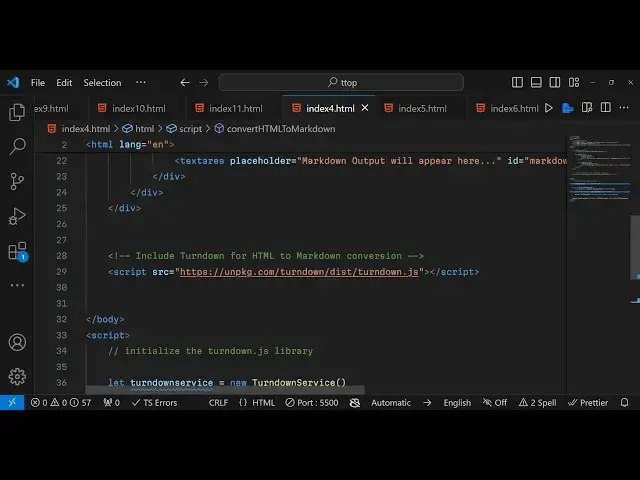
scratch so I just included the CDN of
1:51
bootstrap and this Library turn down JS
1:55
CDN right here a script tag that I
1:57
included
2:02
and now to make this uh
2:04
application we will write the UI we have
2:08
the container class of bootstrap inside
2:10
this you will Define The
2:14
Heading it will simply say that
2:17
HTML to markdown
2:23
converter and then will have the row
2:26
class inside this we will have call md6
2:32
so here you will allow the user to enter
2:35
the
2:36
HTML so the user will enter the HTML in
2:40
the text
2:44
area
2:46
so will basically give it an ID here to
2:49
this element text area which is HTML
2:52
input so here the user we'll also be
2:55
giving a bootstrap class of form control
2:59
and rows will be 10 we will be giving a
3:08
placeholder so we will simply tell the
3:11
user please enter
3:13
HTML code
3:20
here so if you just open this it will
3:23
look something like this you will see
3:25
you will have your text area
3:33
so after this
3:36
uh we will have another section right
3:39
here side by side and then it will have
3:43
call md6 and here it will be showing the
3:46
markdown
3:48
output on the right hand
3:51
section again this will be a text area
3:54
this time this will only be read only
3:56
mode the user can't change the value if
3:59
it can only be
4:03
read and we will basically give an ID to
4:06
this element as well which is
4:09
markdown
4:11
output we'll give it a class here of
4:14
again form
4:21
control give it a placeholder text
4:31
which will be markdown
4:37
output will appear here that's
4:43
it so now we have two sections this
4:46
section and the this
4:56
section so I think we need to give here
5:00
row
5:02
10 so we have now the input text area
5:06
where you will paste your HTML so now we
5:09
need to write the JavaScript code
5:10
required for this
5:14
application so inside the JavaScript we
5:17
first of all need to
5:19
initialize the turn
5:22
down JS library for converting the HTML
5:27
to markdown so first of all we make a
5:30
variable turn down service we need to
5:33
initialize that so we have this
5:36
Constructor of Turn Down
5:41
service initialize the
5:43
Constructor and this
5:47
object
5:50
actually first of all we'll bind
5:53
a listener onclick listener to the
5:56
button we basically
6:00
Target the input element input text area
6:04
we have given an ID to it so you just
6:07
finding a input event handler so when
6:09
you copy paste any text this function
6:12
will execute which is convert
6:16
HTML to
6:19
markdown so this function will actually
6:22
take place convert HTML to markdown
6:30
so let me just put alert statement so
6:32
what will happen if you type anything in
6:34
the text area this uh function will
6:37
automatically trigger so now inside this
6:40
function what we need to
6:43
do we need to take the whatever what the
6:47
user is entering so we need to again
6:50
Target the element by its ID HTML input
6:54
this time we need to get the value so
6:56
you'll simply say dot value so after we
6:58
get the HT
7:00
now we need to convert this into the
7:02
markdown so we can simply create a
7:04
variable markdown
7:06
output and we will use this turn down
7:09
service object and it contains a
7:12
function right here which is turn down
7:16
and here it will take the HTML
7:18
input and then now we can simply show
7:22
the output in the markdown output we
7:25
have given that ID so dot value is equal
7:29
to whatever is the markdown output which
7:31
is coming really simple if you
7:34
see you first of all got the value by
7:38
using dot value by targeting the ID that
7:41
we have given then we are using this
7:43
turn down service it contains a function
7:46
turn down which actually takes the HTML
7:49
and returns our markdown now we are
7:51
showing the output markdown in this by
7:54
using its ID we have given this ID if
7:57
you see to the output text
8:01
here this markdown output we have given
8:04
this ID so we are simply showing this so
8:07
now if you directly paste your HTML let
8:12
me paste this
8:15
HTML so now you can see as you paste the
8:18
HTML this HTML is translated to the
8:22
markdown so in this way you can easily
8:25
turn any HTML to markdown very simply
8:28
now you can simp copy P copy this
8:31
markdown and paste it anywhere else
8:33
let's suppose create a new file sample
8:36
MD and here you can paste it so your
8:40
HTML is successfully converted to
8:42
markdown so in this way you can make
8:44
this uh using this Library which I
8:48
showed you turn down which is a HTML to
8:50
markdown converter library in JavaScript
8:53
thank you very much for watching this
8:54
video and please hit that like button
8:56
subscribe the channel as well and do
8:58
check my webite weite freem mediat
9:00
tools.com for more tools like
9:04
this so I will be seeing you in the next
9:06
one
#Web Services
#Scripting Languages