Up next in 10

Javascript Rainbow Coding Syntax Highlighter Library For Source Code Blogs Full Example in Browser
Jan 9, 2025

Get the full source code of application here:
https://github.com/ccampbell/rainbow
Show More Show Less View Video Transcript
0:00
uh Hello friends welcome to this video
0:02
so in this video we will look at a brand
0:05
new syntax highlighting library inside
0:08
JavaScript which allows you to
0:10
highlight your source code so if you
0:13
basically have a coding block if you
0:16
want to highlight your source code this
0:19
rainbow Library rainbow syntax
0:21
highlighter will be a pretty good
0:24
Library it's very lightweight only 2.5
0:28
kiloby size you will see 2 .5 KB size
0:31
it's very thin library and you can
0:36
customize everything inside this Library
0:38
this is their official website it's a
0:42
free open-source library in JavaScript I
0:45
will show you a complete example right
0:47
here so the GitHub repo is available I
0:52
will give the link in the description
0:53
you can even check out
0:56
so this is the GitHub repo so what we
0:59
can do if in order to get started we can
1:01
copy this link and I will clone this
1:04
repo and show you a simple example so I
1:08
will simply go to the command line and
1:11
get
1:14
clone so I will simply go into
1:19
that so it will basically clone this I
1:22
will CD into this and open this inside
1:26
vs code so this is actually the
1:28
directory structure of this off official
1:30
Rainbow syntax highlighter and you will
1:33
actually see it supports all the
1:35
languages all the major languages coffee
1:38
script C CSS D generic Co hasker HTML
1:42
Java JavaScript Json python PHP Ruby
1:47
shell small talks SQL it also uses the
1:50
prism syntax highlighter prism is also a
1:54
syntax highlighter famous One it also
1:57
uses its
2:01
so the basically all these languages are
2:03
there in the source directory then we
2:06
have the disc here if you want to use
2:08
this rainbow syntax highlighter for
2:11
production you have this min.js file and
2:14
the libraries are all there in the disc
2:18
folder and we have with different themes
2:21
as well so these are the different
2:23
themes each and every theme has a
2:26
separate CSS file right here if you see
2:29
so all these themes are supported and
2:32
now our demos are located in this folder
2:35
if you see if you want to see this one
2:39
HTML code highlighted you will simply
2:41
open this in live server so this will
2:44
open it inside a web server which will
2:46
be hosted by visual studio so now you
2:49
can just basically see we are actually
2:51
highlighting the HTML code right here so
2:55
this is actually the styling it looks
2:58
pretty good you'll see that
3:01
all the source code is highlighted and
3:03
for this we are actually using this
3:06
theme right here if you see we are using
3:08
the Blackboard theme if you go to the
3:11
themes folder CSS we are using this
3:13
Blackboard theme so if I change this to
3:16
Let's suppose GitHub GitHub docss you
3:19
will see it will refresh and now it will
3:21
have some GitHub like theme so you can
3:25
basically use any CSS file here monokai
3:29
if if you change it you will see it will
3:31
change
3:33
it so all these CSS files of theme you
3:39
can use one by one so you can pick your
3:42
favorite theme you can basically in this
3:46
way we have the rainbow one as well
3:48
rainbow.
3:50
CSS so this is looking pretty good if
3:53
you see the
3:54
highlighting part here so here basically
3:59
in this rainbow syntax highlighter if
4:02
you want to highlight a specific
4:03
language you need to give this attribute
4:05
to this code tag so here you can see we
4:07
are highlighting the HTML code so I've
4:10
given this attribute which is data Das
4:13
language in this case we are
4:15
highlighting the HTML code so if you
4:17
want to highlight the JavaScript code
4:19
you will type here JavaScript and then
4:21
you will type your JavaScript code so as
4:24
this is the HTML so we are highlighting
4:26
the HTML
4:28
code and we do need to include all the
4:31
CDN
4:32
for this is actually the base rainbow
4:35
Library syntax highlighter then we
4:37
actually include the language detector
4:41
so in this case we are highlighting HTML
4:43
so we have included the HTML JS file you
4:46
will see that automatically then we
4:49
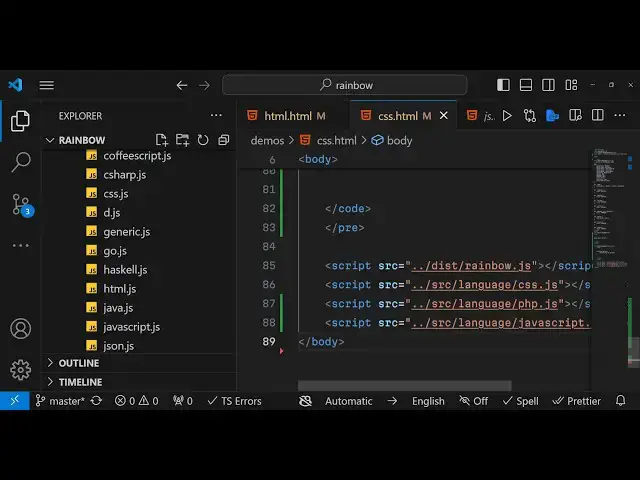
included JavaScript as well PHP as well
4:52
so this is actually located in the
4:55
languages folder so I already told you
4:59
so all these languages are supported by
5:01
this uh rainbow syntax highlighter
5:04
so in this example the CSS example we if
5:09
I show you the highlighting we are
5:11
actually using the you'll see the CSS
5:14
highlighting and for this we have used
5:17
the CSS file the language SL CSS So
5:22
based upon which language you want to
5:24
highlight you need to include the
5:26
language file for that apart from that
5:29
the rainbow Library will be needed for
5:31
all the syntax
5:33
highlighting so whether you are doing
5:35
CSS JavaScript PHP rainbow file will be
5:38
included in all the files but
5:40
specifically if you are highlighting CSS
5:43
you will include the CSS file
5:45
only and then for the themes you will
5:48
pick your favorite theme so you can
5:51
change this theme to anything so now it
5:54
will change to GitHub
5:55
theme so you can open the themes folder
5:59
one by one you can check out all the
6:02
themes and pick your favorite one and
6:04
then include that it's really simple to
6:07
test out the folder structure is quite
6:11
good it basically it's really fast it
6:14
works instantly and it is really
6:16
lightweight 2.5 kilobyte size so it's
6:20
not a lot and the main thing is that if
6:23
you want to attach a specific language
6:25
you need to give this attribute data/
6:28
data- language and Then followed by the
6:30
language that you want to highlight so
6:32
let's suppose in
6:34
this in this very file I need a second
6:39
code tag so what I will do I will open a
6:41
new code tag and this time I need to
6:44
attach a uh let's suppose PHP code so I
6:48
will simply type here PHP and for that I
6:51
need to include the PHP file as well so
6:55
it in many scenarios in a single file
6:58
you need to VI write multiple languages
7:00
so I'm just showing you how to do that
7:02
so you will include your PHP file php.
7:07
JS and then here you will Define your
7:09
PHP code
7:13
so so you will simply say hello
7:19
world so if you see now
7:24
uh you do need
7:26
to just separate this this is a SE
7:29
separate code tag so what you will do
7:31
you will Define it in a different pre-
7:33
tag just open a new pre- tag and paste
7:38
it so now you will see that
7:42
basically it is actually showing
7:50
you I think you don't need this D Stacks
7:54
I think this will be added automatically
7:56
Echo see that
8:03
so in this way you can basically
8:06
highlight multiple language in a single
8:09
file so in this case we are highlighting
8:12
uh PHP CSS as well as well as PHP as
8:16
well so in the similar way if you want
8:19
to highlight more files so let's suppose
8:22
JavaScript as well you will first of all
8:25
add the language here language file
8:27
JavaScript JS and then
8:30
you will make another pre-
8:34
tag this time you will change this
8:36
attribute to
8:38
JavaScript because we want to highlight
8:40
JavaScript code and here you will
8:43
change Define a
8:48
function so I will just write some
8:50
JavaScript
8:52
code so you can see we have defined a
8:54
function
8:58
uh data
9:14
language I think it is located in the
9:17
languages folder
9:21
uh okay I think this is called
9:23
JavaScript
9:28
Js so you you have uh different files
9:32
for different languages and uh you do
9:36
need to give this class as well which is
9:39
language JS if you want to particularly
9:41
highlight a particular language you do
9:44
need to give this class as
9:46
well so just give it a class
9:53
here I think this is
9:59
given to the code
10:09
tag so you will basically see uh we are
10:12
now highlighting the JavaScript code so
10:15
basically we have included monai theme
10:18
right here and language Js
10:29
so this data language tag is attached to
10:31
the pre- tag I just want making making a
10:35
mistake right here this needs to attach
10:37
to the pre- tag not the code tag so here
10:40
you need to attach
10:42
it I think that was the mistake that I
10:45
was doing uh not to the code tag to the
10:47
pre- tag just data language so now it
10:51
will be
10:52
JavaScript so what you will now see
10:59
so this is your PHP code this is your
11:01
JavaScript
11:11
code so in this
11:14
way you can use this rainbow syntax
11:18
highlighter guys this was
11:20
the syntax highlighter it highlights
11:23
almost all the languages and uh the size
11:27
is pretty low 2 .5 kilobyte
11:32
and you can use it in the in your
11:35
programming
11:36
blocks so thank you very much for
11:40
watching this video If you like this
11:41
video please hit that like button
11:43
subscribe the channel and do check out
11:45
my website guys free mediat tools.com so
11:48
here it contains thousands of free tools
11:51
related to audio image and video so I
11:55
basically upload on a daily basis so reg
11:58
regular so do check out this website as
12:01
well so I will be seeing you in the next
12:03
one
#Open Source