live_tv
Livestream Starting Soon
00
Hours
:
00
Minutes
:
00
Seconds
Up next in 10

Javascript PDF-LIB Tutorial to Convert Raw Text to PDF Document in Browser Web App
Jan 9, 2025

Get the full source code of application here:
https://gist.github.com/gauti123456/212a483481edc2bc36c6be60891af37c
Show More Show Less View Video Transcript
0:00
uh Hello friends welcome to this video
0:02
so in this video we'll be looking at how
0:04
to actually make a application which
0:07
converts raw text into PDF document with
0:12
the real
0:13
formatting and uh it can split into
0:16
multiple Pages as well so we will be
0:18
using PDF lib Library which is an
0:21
open-source JavaScript PDF generation
0:24
Library so this is actually the
0:26
interface which we have developed inside
0:28
bootstrap we have it text area where we
0:31
are allowing the user to Simply copy
0:33
paste the raw text and the user will
0:37
paste the text like this and then we
0:41
have this download PDF button so once
0:43
they click the button a PDF file will
0:45
get generated automatically from this
0:49
text and the raw text will be
0:52
successfully converted to PDF document
0:54
you can just see the formatting of the
0:56
text out there you can control
0:59
everything in the code you can set the
1:02
phone size everything you will see that
1:04
we are setting the phone size margin
1:06
text width everything you can control
1:09
the font as well so it comes with these
1:13
settings so you just need to set it in
1:16
the code and then it will automatically
1:18
so if
1:23
you if you have a lot of text I'm just
1:27
copy pasting the random paragraphs just
1:30
to show you it can split into multiple
1:33
Pages as well the text is larger so now
1:37
you can see
2:00
so this actually
2:03
can can have multiple paragraphs as well
2:06
so if you have multiple paragraphs you
2:08
just need to paste it one more time
2:17
and so all the source code will be given
2:19
in the description
2:31
so you can paste as much text as you
2:43
want so you can see that you can paste
2:46
as much text as you want
3:04
so now to get started uh we have this uh
3:08
index.html file here so we have included
3:11
the CDM of PDF
3:13
lip so if you want the CDN of PDF
3:18
lip this is actually the we uh library
3:22
that we using here PDF
3:24
lib j.org this is open source uh
3:29
JavaScript library it can even be used
3:33
in nodejs but we are using it in the
3:35
browser using JavaScript so for that we
3:37
are included the CDN we using this
3:42
1.17.1
3:47
version and also we have using
3:52
bootstrap so let me just delete
3:55
everything start and start from scratch
4:05
so now to get started uh we will inside
4:08
the body we will have the container
4:11
class of
4:14
bootstrap and inside this we will have
4:17
the card MX Auto padding four and a
4:21
shadow class all these
4:24
are bootstrap classes will be giving a
4:27
Max width
4:32
of 600
4:35
pixel uh so inside this we will have a
4:38
heading which will have text Center font
4:43
size three font weight bolt margin
4:46
bottom four and we'll simply say text to
4:50
PDF
4:57
converter so if you open this
5:00
application it will look something like
5:03
this and then we will have a div tag
5:06
which will have margin bottom
5:09
three and inside this we will allow the
5:12
user
5:13
to
5:15
submit the text in the text area you'll
5:19
simply say enter your text
5:31
we will have this text area
5:34
and we will give it an ID here so that
5:37
we can Target in JavaScript which is
5:39
text input we giving a class here which
5:43
is form
5:44
control and
5:47
uh we will give the row which is
5:54
eight I will give it in placeholder that
5:57
is
6:00
type your text
6:05
here so it will look something like this
6:07
so here the user will type their
6:10
text after that we will have the
6:19
button we'll give it an ID here to it
6:23
download button you give it a bootstrap
6:26
class of BTN BTN primary
6:35
and it will
6:40
actually say to the user simply download
6:54
PDF so after that
7:08
we will actually write the JavaScript
7:11
code so for that we will be including a
7:13
separate file which is
7:15
script.js so here we'll be writing the
7:17
JavaScript code so we'll be attaching
7:21
the references in the Dom elements so
7:23
first of all to the text area which we
7:25
have given an ID text input and now the
7:28
download button
7:32
we given this ID which is download
7:35
button so now we will b a event handler
7:40
so when we click this button this call
7:43
back function will execute and we will
7:46
first of all extract the text which is
7:49
entered inside uh
7:51
the text area by
7:54
this after we get this text we can
7:57
actually create a
8:00
new PDF document for creating a new PDF
8:04
document we can use these two methods an
8:10
extracted PDF document and standard
8:15
phones and RGB and this will all be
8:18
coming from PDF lip library and now to
8:23
initialize a new PDF talk we can make
8:26
this function async because we will be
8:28
using a keyword right here and this PDF
8:32
document contains a function which is
8:34
create to actually create a new PDF
8:36
document Now to create a new page inside
8:39
that this object PDF doc contains a
8:42
function which is ADD page to actually
8:45
add a new page in the PDF document so
8:48
here you need to provide the width of
8:51
the page so I will provide here
8:54
595
8:55
28 and comma this is the height of the
8:58
page 84
9:00
1.89 so you can control this accordingly
9:03
whichever width and height you want to
9:06
do so this is in millimeter uh the size
9:10
so A4 size is of the PDF document we are
9:14
providing
9:16
it and then similarly we will
9:19
be extracting the width and the
9:23
height this contains a function which is
9:25
get size so this will actually return to
9:28
us the width and the height of the page
9:30
now we can set all these options which
9:32
is forone size we can set it to 12 and
9:36
the margin of the page I will set it to
9:38
40 and the text width of the page you
9:41
can calculate this using this formula
9:44
which is width minus margin multiplied
9:47
by two so all this thing you can control
9:50
it right here and now we can load the
9:54
font that we want to use so this
9:57
contains a function which is embed font
10:01
and here you can provide the standard
10:04
fonts which is builted inside the PDF
10:08
lib Library we will be using the
10:10
standard fonts which is
10:12
helvetica and now we need to split the
10:15
lines for that we will be making a
10:17
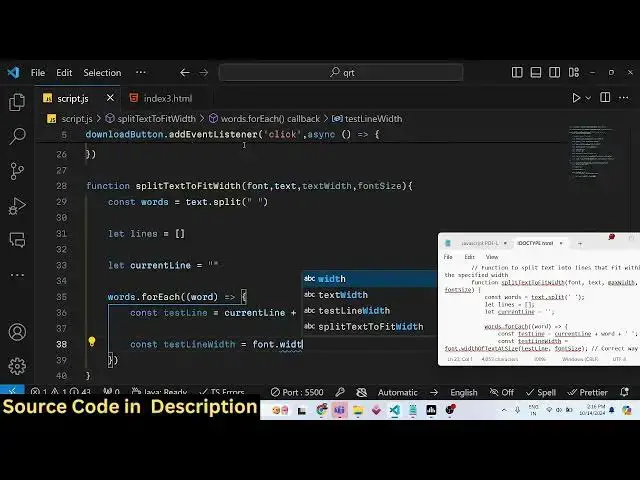
function for this split the text to fit
10:22
in the
10:24
page making this function we will
10:26
provide the font and the text as
10:31
argument also the text width and the
10:35
phone size as four argument so now we
10:38
need to make this function which is
10:40
split text to fit phone text text
10:45
fit phone size all this will be passed
10:49
as arguments so inside this function
10:53
basically here we need to write the
10:55
logic to fit the text inside the PDF so
10:59
you'll be using the split function
11:02
of JavaScript you split this by using
11:07
space and then we will create a
11:11
lines array which will be empty by
11:14
default and we will be
11:17
processing using a current line variable
11:20
which will be empty and here we will be
11:24
using the for each
11:26
loop on that word array
11:32
so here we will
11:35
be creating a test line variable and
11:39
current line we will concatenate the
11:45
word like
11:48
this and then we will be calculating the
11:51
text line
11:53
width and font and it contains a
11:56
function which is width of
11:59
text at
12:02
size this is actually the function which
12:04
is contained it calculates the width of
12:07
the
12:09
text and it containes two options the
12:12
test line and the phone
12:15
size so it's a correct way to measure
12:19
the size of the
12:22
text and here you will have if condition
12:25
that if the test line width is greater
12:28
than the Max width
12:38
variable uh I think we set max width
12:42
here this needs to be Max
12:45
width so here we are passing this Max
12:48
width the text width right here we are
12:51
just comparing if this test line WID is
12:53
greater than Max width in that
12:56
case we need to push
13:00
the word to the line array so you'll be
13:03
pushing that line current
13:06
line so current line is equal to word
13:12
plus so if you don't understand this
13:14
logic guys just copy this code because
13:16
this is required to if you want to fit
13:18
the test inside the PDF
13:22
document so this is just a
13:26
logic to convert the text into the PDF
13:29
document with formatting so it is doing
13:32
the formatting for us in PDF lip so when
13:36
you directly submit the text it converts
13:38
the text into the PDF document so this
13:41
is actually the function split text to
13:43
fit so after that we will get all this
13:48
in the
13:53
lines so now we can
13:56
simply calculate the Y coordinate which
14:00
is height minus
14:03
margin and then we will simply use the
14:07
for each loop on the line
14:09
array so how many lines are there for
14:11
each line we will compare that if the y
14:15
coordinate is smaller than the margin in
14:17
that case we will
14:19
set we will add a new page because this
14:23
simply means that if the text is larger
14:26
then we need more pages to fit than
14:29
we'll be using add page once again and
14:31
we adding a new page once again with the
14:34
same
14:35
height in millimeter
14:37
59528 and
14:39
841 89 so we have set this same here you
14:43
can see we have used the same values you
14:46
can change at
14:49
well so then we calculate the Y index
14:53
height minus margin once again the same
14:58
formula so after that we use the draw
15:01
text method to actually add the text add
15:05
the
15:06
line and x coordinate here will be the
15:10
actual margin and the y coordinate here
15:13
will
15:14
be we are passing y
15:18
coordinate simply like this Y and the
15:21
size of the text will be phone
15:25
size and uh we are passing the font here
15:28
which we are using and the color here
15:31
will be RGB 00 0 0 which is a black
15:45
color and then we will simply say y
15:49
coordinate minus is equal to phone size
15:53
+ 5
16:06
so that's all so after that we just need
16:08
to serialize the PDF document for that
16:11
we will simply say await again and PDF
16:16
doc now to save the PDF document we
16:19
using the save function and now to
16:22
download the PDF document we need to
16:24
convert that into a blob so for that
16:26
we'll be creating a new blob Constructor
16:29
and passing these PDF bytes and then the
16:32
type here will
16:34
be application PDF the M type of PDF
16:40
file after that we can actually download
16:43
the PDF document using anchor element by
16:46
creating a new Dynamic anchor
16:49
element and then link. HF we can simply
16:54
URL create object URL passing the blob
16:58
just converting The Blob into a URL
17:01
link. download result. PDF file name and
17:05
then just clicking it dynamically link
17:07
do
17:09
click so that's all this completes the
17:12
application so if I refresh it submit
17:15
any text click on download PDF you will
17:18
see that it will convert the raw
17:21
text you can take any paragraph any long
17:26
paragraph So you'll see that
17:31
so if I change the font size let me in
17:35
the code right here if I change the
17:38
phone size to the
17:52
40 so it is script.js you will see it
18:08
can reset this to I think 12 12 is a
18:11
legal value I think you can't
18:14
change too much of this phone
18:17
size so you can see that so in this way
18:20
you can do this you can make a text to
18:24
PDF converter in PDF lib library and all
18:27
the source code is in the description
18:29
also do check out free mediat tools.com
18:31
which contains a lot more free tools out
18:36
there so please hit that like button
18:39
subscribe the channel and I will be
18:41
seeing you in the next one
#Online Media
#Open Source