Up next in 10

Javascript Mermaid.js Example to Draw Flowcharts & Sequence Diagrams in Browser Using HTML5
Jan 9, 2025

Buy the full source code of application here:
Show More Show Less View Video Transcript
0:00
uh hello guys welcome to this video so
0:02
in this video I will show you a new
0:04
library inside JavaScript which is
0:06
called as merate which is a diagram and
0:09
sequence charts library for if you want
0:12
to actually draw some diagrams
0:15
sequence charts inside your application
0:19
let me show
0:20
you so sometimes in algorithms sometimes
0:24
to explain something to the user we do
0:26
need to actually draw these diagrams
0:28
such as when the start process so we
0:32
have different shapes out there inside
0:34
this pack Library we have rectangles we
0:36
have triangles we have these nice little
0:39
arrows which actually act signifies uh
0:43
lot of information to the user through
0:46
diagram sequels diagrams charts so I
0:49
will actually show you how to implement
0:51
this in a very simple example in browser
0:53
using HTML and JavaScript so this
0:56
Library Works in both in the browser you
0:59
can even use it in nodejs as well this
1:01
is their official website
1:08
mermaid.jpg
1:15
using this
1:17
Library I will just show you the very
1:20
basic example so let me just show you
1:23
from scratch so just actually make a
1:26
simple index HTML file and just change
1:29
the type title mermaid JS
1:33
example so right inside this the main
1:37
thing about this it uses markdown
1:39
markdown if you know guys it's a
1:42
language it's a syntax which will
1:46
actually it's very similar to Simple
1:49
Text but markdown files are written for
1:52
actually writing documentation
1:53
everything so it uses markdown to
1:56
actually draw these diagrams which is
1:58
really easy
2:00
let me show you first of all you do need
2:02
to include the CDN of mermaid so just
2:07
the configuration is really
2:09
important just right here in the script
2:12
tag you can simply say
2:14
script it will be a es module so that's
2:17
why we need to add this type parameter
2:19
type is equal to
2:21
module and right now we can now use the
2:25
import statement import mermaid
2:30
from and here this is actually the CDN
2:33
from which we are fetching this Library
2:35
CDN do
2:37
jsd deliver.
2:40
net and then npm SL
2:45
mermaid and this is actually the version
2:48
we are using the latest version 10th
2:49
version disc mermaid
2:53
esm min.
2:55
MJS so you are fetching this mermaid
2:58
package now to initialize it it's very
3:00
simple mermaid do initialize this is a
3:04
initialize function so here it takes a
3:08
simple property right which is start on
3:14
onload we need to set it to true that's
3:17
all these are the two lines of
3:19
configuration code we need to add this
3:21
Ty module import mate from this
3:25
package this is a CDN link and then we
3:27
need to initialize it past this prop
3:29
property start on law to true that's all
3:33
so after you do this now you can use
3:35
this actual Library you can just give it
3:38
an H1 heading mermaid JS
3:42
example and now you'll be simply be
3:45
writing some diagrams you writing some
3:47
flowcharts sequence diagrams and charts
3:50
so this is a very simple
3:52
flowchart and we do need to actually
3:55
give it a mermaid class which is a
3:56
built-in class if you want to make a
3:58
flowchart diagram you do need to
4:00
actually bind this mermaid class to a
4:03
Dom element so right this is actually
4:06
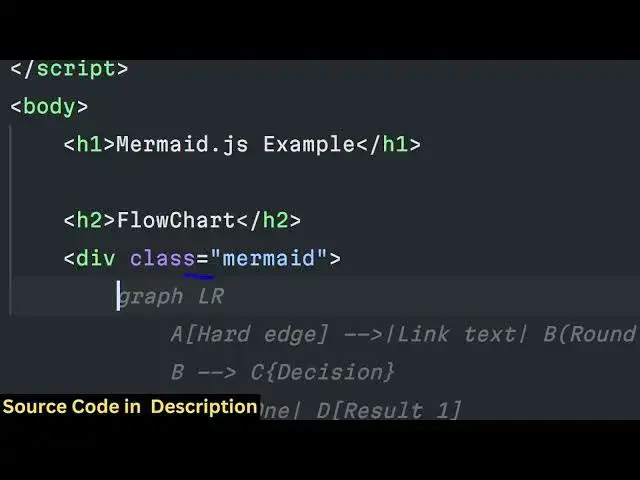
the syntax
4:07
graph
4:10
TD and here this is just this is actual
4:14
syntax a start B is it is it a bug so
4:19
these are different two notes out there
4:21
if you open this this is you can see
4:24
this is actually a start
4:28
node and this
4:31
is if you see uh these are square
4:34
brackets square brackets that you see
4:37
right here these are square brackets
4:38
these are curly brackets so curly
4:40
brackets are used for triangles and
4:43
square brackets are used for
4:45
rectangles if I also change this to
4:47
curly bracket as well it also changes to
4:50
triangle if I show you you can see
4:54
that square shape
4:57
so it totally depends upon the syntax
5:00
how you are doing it so you just need to
5:02
learn the
5:04
syntax it's very
5:09
easy uh so this is actually the thing
5:11
and then we have some condition on as
5:13
well so if you want to have some
5:16
condition you have these
5:19
arrows you need to move from B to C so
5:23
we can simply say from B to C we need to
5:26
make a decision so for decision we will
5:28
put the bracket this is for drawing the
5:33
rectangle so now you can see
5:36
it so once again in from C we do need to
5:41
make a decision so we'll have two
5:44
choices here for choice for multiple
5:47
choices we need to put this syntax
5:52
yes if you select yes in that sense you
5:56
will move to the outcome one which is
5:59
like
6:01
this just change it to a rectangle
6:05
square bracket similarly if you choose
6:08
the outcome
6:10
two if you choose
6:13
no then you will move to the E outcome
6:17
which will be a another outcome let me
6:21
make it as outcome to you can just
6:24
change the choices accordingly according
6:27
to your
6:28
diagram so so if you see now we have two
6:32
choices either we can move in the
6:34
outcome One Direction or we can choose
6:36
no if I choose yes then this will happen
6:39
if I choose no this will
6:42
happen in the end both these d and e
6:46
will redirect you to the
6:48
F which will be the
6:54
end e will also move to f
7:02
you can see so you can see how beautiful
7:04
the diagram flowchart looks like it
7:06
moves from start it basically moves to
7:09
this then we have to make a
7:11
decision we can choose two choices yes
7:14
or no you can even have three choices as
7:17
well if I basically
7:21
say if I once again copy for the third
7:23
time and now if I write here G outcome
7:28
three
7:29
so now I have three choices you'll see
7:32
that so the complexity depends upon you
7:36
once you learn the syntax it becomes
7:38
really easy to actually make these nice
7:40
little flowchart diagrams uh so it's
7:43
really used in data science you using
7:46
data algorithms in computers if you want
7:49
to make a flowchart diagrams if you want
7:51
to explain something so it's really used
7:54
in data structures so it's if you need
7:57
this it's a great package mermaid JS and
8:03
uh you can just see here G also
8:09
redirect
8:12
F you can even redirect G2 let's
8:16
suppose if you want to redirect the G to
8:21
a now you can see that so now G is
8:24
redirecting back to a you can see that
8:27
how this flowchart is happening so so
8:30
this totally depends upon you you can
8:32
make complex flowchart diagrams so this
8:35
is actually the syntax it uses mark down
8:38
so curly bracket is used for triangle
8:41
which is used for conditioning and the
8:44
square brackets are used for drawing
8:46
rectangles so these are different once
8:49
you actually make yourself the diagrams
8:52
you will get practice and you will be
8:54
able to similarly we have the sequence
8:57
diagrams as well the second category of
9:01
diagrams which it this supports so we
9:04
have also the sequence diagram as
9:09
well you can also have just give it a
9:13
class marbit and you have the sequence
9:19
diagram so you can have people speaking
9:22
to one another so we have let's suppose
9:24
John speaking
9:26
to
9:27
Kane you can say say hello
9:31
Kane how are you so now Kan will
9:35
response to
9:38
John hi I am nice if you see that now we
9:43
have this John is speaking to K hello
9:45
Kan how are you so Kane is saying I'm
9:53
nice so sorry this needs to be double
9:58
bracket so now you see this
10:01
uh nice little arrows you can see this
10:05
one this
10:07
one
10:09
so you can see that guys the power of
10:12
this
10:14
Library it is really easy to make these
10:17
flowchart
10:22
diagrams
10:23
so it's very nice to hear you can see
10:28
that
10:31
so you have seen these diagrams in
10:35
algorithms so in this way you can
10:38
construct them in very easily using
10:40
JavaScript right in the browser itself
10:42
no need to have a special software to
10:44
actually construct it so mmid actually
10:47
allows you to do this and you can
10:50
actually take the screenshot and in the
10:53
browser of these diagrams once you
10:55
create
10:56
them so please hit that like button guys
10:59
subscribe the channel as well and I will
11:01
be seeing you in the next video
#Software
#Multimedia Software
#Clip Art & Animated GIFs
#Scripting Languages