live_tv
Livestream Starting Soon
00
Hours
:
00
Minutes
:
00
Seconds
Up next in 10

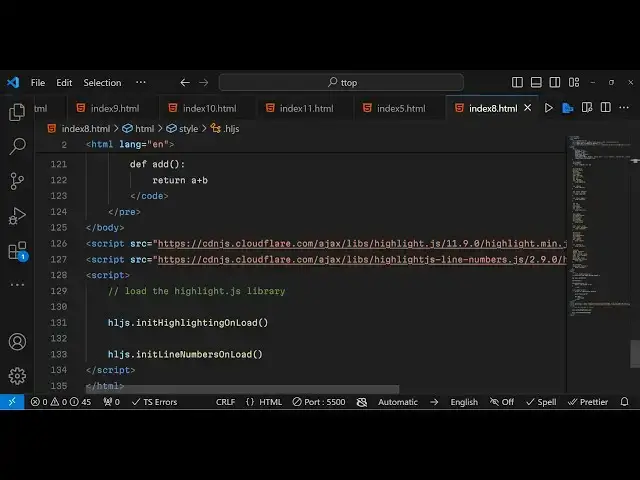
Javascript Highlight.js Syntax Highlighter Example to Highlight Source Code in Browser Full Example
Jan 9, 2025

Get the full source code of application here:
https://gist.github.com/gauti123456/90c59a6ab2c92b1f83ca914454fb1adc
Show More Show Less View Video Transcript
0:00
uh Hello friends welcome to this video
0:02
so in this video I will show you another
0:04
uh popular syntax highlighting library
0:08
in
0:08
JavaScript you can use it right in the
0:11
browser itself to highlight any section
0:13
of source code that you are writing
0:16
let's suppose you own a Blog and you own
0:19
basically write a article which involves
0:22
some kind of coding snippet that you
0:23
want to highlight then you can use
0:25
highlight JS which is essentially a
0:28
open-source syntax highlighting library
0:30
in JavaScript you can have syntax
0:33
highlighting for all the languages so
0:35
I'm just highlighting this JavaScript
0:37
code right here you will see that with
0:39
different colors and also it has line
0:41
numbers plugin as well I will show you
0:43
how to integrate this inside browser how
0:46
to show line numbers as well so the
0:49
library that I'm talking about is
0:51
highlight JS which is a very popular
0:54
syntax highlighting
0:57
JavaScript library it also supports
1:00
nodejs as well but in this example we
1:02
will be looking at how to integrate them
1:05
inside the browser it has various themes
1:09
you will see it supports 192 languages
1:11
out of the box and 498 themes it also
1:14
has plugins automatics language
1:17
detections it can work with any HTML
1:19
walk Markham and it zero dependencies
1:22
and it's compatible with any JavaScript
1:25
framework and also it supports nodejs
1:27
and doo so so you can load them directly
1:32
using acdm they have great documentation
1:36
on their website either you can use the
1:39
Snippets of code in order to you'll see
1:42
everything is there now let me show you
1:45
how to get started right here
1:49
so I will delete everything and start
1:52
from scratch so here you need to simple
1:54
index.html file and just change the
1:57
title of the file highlight
2:01
example all the source code will be
2:03
given in the description so highlight
2:06
example in
2:07
browser
2:11
so first of all as we need to get the
2:15
CSS file so I will simply copy it from
2:18
the documentation website after the
2:21
ittle paste it the CSS CDL similarly we
2:24
need the JavaScript CDN as well so
2:27
simply copy that also after the body
2:29
paste it so now we can easily use the
2:33
Highlight JS library in order to
2:36
highlight section of code so here we
2:40
will
2:53
also uh just
2:56
wait to copy this somewhere else so that
2:59
I can explain
3:00
you when I write the code here
3:03
so after you copy pasted the CDM inside
3:07
the body we will have a pre-
3:10
tag so pre- tag is useful if you want to
3:13
highlight a certain section of source
3:15
code so this this tag is useful and
3:18
inside this we will have the code tag so
3:21
here you'll be defining a class so
3:25
highlight JS offers various classes if
3:27
you want to highlight various languages
3:31
so one such class is Javascript if so
3:34
now you'll be writing here JavaScript
3:35
code so we'll have a simple comment
3:39
which is Javascript
3:41
code
3:43
highlighting
3:46
example so we have this comment here
3:48
that we are
3:49
defining so here we'll be defining some
3:53
code we will Define some variables so
3:56
you're just writing it manually you'll
3:58
see that
4:07
you will Define a simple if condition
4:09
right here if switch
4:12
State triple equal to
4:17
1 then text value will be the switch is
4:21
on so we have just defined these five
4:24
lines of JavaScript code now if I want
4:26
to highlight that if I just see it in
4:29
the browser browser right here so it
4:31
will look something like this now the
4:33
code is not highlighting it is just
4:35
showing it as a normal code so now to
4:38
highlight this we need to write a simple
4:41
line of
4:42
code after we included the CDM for the
4:46
JavaScript so now we in order to high uh
4:50
just load the
4:53
Highlight JS Library we need to write a
4:57
simple line of code which is HL
5:00
JS which stands for highlight JS and it
5:03
contains a function which is
5:06
init
5:09
highlight highlighting on load so just
5:13
make sure that you write like this the
5:16
spelling this contains this function in
5:19
it highlighting on load if you do this
5:22
now it will have the default styling if
5:26
you see which for the JavaScript code
5:29
right here here so the comment is
5:32
highlighted if you see right here and
5:34
then we have the actual code that is
5:37
there so this is
5:40
automatic default styling which comes
5:43
with highlight JS you can see we haven't
5:45
uses this we have just included the
5:48
default CSS and that's all so all this
5:52
default styling is coming using
5:54
highlight JS this is more than looking
5:56
good but if you do need to customize
5:58
this with a custom theme you can provide
6:02
options as well so one plugin that I
6:05
want to show you if you want to add line
6:08
numbers right here inside your code so
6:12
there is a plugin out there that you
6:13
want to include
6:15
it so this plug-in is a custom plugin
6:19
this is not part of highlight JS just
6:22
after you initialize the script tag of
6:24
highlight J simply paste the Highlight
6:28
line numbers plugin so after you paste
6:31
it you can initialize that plugin which
6:33
is
6:34
hjs and it contains this function
6:38
init line
6:41
numbers on load this is the function if
6:46
you initialize this now you will also
6:48
see your line numbers as well appearing
6:51
on the left hand side you'll see
6:53
that so now this is looking
6:56
good and this this is not the part of
7:00
the Base Library this is a custom
7:03
plug-in that I included it so you will
7:06
get the source code in the description
7:09
so after you do
7:13
this if you want to Let's suppose this
7:16
is a JavaScript code if you want to
7:18
highlight another code you will simply
7:20
Define another code block this time I
7:23
need to highlight the python code so I
7:25
will change the class from JavaScript to
7:27
Python and then the inom comments you
7:30
write comments in Python like this so
7:33
you say this
7:34
is simple Python
7:37
program so here you define the Python
7:40
program a print
7:45
statement then we Define a
7:56
function so this is actually the python
7:58
code and if you see now now this was the
8:02
JavaScript and this was now the python
8:05
code you can just see the slight
8:06
difference in the highlighting of
8:08
JavaScript slight difference in the
8:12
colors if you do visit highlight JS they
8:15
have various themes for various
8:17
languages you can just check their
8:19
documentation it's a pretty vast
8:22
Library so they do have plugins API as
8:26
well if you want to just develop plugins
8:29
using their Base Library you can even do
8:31
that as
8:34
well
8:38
so you can see you can have all these
8:42
CDM now if you want
8:44
to customize the behavior of the CSS
8:47
that you are seeing right here if you
8:49
want to change the background color of
8:50
this
8:52
now I just uh made this custom
8:56
CSS covering each property of highight
8:59
GS so what I have given this the source
9:03
code so what you will do you will simply
9:06
paste it after the head section just
9:09
paste it so it actually covers each and
9:11
every minute detail of highlight JS
9:14
property so if you just apply this you
9:16
will see the slide
9:19
difference so it
9:21
actually covers each and everything you
9:24
can see we are controlling the comment
9:26
here color here of the comment it's in
9:29
red red color you can change this by
9:31
changing this customize this so let's
9:34
suppose I want to change it to the green
9:36
color so now you can see all your
9:38
comments will be highlighted by by the
9:40
green color so this is a simple
9:43
stylesheet that I developed guys the
9:45
link is given in the description if you
9:47
want to get the full source code so you
9:50
just need to uh make the stylesheet once
9:53
and then you can customize this
9:55
accordingly
10:10
if you want don't have don't want extra
10:14
space then you can adjust the spacing
10:15
from
10:25
here so just to adjust some spacing
10:28
horizontal Al and vertically so you can
10:31
even adjust uh the background color so
10:35
we have this background here selected if
10:37
you want a different background you can
10:39
select a different background color so
10:42
now it will change so accordingly you
10:44
can select whichever background color
10:47
that you
10:55
want so this is the actual color of the
10:57
text you can even change this also if
11:00
you want to change it to black color you
11:01
will see
11:03
that so each and everything you can
11:10
customize so in this way you can
11:12
highlight any programming language and
11:16
with custom CSS using highlight JS with
11:20
line numbers plugin as well so all the
11:24
source code I have given in the
11:25
description of this video and do check
11:28
my website as well guys free mediat
11:30
tools.com which contains thousands of
11:32
free tools related to audio video and
11:35
image and please hit that like button
11:37
subscribe the channel as well and I will
11:39
be seeing you in the next one
#Scripting Languages