Up next in 10

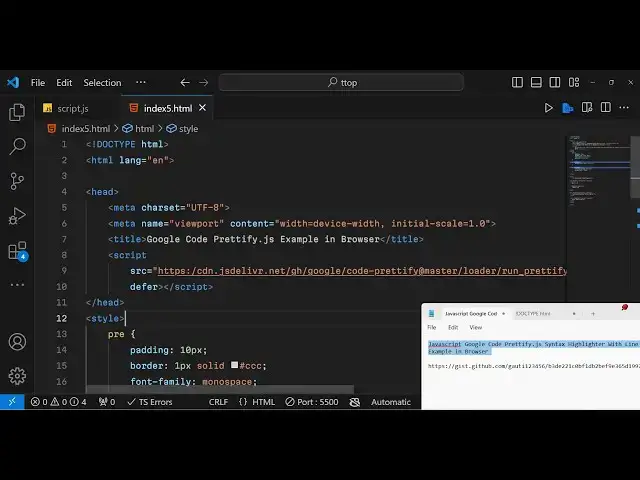
Javascript Google Code Prettify.js Syntax Highlighter With Line Numbers Example in Browser
Jan 9, 2025

Get the full source code of application here:
https://gist.github.com/gauti123456/b3de221c0bf1db2bef9e365d19975f89
Show More Show Less View Video Transcript
0:00
uh Hello friends welcome to this video
0:02
so in this video I will actually show
0:04
you another uh syntax
0:08
highlighter which can be used to
0:10
highlight source code inside uh web
0:13
pages in the browser so it is basically
0:16
brought to you by Google Google has
0:19
developed this code editor code syntax
0:22
highlighter it is actually called as
0:24
Google code prettyy it is also called as
0:28
pretty. Js and this is their GitHub
0:31
repo and
0:34
uh this is actually JavaScript code
0:37
prettifier and it works on HTML Pages we
0:40
can directly use it by direct CDN right
0:43
here so I have
0:46
just just shown this actually is an
0:49
example
0:50
here and if I open this in the
0:54
browser it can highlight multiple
0:56
languages so we are highlighting
0:58
JavaScript we are highlighting PHP and
1:01
we are highlighting C and it contains
1:04
line numbers as well if you see on the
1:06
left hand side we do have these line
1:10
numbers and it has various themes as
1:13
well so you can have you can see I'm
1:17
using the Dark
1:18
theme so if you go to their website it
1:21
do have various themes this is actually
1:24
default theme this is a desert theme
1:26
that I'm using uh Sunburst these are
1:30
some of the themes that it has so you
1:32
can pretty much if you want to have the
1:36
default theme so I will simply change
1:38
this in the
1:39
code so it works entirely in the client
1:42
site it is very lightweight if you now
1:45
open this this is actually the
1:47
lightweight theme that you are seeing it
1:50
has white
1:52
background and uh whichever theme that
1:55
you you like you can actually use this
1:58
so all these themes are there so one
2:01
such theme is doxy d o x
2:04
y so basically using this theme font is
2:08
little bit changed I personally don't
2:12
like this theme because of the font but
2:16
uh you can like according to your theme
2:19
so we have this themes as well Sun
2:23
Burst so here you just need to change
2:26
this value skin value and replace it
2:30
you can try out all the themes one by
2:33
one and depending this also looks good
2:36
with having the black background
2:38
color this also highlights pretty much
2:43
good so in this way uh I have given all
2:46
the source code in the description so
2:49
now to get started I will start from
2:52
scratch so first of all just make a
2:54
index.html file and right here we will
2:57
simply say Google code
3:00
code prettify JS
3:04
example in
3:06
browser so now we do need to include the
3:10
CDN that I already told
3:14
you so this CDN will be coming from
3:18
https
3:20
cdnjs
3:22
deliver. net uh GH Google SLC Cod d
3:27
prettyy
3:31
and at theate Master this is a full
3:33
address I'm I'm typing so that you can
3:37
see Slash run underscore
3:42
prettyy DJs and then question mark and
3:45
here you provide some parameters to this
3:48
Library we need to autoload this Library
3:51
so I will put out autoload to be true
3:54
and then we have the next property which
3:56
is skin property skin rep represents
3:59
which theme that you want to use so I
4:01
want to use the desert theme so I will
4:03
provide here desert and then the
4:05
languages that you want to highlight so
4:08
there is a language attribute that you
4:10
need to pass so you can highlight
4:12
multiple languages so let's suppose I
4:14
want to highlight the PHP language comma
4:17
and CSS language comma JS so I'm just
4:21
highlighting these three languages and
4:24
we need to load this so we can write
4:26
here defer so this script tag will be
4:29
loaded in the
4:31
browser so now in order to highlight
4:34
your code you will simply write the code
4:38
manually that you want to
4:41
highlight in the pre- tag so now we will
4:46
have the pre- tag right here and we will
4:47
be giving this
4:49
class which is pretty print this is
4:53
actually the CL class that you want to
4:55
give to whichever section that you want
4:57
to highlight this is actual class pretty
5:00
print you give this
5:02
class and here inside this you will
5:04
write your code so I'm just writing
5:07
first of all showing you the JavaScript
5:10
code so this language will automatically
5:12
be detected you don't need to pass any
5:16
specific JavaScript class right here the
5:19
language as you type the code will
5:20
automatically be detected by the library
5:23
so we'll Define a simple function
5:26
JavaScript function sum
5:32
so we return A+ P so now if you refresh
5:37
your
5:39
browser so you will basically see guys
5:42
now the JavaScript code is being
5:46
highlighted so desert theme is being
5:49
loaded and you will see the default
5:52
styling doesn't look good it doesn't
5:55
have padding so if you want to now
5:57
customize this it's very simple simple
6:00
we can write custom CSS right here we
6:03
can Target
6:04
the preag right here in the CSS and we
6:09
can basically provide some padding we
6:11
can provide a padding of 10 pixel so if
6:14
you just make this change you will now
6:15
see some
6:16
spacing you can even provide a border as
6:19
well one pixel
6:22
solid and you need to overwrite the rule
6:25
so you will need to write important
6:27
right here just to overwrite this so you
6:29
actually
6:30
see bordering as well if you want to
6:34
change the background
6:38
color you again need to put important
6:41
right here to override the rules so now
6:43
the background will change if you see
6:46
you can pick a dark background
6:50
color so you will see that so you can
6:53
pick
6:55
any color of your
6:57
choice this brownish color you will now
7:00
see so in this way you can change all
7:03
these properties by just putting this
7:05
important right here so it will change
7:07
these proper I don't want to change the
7:09
background color so I will just reset to
7:11
the default color and we can even change
7:15
the font family as well so
7:18
monospace or you can even use a custom
7:21
font as well and then just write
7:23
important right here to override it and
7:26
then the position will be relative
7:31
and if you do want to add line numbers
7:34
uh this pretty 5js has a redate class
7:38
here for line numbers you will just
7:40
write here line numbers this is actual
7:42
class so if you refresh
7:45
basically after every five lines it
7:48
shows the line number so in order to
7:50
rectify this we need to add some styling
7:54
so we need to Target
7:56
this line nums class and we need to give
8:00
margin from the left position 40
8:04
pixel and we need to import
8:12
it just make sure that you put important
8:15
right here it will just give some margin
8:19
from the left
8:20
position and then we need to write this
8:25
style we need to give margin from the
8:27
left position minus 55 pixel list Ty
8:31
type decimal so you will now see you
8:34
will see your line numbers appearing on
8:36
each line like
8:51
this so you can add adjust the spacing
8:55
like
8:58
this if you you don't want this extra
9:00
space you can just adjust the spacing
9:02
like
9:11
this so it totally depends upon you how
9:14
much space that you
9:16
give inside your pre-t
9:30
so this looks perfect you will see that
9:32
so in this way you can highlight the
9:35
JavaScript code and similarly if you
9:37
want to highlight other languages you
9:39
will paste it and this time you can
9:42
write uh C program so I will make ask a
9:47
question make a
9:51
c hello world
9:56
program so it will automatically
10:01
detect that this is actually a c you'll
10:04
see automatically different styling will
10:07
be
10:08
there we just need to add these classes
10:11
pretty print line numbers every
10:14
time and you here you can write let's
10:18
suppose PHP
10:22
program so Echo hello
10:25
Vol so this is you can see PHP code so
10:29
you
10:30
can highlight any sort of language so in
10:34
this easy way all the source code I've
10:36
given in the description so in this way
10:38
you
10:39
can do
10:41
this Google code pretty print it's a
10:45
pretty old library guys it's there in
10:47
the market but I just wanted to make a
10:49
video on this so that you can guys can
10:51
use it it's totally free and it's pretty
10:54
lightweight and uh thank you very much
10:58
for watching this video video and
11:01
uh it do offers various themes if you
11:04
want to change the theme right here you
11:07
can just need to make this change right
11:10
here in the skin parameter just change
11:12
it to default so now your theme will
11:16
change so you can see that so whatever
11:20
theme that you like you can change it in
11:22
this parameter so please hit that like
11:25
button subscribe the channel and I will
11:27
be seeing you in the next video and one
11:29
more thing do check my website out free
11:32
mediat tools.com so it contains free uh
11:35
thousands free tools related to audio
11:37
video image I daily up upload on this
11:41
website so I will be seeing you in the
11:43
next one
#Web Design & Development
#Clip Art & Animated GIFs
#Other
#Other