Up next in 10

Javascript CodeFlask IDE Syntax Highlighter Example to Highlight Source Code in Browser Full Example
Jan 9, 2025

Get the full source code of application here:
https://gist.github.com/gauti123456/af5383bca004ea09c9c9e540f8127200
Show More Show Less View Video Transcript
0:00
uh Hello friends welcome to this video
0:02
so in this video we'll be looking at
0:03
another open source JavaScript syntax
0:06
highlighting library for highlighting
0:07
source code inside your browser so this
0:10
one is called as code
0:12
flask it's a fairly new in the
0:15
development space so I just figured out
0:18
yesterday so I just wanted to make a
0:20
video so it has uh two three themes
0:23
associated with it it has light theme it
0:26
has dark theme as well
0:30
so it's a micro level code editor it
0:34
supports multiple languages so it's a
0:37
code editor so here you can paste your
0:39
source code something like that so the
0:42
Dark theme looks good you will see it
0:44
supports the all the HML tags that that
0:47
it also have line numbers as well if you
0:49
see on the left hand side uh each and
0:52
every line is highlight it properly with
0:55
line numbers as well so this is actually
0:58
the default theme which comes right here
1:01
so each and every tag is
1:04
highlighted so this is the light theme
1:08
with the gray background color so
1:10
essentially it highlights HTML CSS and
1:13
JavaScript code so if you have a
1:16
different programming language such as
1:18
python Java then this will not
1:22
work you can write python
1:26
code
1:28
but you can see python is also
1:31
supported so you can just test
1:36
out but mainly this editor is for web
1:39
development so if you are writing HTML
1:43
CSS JavaScript then it is
1:48
useful so this is their GitHub repo uh
1:51
official website code flask you can
1:54
directly write code Flex on Google and
1:57
the very first link which comes this is
2:00
their official
2:01
website and
2:05
uh you can even use it as a node module
2:08
as well or you can directly use it in
2:11
the
2:12
browser so I will show you how to use it
2:15
directly in the browser uh using a CDN
2:19
so we have this CDN right here so we are
2:22
including this CDN so that we can
2:24
directly use it in the
2:25
browser so the source code will be given
2:29
in the description
2:32
deson so now to get
2:34
started I will write this from scratch
2:39
so if you just open this now nothing
2:41
will be present so we are starting it
2:43
from scratch so for building the UI we
2:46
will be using bootstrap so we have
2:48
included the CDM for that also so we'll
2:52
be using the container
2:53
class so
3:02
so inside this we will have a simple
3:04
heading which will simply say code
3:09
flask code editor and
3:14
uh so after this we will have uh a
3:17
select list which will have different
3:19
options for themes the default theme
3:22
dark theme light theme so we have given
3:25
an ID to it of theme select so that we
3:28
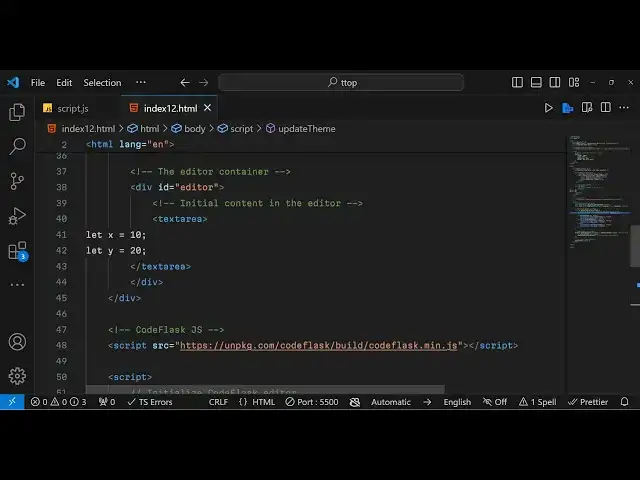
can Target in JavaScript so after this
3:30
we will have the actual div tag where we
3:33
will give it an add ID to it of editor
3:36
so here we will be loading the actual
3:40
code editor so here you can actually
3:42
write any code that you want to write so
3:45
let me write some JavaScript code right
3:48
here with the
3:51
comment so just close the text area so
3:55
inside this text area we
3:58
are so if you just refresh now it will
4:01
look something like this the code will
4:02
not be highlighted so now to load this
4:05
code flask
4:08
Library we do need to write some
4:10
JavaScript code here
4:12
so we write this in this script.js file
4:16
so now to initialize this
4:21
Library you need to get access to that
4:24
element in which you need to load your
4:28
so we given an ID to it
4:30
so you'll get reference to this and now
4:33
we can simply initialize this using new
4:36
code flask you will use this Constructor
4:39
and you need to pass the reference in
4:41
which you want to load this editor the
4:44
second option is Tes is the which
4:46
language you want to highlight so in
4:48
this case we want to highlight the
4:50
JavaScript language and the second
4:52
option is takes if you want the line
4:54
numbers it's a Boolean option so I want
4:57
the line numbers so I will put true here
5:01
so that's all so if you just refresh now
5:03
you will actually see the editor will
5:06
get
5:08
loaded
5:11
so if I paste this JavaScript code I
5:15
want to highlight
5:16
this so now you can see the highlighting
5:19
is working perfectly so this is actually
5:22
the default theme
5:25
so now if I want to update this tee
5:31
I will bind a event handler so whenever
5:34
the theme changes this event handler
5:36
will execute this change one we'll get
5:39
the theme value and we will execute this
5:41
function custom function update theme so
5:45
it will take the theme name as an
5:53
argument So based upon which theme is
5:57
selected we will
6:10
so we'll be selecting this class which
6:13
is code
6:15
flask
6:18
pre here'll be Simply Be comparing if
6:21
the selected theme is Dark
6:24
theme then we just need to change the
6:28
background color here
6:35
so you can even customize uh any color
6:38
that you want so I have predefined these
6:41
colors these hexadecimal color
6:45
codes So based upon the Dark theme and
6:48
the light theme so you can customize
6:50
your own colors just put your own hexad
6:53
decimal codes so now if I
7:05
let's suppose if I change to Dark
7:26
theme so if you change to Dark theme it
7:29
will change to dark so you can all
7:32
customize this colors uh these exad
7:35
decimal colors you can replace with your
7:37
own colors as well
7:43
so so this was
7:46
the syntax highlighting Library if you
7:49
want to highlight source code you can
7:51
use this
7:53
one it's fairly new and uh it's very
7:57
lightweight uh the size is very low as
8:01
you can easily integrate with the in the
8:03
within the
8:05
browser so do check out free media tools
8:09
as well which contains thousands of free
8:12
tools this is my website
8:16
so so thank you very much for watching
8:19
this video and I will be seeing you in
8:21
the next one
#Web Design & Development
#Development Tools
#Scripting Languages