live_tv
Livestream Starting Soon
00
Hours
:
00
Minutes
:
00
Seconds
Up next in 10

Javascript Array Fill() Method to Insert Random Data in Array Locations Using Index Number
Jan 9, 2025

Buy the full source code of application here:
Show More Show Less View Video Transcript
0:00
uh hello guys welcome to this video so
0:02
in this video we'll look at another
0:04
JavaScript array method which is called
0:06
as fill method so fill method is
0:09
actually used to fill out elements with
0:12
the random values with fake data so if
0:14
you want to actually in your application
0:17
let's suppose I have a array here some
0:21
with the elements numeric element so we
0:24
have four element 1 4 6 7 so what this
0:28
method does you invoke this method like
0:31
this on your array name f i l this is
0:36
actual method here
0:39
fill so let's suppose if you want to
0:43
fill out your array this is your array
0:45
here which contains four elements right
0:48
here now so if you want to fill out your
0:50
element uh fill out your whole array
0:53
with the five so what this will what
0:57
this will do it will modify your ARR
1:00
and it will fill out all the
1:03
elements with five value so all the four
1:07
elements that you see right here will be
1:09
gone and if I want to console log the
1:12
actual output you will see this output
1:16
right here all the four elements in the
1:18
array will be
1:21
five so you can see so in this way uh if
1:25
you want to fill out elements with a
1:27
certain value with a certain string you
1:29
you can use this fill method it also
1:32
takes two more arguments so let's
1:34
suppose if you don't want to fill out
1:36
all the elements with this five value if
1:38
you only want a specific location then
1:40
you can uh tell the function a specific
1:43
location in the second and third
1:45
argument so first argument is the actual
1:48
value that you want to fill and then now
1:51
in the second argument you can tell the
1:54
starting location and the ending
1:56
location so I want the array to be
2:00
filled at five from the location you can
2:04
tell so if you see indexing start from
2:06
zero so this is a zero Index this is one
2:10
this is two this is three so I want the
2:13
indexing from start
2:16
from one and two so what this will be
2:21
the result here if you
2:23
see it will fill out five at the first
2:26
index so at the second element so it
2:29
will remove this four and it will place
2:32
this five at this location so the output
2:36
will become
2:37
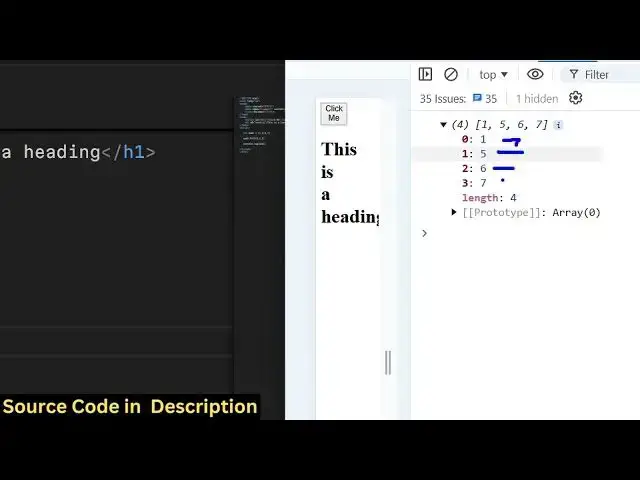
15 6 7 so if you see the output this is
2:42
actually the output which will come 1 5
2:49
67 so this is actually uh we want this
2:53
five value to place
2:55
between the at this location which is
2:59
the
3:00
starting index which is the second
3:02
element so this ending index is not
3:05
counted so this is actually the third
3:07
element right here this sixth one so the
3:09
ending index is not counted the only the
3:12
starting index is counted so that's why
3:14
this five value is placed in between 1
3:17
and six so if you want to do if you want
3:20
to place this five value at the last
3:23
location what you will say 0 1 2 3 so I
3:27
will
3:28
place 4
3:36
here 14 67 I think you need to place
3:43
three so now if you see the output it is
3:47
1465 so now the Fifth Element five has
3:50
been placed in location of
3:54
this because zero this was zero this was
3:58
one this is two
4:00
and this is three so it at this location
4:03
fifth element has been inserted so in
4:06
this way you can modify your array
4:08
elements dynamically using this function
4:11
of fill you provide the first argument
4:14
as the actual value that you want to
4:15
insert the second argument is the actual
4:18
location so here we are simply providing
4:20
the location the index number at which
4:22
we want to insert this so three index
4:25
number we are providing it the starting
4:27
location and right here it
4:31
displaced so if you want to provide
4:33
let's suppose the ending location as
4:35
well
4:36
so I will provide 0 to
4:40
1 so now the output will look 5 4 6 7
4:44
because so the ending index doesn't
4:47
count so it it will only target the
4:49
first element because zero index is
4:51
first so fifth will be placed at the
4:54
first
4:56
location so the output will become five
5:00
467 that's exactly the output that you
5:02
see in the right hand side 5 467 so this
5:05
is actually the uh method of fill you
5:09
can fill out your array so let's suppose
5:12
if you want to create a new
5:16
array if you want to create a uh string
5:19
value now if you
5:21
see it will replace all the existing
5:25
elements with this string of John so in
5:27
this way you can create as much element
5:29
ments as you want you need to Simply
5:31
call The Fill method and then you can
5:33
replace the string or simply replace the
5:36
number uh if you don't provide any
5:38
argument it will fill out all the
5:40
elements with this string that you put
5:44
and if you want to put it at a certain
5:46
location then you can put it uh provide
5:48
additional two arguments the starting
5:50
index and the ending index so I just
5:52
show you the complete example of this
5:55
function so this was the function of
5:58
fill to fill out Rand random data inside
6:00
your arrays so if you do like this video
6:04
please hit that like button subscribe
6:05
the channel and do check out my website
6:07
free mediat tools.com which contains
6:09
thousands of free tools regarding audio
6:11
video and image and I will be seeing you
6:14
in the next video
#Programming
#Software
#Scripting Languages