Up next in 10

Javascript Animate.css Exampe to Animate HTML5 DOM Elements in Browser Full Example
Jan 9, 2025

Buy the full source code of application here:
Show More Show Less View Video Transcript
0:00
uh hello guys welcome to this video so
0:02
in this video I will look at a CSS
0:06
animation Library which can attach uh
0:10
animations to your Dom elements inside
0:13
uh browser so this is actually a third
0:16
party Library which is called as
0:17
animate.css
0:20
so it basically supports any kind of
0:23
Animation that you can think of while
0:26
you animate your Dom elements it can be
0:29
either forms it can be paragraph it can
0:32
be images it can be anything that you
0:35
think of while you actually develop web
0:39
applications so this is actually the
0:42
official website of animate CSS so if
0:45
you just type here
0:47
animate.css just write this on Google
0:51
the very first li website which comes
0:55
which is a it's a cross browser
0:58
library with supports built-in CSS
1:02
animations and this is a bouncy
1:05
animation this is flush pulse rubber
1:08
band so you can actually see all these
1:11
animations by visiting the website in
1:13
this tutorial I will show you how to
1:14
integrate animate CSS in a very basic
1:18
HTML document to get started while you
1:21
are building your application you can
1:23
actually integrate these nice little
1:25
animations to your Dom elements to just
1:28
uh
1:30
he to just make your application little
1:33
bit Dynamic and
1:36
professional so it can come from either
1:39
direction Left Right top Center it and
1:43
uh you can see that
1:45
so rotation zoom in every animation is
1:49
supported buil
1:51
in so this will actually save a lot of
1:54
time you don't need to write your CSS
1:56
from scratch you can use this Library
2:00
for animations like this so now to get
2:03
started just make this index.html file
2:07
and
2:08
uh I will simply make a simple document
2:11
right here and just type here
2:12
animate.css
2:14
simple
2:17
example and here we need to include the
2:19
CDN for animate
2:22
CSS so all the source code which is used
2:25
in this video is given in the
2:26
description of this video you can check
2:28
the source code so we have things uh
2:31
simply included the C uh CDN link for
2:34
the CSS file of animate main. CSS so
2:38
this actually stores the base tiles
2:41
which will be used in this
2:42
animation so once you include this now
2:45
you can
2:46
actually write your basic application
2:49
whatever is your application first of
2:51
all I will just give it a container
2:53
class right here and then we will have
2:56
some headings so I will show you both
2:59
both the
3:01
ways animate.css have pre-built classes
3:05
that you can use for attaching
3:06
animations to your Dom elements or you
3:09
can also attach them dynamically using
3:12
JavaScript as well so I will show you
3:13
both the methods which one you prefer
3:16
you can choose here so now we have the
3:19
first heading here let me say welcome to
3:22
animate.css
3:26
example so we have the simple heading if
3:30
I just open this heading open this brow
3:33
application in the browser so it
3:36
actually looks something like this no
3:38
animation is there so now we need to
3:40
Simply attach a simple class to it to
3:43
this element so this class is called
3:47
as
3:50
animate
3:52
underscore
3:54
animate
3:57
animate underscore f
4:00
in I is capital so if you now see if you
4:05
refresh it I think it is
4:11
double so underscore is double not a
4:14
single
4:16
double now if you see if you refresh
4:18
here now you will see it will slightly
4:22
fade in you will see that now it is not
4:25
appearing it it is fading in so you can
4:28
see this is a actually a animation that
4:31
we have attached so what I will do we
4:34
will make everything in the center
4:35
position I will simply attach some basic
4:37
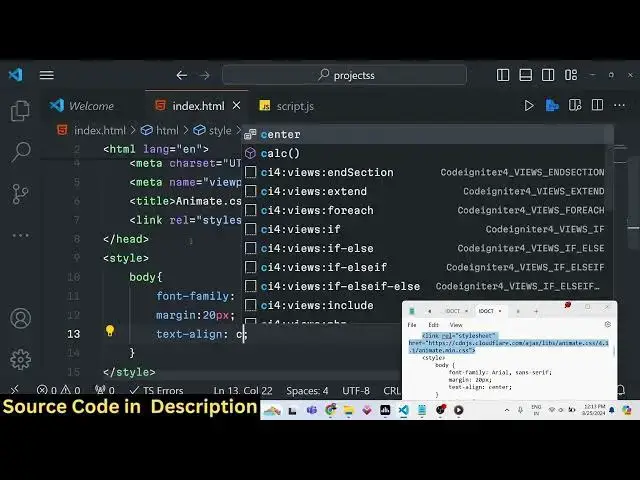
Styles in the body you will
4:42
simply change the font family to be aial
4:51
sanserif and margin I will give it to 20
4:54
pixel text align which is Center
5:00
so now if you'll appear in the center
5:02
position you will see it will fade in so
5:05
this is actually the first animation it
5:07
supports
5:09
fade the proc the and this is actually
5:12
the syntax here animate underscore
5:15
uncore animated and then we attach our
5:18
different classes which it supports
5:20
animate uncore undor fadein this is a
5:23
fade in
5:24
animation then we simply write a simple
5:27
paragraph let's suppose I give it an
5:29
animation which is
5:31
animate animate uncore
5:35
animated and this time I need to animate
5:38
the fade in once again I will use the
5:40
same animation fade in but in this case
5:43
I will have a slight delay of one second
5:46
so now to have this delay you'll simply
5:48
say animate uncore unor delay this is
5:52
actually the delay class and then we
5:55
provide dash 1 second 1 second that's
5:58
all you can see the classes are also
6:00
very simple so this simply means that it
6:03
will have a delay of 1 second when
6:06
appearing so we'll simply have this
6:09
paragraph you can simply say this
6:13
paragraph fades in with a delay
6:18
of 1
6:20
second so now if you refresh what you
6:24
will see it will have a one delay second
6:27
delay and then it will appear
6:30
this you can set this for any Dom
6:33
element let's suppose if you have a
6:34
profile picture that you want to load
6:36
this after 1 second 2 second it can even
6:40
have a delay of 2 seconds you can set
6:42
any
6:43
value let me set 5 Second so what will
6:46
happen it will actually have a delay of
6:49
5 Seconds then it will appear on the
6:52
browser now it appears after 5 seconds
6:55
so you can have delay according to your
7:00
choices
7:02
so so in this way we are attaching it
7:05
directly using the built-in classes
7:08
which are there this is the first
7:11
way but now in in some situations you
7:15
need to attach it dynamically using
7:18
JavaScript so one such situation will be
7:20
let's suppose if you have a form element
7:23
so after this paragraph let's suppose I
7:26
have to attach
7:29
this animation to a form which will not
7:32
appear in the application once we load
7:35
the page it the form will not be
7:37
appearing it will be appearing
7:39
dynamically once we click a certain kind
7:42
of button so in those situations when
7:45
your Dom elements are not visible on the
7:47
page then you can attach them
7:49
dynamically using JavaScript so let's
7:51
suppose if you have a div element let me
7:54
give it a form container
7:57
class and by default it will be h
8:00
done it will not be shown once we load
8:02
the page we're giving an ID to it of
8:07
form inside this we will have a simple
8:09
form user
8:16
form simple
8:18
form so I'm just using basic HTML we are
8:22
not using any Tailwind CSS or bootstrap
8:25
I just want to make it very simple to
8:28
understand so we have the
8:30
label of name and then the input field
8:33
will be input type text and giving an ID
8:36
here
8:38
name so this will be required and next
8:42
one after two break tags we will have
8:45
another label this time for the email
8:49
address so here the user will enter the
8:51
input type email it will also be
8:57
required so you can see if you refresh
9:00
the page the form will be shown to us
9:03
because we haven't written the we have
9:06
attached the hidden class but we haven't
9:08
written the custom CSS so what I will do
9:11
uh we will attach do hidden class and
9:15
change this opacity to zero this means
9:18
that the form will not be shown if I
9:20
refresh now now you see the form is not
9:23
showing the paragra the paragraph and
9:25
the heading is only
9:26
showing and also we need to make sure
9:29
the form container has a margin
9:33
top so it should have some spacing
9:37
margin top to 20 pixels
9:39
so now what I need to
9:42
do there will be a simple button so
9:46
which will actually trigger once we hit
9:50
that button we all we need to show the
9:52
form so you will say the label of the
9:56
button will be simply show form with
9:58
animation
10:02
so we need to bind a on click listener
10:05
to this button so when we click this
10:07
button we will actually execute a
10:09
function which will be show
10:13
form now we need to actually Define this
10:15
function in the custom JavaScript we'll
10:17
simply say function show
10:21
form so inside this function we will be
10:24
attaching the animation as well and then
10:26
showing the form so first of all we need
10:29
need to get the reference of the form we
10:31
have given the ID here if you see in the
10:35
HTML ID of form we are targeting this
10:38
div and now to show this we first of all
10:41
need to add that class class list. add
10:46
so
10:47
this the same class we will add it of
10:50
animate CSS animate unor
10:54
animated and then the second parameter
10:57
is actually the animation that you want
10:59
to perform so I will be performing a
11:01
bouncing animation so animate uncore
11:05
uncore this time bouncing
11:08
animation so again form. classlist do
11:13
remove you need to remove that hidden
11:15
class so in this way you can dynamically
11:18
add classes remove classes anything you
11:20
can do this using
11:21
JavaScript so we are not using jQuery it
11:25
is all vanilla JavaScript so now if you
11:29
refresh the browser what will happen by
11:32
default The Heading and the paragraph
11:34
will show and now we have this button so
11:37
once we click this button now the form
11:39
will show with the bouncing animation
11:42
you can see that it is appearing right
11:44
in the center
11:46
position so you can see how the form is
11:49
bouncing so you can actually see all
11:52
these
11:53
classes if you want the rotation
11:55
animation as
11:58
well you can check out the documentation
12:00
it is very good
12:02
documentation and whichever animation
12:04
that you want all the classes are
12:06
present for each kind of Animation so
12:09
you can actually get this code the link
12:11
is given in the description you can
12:13
modify this code accordingly whichever
12:15
animation that you want to do the syntax
12:18
will remain the same so this was a
12:20
tutorial guys on you how to use animate
12:22
CSS in your HTML document to actually
12:25
animate Dom elements if you are building
12:28
any sort of appli ation animations are
12:30
really important and this this Library
12:33
will save you a lot of time in actually
12:36
animating your things and thank you very
12:38
much for watching this video please hit
12:40
that like button subscribe the channel
12:42
and I will be seeing you in the next
12:44
video
#Fun & Trivia
#Flash-Based Entertainment
#Movies
#Programming
#Software
#Online Goodies
#Clip Art & Animated GIFs
#Animated Films