live_tv
Livestream Starting Soon
00
Hours
:
00
Minutes
:
00
Seconds
Up next in 10


Buy the full source code of application here:
Show More Show Less View Video Transcript
0:00
uh hello guys welcome to this video so
0:02
in this video we will talk about the for
0:05
each Loop for each Loop is uh widely
0:09
used inside programming inside uh
0:12
day-to-day task related to development
0:16
so this is a widely used Loop so let's
0:19
suppose you have a array of data that
0:21
you want to Loop let me declare a array
0:24
here so let me this is a numeric array
0:27
it will have five numbers let me put
0:30
these
0:31
numbers so we have these five numbers in
0:34
this array the first second 3 4 five so
0:37
five elements are there in this array so
0:39
now we can simply run this for each Loop
0:42
so how we need to run this so first of
0:44
all whatever is your array name I will
0:47
write this num and then we have this for
0:50
each Loop you will see in the drop down
0:52
for each is coming so we'll simply use
0:54
this for
0:55
each and now it take actually takes
0:58
three arguments there
1:00
uh but in our day-to-day task we only
1:04
use the first one which is actual value
1:07
so I can call this as n so in a short
1:11
head notation we actually write like
1:13
this so it actually takes the argument
1:14
of n the very first argument it is
1:17
actual
1:18
and you you can call it anything I'm
1:21
just calling it n right here so it
1:23
actually refers to the value so if I
1:25
just console log it on the screen you
1:27
will see it will print out these values
1:30
One By One The arrays 34 56 78 89 45 so
1:34
whatever is there inside this array one
1:36
by one it is Loop through inside this uh
1:40
variable the first variable which is
1:43
passed to this for each Loop so one by
1:47
one all the elements will be printed out
1:49
so in this way we actually Loop through
1:51
an array using this for each Loop the
1:54
second variable which is takes is the
1:56
index variable so if you also want to
1:58
print out the position as well so as you
2:01
know in uh arrays indexing start from
2:04
zero so this is a zero Index this is one
2:07
this is two this is three this is four
2:11
if you also want to print the index you
2:13
have this Set uh
2:15
second argument which is passed which is
2:18
index you can call this anything I'm
2:20
just calling it index so again you can
2:22
console log the index which is actually
2:25
the position of the element and now you
2:27
will see it will print out so 34 is
2:31
located at zero index because the
2:33
indexing start from zero then this
2:35
element is at one location this is at
2:38
two
2:39
location three index number and four so
2:43
from 0 to four there are five elements
2:45
in the array so the indexing start from
2:47
0o 0 1 2 3 4 so this is the second
2:53
argument it takes is the index
2:55
positioning of the array the third
2:57
argument if you don't know it is
2:59
actually the array
3:01
itself so you can simply console log
3:04
this so which is actually the actual
3:07
array so whatever is you will see all
3:10
the five elements which is there in the
3:13
array so this is the third argument
3:16
which is passed which is actual
3:18
array so in all these five scenarios the
3:22
same array will be passed so if you do
3:25
need to use this array variable so this
3:27
is also available but we don't widely
3:30
use this variable so we can delete this
3:32
so widely two two variables are used in
3:35
this for each Loop first is actual value
3:38
to iterate through one by one and then
3:41
the index position so this is 0 1 2 3 4
3:45
so these are two widely used variable uh
3:47
arguments so so the third argument is
3:50
the actual are itself you can use it but
3:54
we don't use it
3:57
so in a nutshell this is actually the
3:59
for each Loop it is just used to Loop
4:03
through the data if you have so this may
4:07
be array of objects as well so this is
4:09
actually a very simpler array let's
4:11
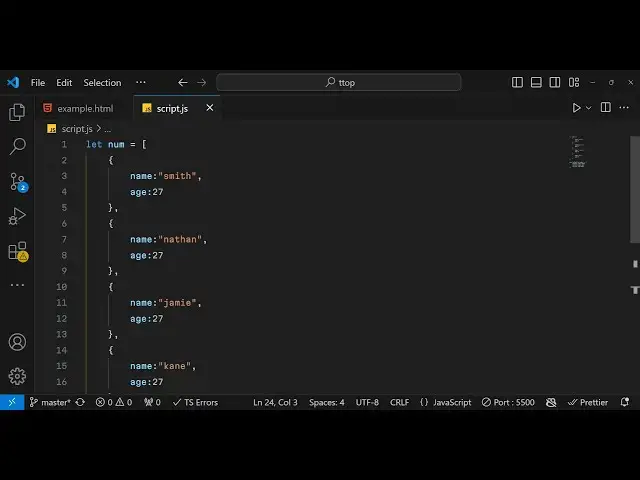
suppose we have an array of objects that
4:14
you want to Loop so we have one
4:18
object name we can say Smith age we can
4:23
say 27 and then we can repeat
4:26
this quite a number of times so we can
4:29
simp simply paste
4:33
it so we can just change
4:36
it naan you can change the
4:41
names Jamie and I can
4:47
J and now if you want to Loop through
4:50
this array of
4:52
objects again the logic remain the same
4:55
you just use for each array will change
4:58
but the syntax will remain the same we
5:00
again just say for each and and now we
5:04
can simply if you see we are simply
5:07
putting the positions here 012 index
5:09
number and this is actually printing the
5:11
whole object so this represents the one
5:13
location that you see this is currently
5:16
selected object now this is an object
5:18
here this is not a array so now for the
5:21
object we need to destructure the
5:24
property so we can say n do name so it
5:27
will print out the names here we can see
5:28
Smith name J K so in this way you can
5:32
print out individual properties of an
5:34
object so n do H so it is printing out
5:38
the name and age for you so in this way
5:40
you can Loop through any data structure
5:42
it can be object it can be array so it
5:45
can be used for any of the data
5:47
structures which is this for each Loop
5:50
so it is widely used in programming I
5:52
also use it a lot whenever I'm
5:55
developing projects so it's a
5:58
very uh widely used Loop so you must
6:01
know it if you want to study JavaScript
6:04
or nodejs you must know this for each
6:07
Loop and it's very useful so thank you
6:11
very much guys for watching this video
6:12
about for each Loop please hit that like
6:15
button subscribe the channel and do
6:16
check out my website as well which is
6:18
freem mediat tools.com which is a
6:21
open-source website regarding audio
6:23
video and video tools you can check out
6:25
this tool website that I developed by me
6:28
so I will be seeing you guys in the next
6:30
video
#Programming
#Scripting Languages