Up next in 10


Hi Join the official discord server to resolve doubts here:
https://discord.gg/cRnjhk6nzW
Visit my Online Free Media Tool Website
https://freemediatools.com/
Buy Premium Scripts and Apps Here:
https://procodestore.com/
Show More Show Less View Video Transcript
0:00
uh hello guys welcome to this video so
0:02
in this video I will actually show you
0:04
an extension in Visual Studio code which
0:07
allows you to spot errors and debug
0:09
errors really easily inside any
0:11
programming language whether it's
0:13
JavaScript or python or any language you
0:15
will see these descriptive messages
0:18
right here if if you make any sort of
0:20
mistake right here this is actually the
0:22
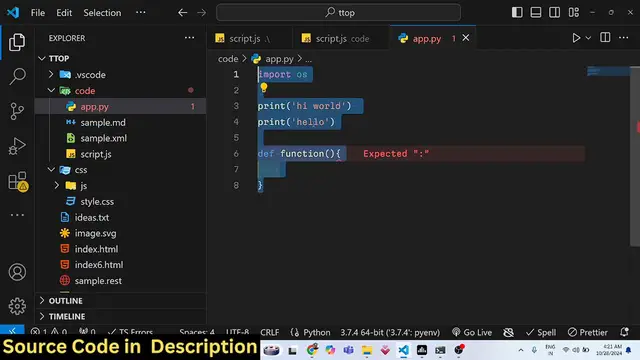
python code so as we all know we Define
0:27
the function using def keyword and then
0:30
we actually Define this function so we
0:35
can't use parenthesis so it is actually
0:37
telling us that expected this colon so
0:40
we do need to uh expect the colon right
0:43
here so we Define
0:46
this so it is actually telling expected
0:51
parenthesis and then if I just write
0:54
like
0:57
this it will tell me that expect
1:00
indented block so I need to indent my
1:06
code so this is correct when it comes to
1:09
JavaScript so if I just make any sort of
1:12
mistake here so as you just write the
1:14
code it is instantly giving you the
1:16
error messages so if I Define a
1:21
function so let's suppose
1:26
I make any sort of mistake right here I
1:31
don't Define this bracket right here so
1:33
it is saying that signature declarations
1:35
can only be so it basically it is
1:38
telling us that this bracket is required
1:42
and if
1:46
I
1:50
write so it will tell me that semicolon
1:53
is expected so the extension name is
1:56
really simple guys which is error length
2:02
this is actually the extension
2:05
uh
2:08
it it is almost having 5.1 million
2:12
downloads it shows you this highlighting
2:14
of Errors warnings and other language
2:17
dyos stics so it's really simple
2:20
extension you need to click the install
2:22
button to actually install this module
2:25
so once it is installed you will be
2:28
having these messages
2:31
so once you actually write any sort of
2:42
code
2:44
so here we are expecting two arguments
2:47
so let's suppose if I call this function
2:49
without providing any
2:57
argument let's suppose 2 comma 5
3:01
and here if I declare a
3:09
sum so you will see it will highlight
3:13
this unknown word so automatically you
3:16
will be able to rectify the mistake very
3:18
easily so it works with all the
3:20
languages you can work with PHP files as
3:23
well so if you define a PHP
3:26
file it works with python PHP JavaScript
3:29
all the
3:38
so file so in PHP you basically forgot
3:42
to add the semicolons really so at that
3:46
moment of time it will be able to show
3:49
you this message that semicolon
3:53
expected so you missed that semicolon so
3:56
syntax error and expected token Echo so
3:59
it will tell you this message you need
4:01
to fix this error so here you can Define
4:04
this so as you write the function as you
4:08
write the code it will tell you exactly
4:11
what you want to do
4:24
so so you can see hello it was not
4:28
closed so it is expecting that so it
4:32
gives you this descriptive messages as
4:36
well so let's suppose you are working
4:39
with nodejs you actually
4:50
requiring and then we changing this
4:53
value
5:07
so by accident you put colon symbol
5:10
right here it will tell you ex semicolon
5:12
expected so you basically getting the
5:15
concept guys this is actually the module
5:18
extension you should have installed
5:20
error lens it gives you the highlighting
5:23
of error messages so if you make by by
5:25
accident if you make any sort of mistake
5:27
in any of these languages you will get
5:29
this descriptive message in a red color
5:32
so it will basically highlight your
5:34
attention that you have made a mistake
5:36
so I think it's a very good extension
5:38
you should definitely install it it will
5:41
give you this descriptive messages as
5:43
you type your code instantly so this is
5:46
the extension that I wanted to tell you
5:48
in this video so thank you very much for
5:50
watching this video guys please hit that
5:52
like button subscribe to channel as well
5:54
and I will be seeing you in the next
5:56
video
#Software
#Development Tools
#Scripting Languages