Up next in 10


Buy the full source code of application here:
Show More Show Less View Video Transcript
0:00
uh hello guys welcome to this video so
0:02
in this video I will show you a specific
0:05
react CHS package for generating QR code
0:07
and exporting is as a JPG
0:10
image and you can even customize the
0:12
look and feel of the QR code as well so
0:14
this is on your screen we have this QR
0:17
code you can change the foreground color
0:19
background color as well and then you
0:21
can export this as a image file so this
0:23
is your jpg image F the package name is
0:27
uh this one next QR code this is
0:30
specifically react CH component for
0:31
generating QR code and it's having 67
0:34
weekly th000 weekly downloads and this
0:37
is actually the command npmi next QR
0:40
code I've already installed it so I will
0:43
just show you a very basic example of
0:46
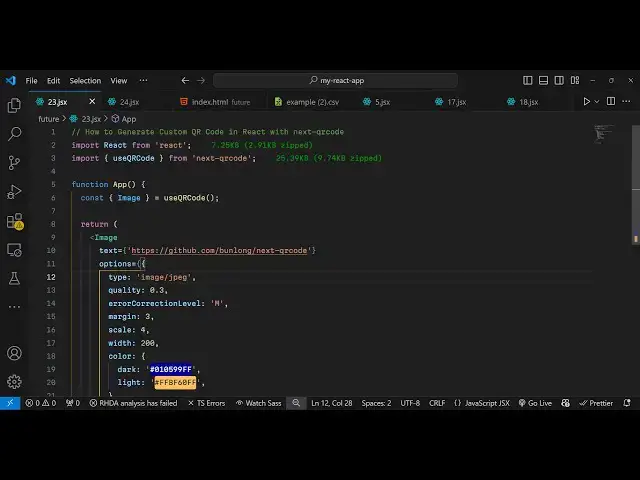
using this package so just import this
0:49
package first of all by using the import
0:51
statement so we will just import this
0:54
package so we have this hook which is
0:58
use QR code and you'll be using this
1:01
hook and first of all creating a state
1:04
we will use this
1:05
image uh class from this hook use QR
1:09
code and now we can embed this QR code
1:13
component very simply we'll use this
1:16
image that we imported and this takes
1:19
some options that you need to pass to
1:21
this component first of all the text
1:24
from which text you want to this QR code
1:27
should redirect the user to google.com
1:30
and then here you can specify the
1:31
options related to your QR code what is
1:34
the type of the image I need to save it
1:37
as a JPG image so I will just provide
1:39
this MIM type and here you can even
1:41
quality you can control the quality of
1:43
the QR code I will provide
1:47
0.7 you can provide from 0 to 1 and then
1:51
we also have the variable for error
1:53
correction level which I will set it to
1:56
medium and then we also have margin you
1:58
can specify the scale L parameter as
2:00
well how big is your QR code I will
2:03
provide four and then here you can
2:05
provide the width of the QR code I will
2:07
provide 200 and then if you want to
2:10
customize the look and feel of the QR
2:12
code let's suppose you want to change
2:15
the color you can provide this object of
2:17
color which here you can specify the
2:20
dark and the light color so you can see
2:23
that so if you refresh your application
2:27
now and go to it here you will see your
2:30
QR
2:32
code so you can
2:35
change the color as
2:38
well and if you scale it let's suppose I
2:41
change this to 8 so it will look bigger
2:44
now this QR
2:46
code and simply you can save this image
2:49
as jpg you will see that your QR code
2:52
has been downloaded as a image file it's
2:54
a JPG image file this is actually the
2:57
package react hook for generating QR
3:00
code for your react apps it's a very
3:03
simple package it you can simply use it
3:05
by customizing all these options you can
3:07
pass it you can provide any text and it
3:10
will generate this QR code for you so
3:12
thank you very much guys for watching
3:14
this video If you like this video then
3:16
please hit that like button subscribe
3:17
the channel and do check out my website
3:19
as well free mediat tools.com which
3:22
contains thousands of tools regarding
3:24
audio video and image and I will be
3:26
seeing you in the next video
#Educational Software