live_tv
Livestream Starting Soon
00
Hours
:
00
Minutes
:
00
Seconds
Up next in 10

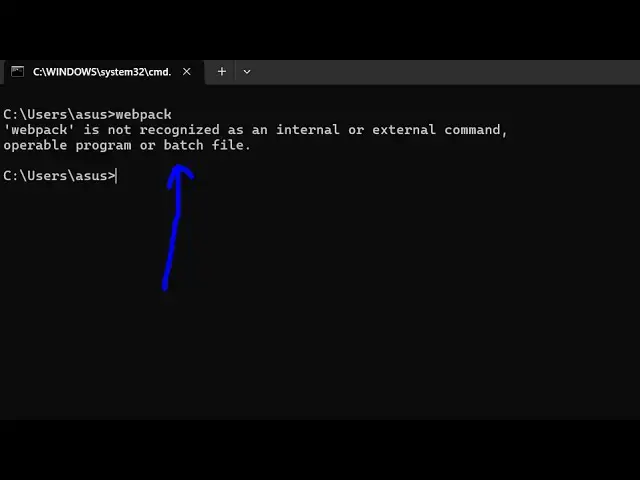
How to fix webpack is not Recognized as Internal and External Command Operable Program or Batch File
Feb 15, 2025

Get the full source code of application here:
Hi Join the official discord server to resolve doubts here:
https://discord.gg/cRnjhk6nzW
Visit my Online Free Media Tool Website
https://freemediatools.com/
Buy Premium Scripts and Apps Here:
https://procodestore.com/
Show More Show Less View Video Transcript
0:00
uh hello guys welcome to this video so
0:02
in this video I will show you how to
0:04
install webpack if you are seeing this
0:07
error message that just write webpack
0:10
inside command line it is actually
0:12
showing this error message that webpack
0:14
is not recognized as an internal or
0:17
external command so this typically
0:19
occurs if you haven't installed webpack
0:21
inside your system so in order to fix
0:25
this you simply need to execute this
0:27
command
0:28
npmi and - G for Global and then just
0:32
type web
0:34
pack so here we are explicitly telling
0:37
that we need to uh globally install web
0:40
pack inside of a system you should have
0:43
nodejs and npm installed I'm assuming
0:45
that you have install npm and nodejs
0:49
execute this command so now what this
0:51
command will do it will add the web pack
0:53
package as a global package so you can
0:56
see it has added these 12 packages so if
0:59
you try to execute this webpack command
1:02
you will
1:03
see
1:04
now CRI for webpack must also be
1:07
installed so webpack CLI so do you want
1:12
to install webpack CLI so the you can
1:15
also install this globally as well so
1:18
npmi dgb webpack-cli this is actually
1:23
the CLI version of webpack so also
1:25
execute this command as well npmi dasg
1:28
webpack CLI
1:30
and this will install the CLI version of
1:33
webpack so you will see it has added
1:35
these seven packages so now if you
1:38
execute
1:40
webpack so you will see the webpack has
1:43
been successfully installed and one more
1:47
command you need to install which is the
1:49
webpack server Dev server so webpack
1:53
dasg webpack Dev server so this is
1:57
actually the command here so install all
2:00
these three packages globally npmi D
2:03
weback dd- server so execute this as
2:09
well so this command after it is
2:14
successful you will see it has added 41
2:17
packages so if you just uh write this
2:19
command npx webpack it will actually
2:22
show you the version which is installed
2:26
so it is web pack 5.9.7
2:30
so Now webpack command is
2:34
successfully executing it so you can see
2:37
it is successfully installed so it is
2:40
giving you the version where it is
2:42
stored
2:44
here so in this way you can fix that
2:47
error message and web pag if you don't
2:49
know it's a module
2:51
bundler very famous web pag so it
2:54
bundles all your dependencies into a
2:57
static
2:58
asset so in this way you can fix that
3:01
error message I showed you the series of
3:04
commands execute that and your error
3:05
message will go away and also check out
3:08
my website as well free mediat tools.com
3:10
uh which contains thousands of tools
3:13
regarding audio video and image and I
3:15
will be seeing you in the next video