0:00
uh hello guys welcome to this video so
0:02
in this video I will show you how to
0:04
tackle this message which comes if you
0:06
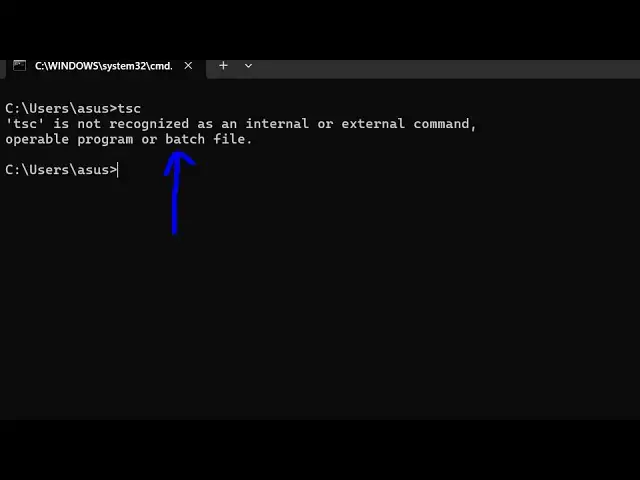
write TSC which is shorthand for
0:09
typescript compiler so if you just see
0:12
this message that TSC is not recognized
0:14
as an internal or external command so
0:16
this typically means you haven't
0:18
installed typescript inside your
0:19
terminal so the simple fix to this
0:22
problem will be to execute this command
0:28
typescript so let me zoom in npmi dasg
0:32
for globally installing typescript
0:34
inside your terminal or machine so that
0:37
whenever you type typescript on the
0:40
command line it will be successful so
0:42
just execute this command so what it
0:43
will do it will install this typescript
0:46
package globally so it has added this
0:48
package one package in 2 second so if
0:51
you now type this command TSC
0:58
sorry so now you can see the typescript
1:00
compiler is there so now you can compile
1:03
your typescript code to JavaScript as
1:06
well so all these commands are there we
1:08
have using the latest version which is
1:11
5.7.3 this is a typescript compiler so
1:15
for this you should have I think I'm pre
1:18
assuming that you should have nodejs
1:21
installed on your system so we are using
1:22
the latest version which is 22.13 one
1:25
and also npm comes with this which is 10
1:29
. 9.2 and also npx as well so you should
1:34
have all these things prequest installed
1:36
before you install this command
1:40
npmi so in this way you can fix this
1:43
very simple solution so just execute
1:45
this command globally inside your system
1:47
if for some reason it's not working just
1:49
restart your terminal and then execute
1:51
the command it will perfectly work and
1:55
thank you very much guys for watching
1:56
this video and also check out my website
2:00
free mediat tools.com uh which contains
2:03
thousands of tools regarding audio video
2:05
and image and I will be seeing you in