live_tv
Livestream Starting Soon
00
Hours
:
00
Minutes
:
00
Seconds
Up next in 10

How to fix node-sass is not Recognized as Internal and External Command Operable Program
Feb 15, 2025

Get the full source code of application here:
Hi Join the official discord server to resolve doubts here:
https://discord.gg/cRnjhk6nzW
Visit my Online Free Media Tool Website
https://freemediatools.com/
Buy Premium Scripts and Apps Here:
https://procodestore.com/
Show More Show Less View Video Transcript
0:00
uh hello guys welcome to this video so
0:02
in this video I will show you a solution
0:04
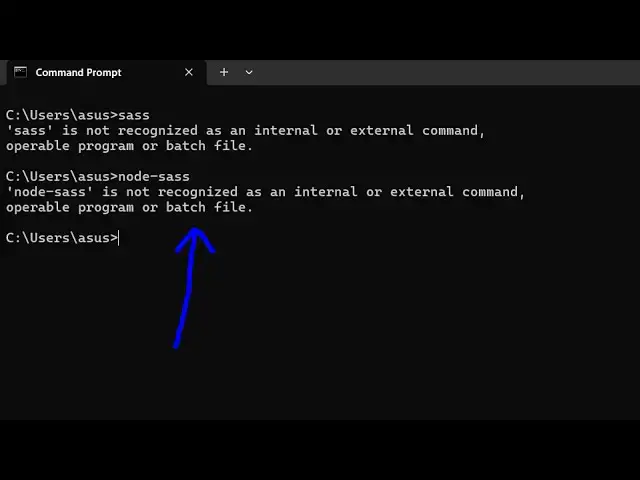
to the problem whenever you type
0:07
SAS inside the terminal this error
0:11
message comes that SAS is not recognized
0:14
as an internal or external command or
0:16
also if you just type node Das SAS the
0:20
same message comes node D SAS is not
0:22
recognized as an internal or external
0:24
command so I will just solve this
0:26
problem for you I just explore stack
0:29
overflow
0:30
this is actually a website where
0:32
programmers ask questions and someone
0:34
has answered this question that from
0:37
2024 node SAS will not work instead try
0:41
installing SAS only so this is true
0:44
because if I try to install notes say
0:46
inside my system it can't install it you
0:50
will see actually this is a command here
0:53
npmi dasg for globally installing it and
0:55
then type node Dash says if you try to
0:58
execute this command mostly
1:00
in the
1:01
systems this command will not be access
1:05
successful if just try to execute this
1:08
you will see this error coming most of
1:11
the time this will this error will come
1:13
that
1:14
python this is not found like
1:19
this so most of the time this command
1:22
will fail and if if it happens then in
1:26
your computer if if this command is
1:28
successful then it's good for you but
1:30
most of the computers will not accept
1:32
this command but instead what you can do
1:34
is that you can install the SAS module
1:38
only which is this command npm
1:41
i-g SS so try to execute this command
1:45
this will
1:46
work install this
1:48
module and now you can see it has added
1:51
the five
1:52
packages so now you can simply type the
1:55
command SS and then type the watch flag
2:01
so now you can see here you need to
2:03
provide a file here CSS file in this way
2:06
you can see the command is perfectly
2:07
working it is doing the same thing such
2:10
as the node S is doing but it's a great
2:12
solution you just need to execute this
2:14
command that not as command will not
2:17
work because of the reason that I showed
2:19
you so just execute this command and
2:23
then it will perfectly work you will see
2:24
if I type SAS the command is perfectly
2:27
working you can compile your CS SAS file
2:30
to CSS inside your terminals so in this
2:34
way there is one other command here
2:36
which you can run npx run SAS you will
2:39
see that this will also work the same
2:41
thing so it will just say I need to
2:44
install the following packages so you
2:46
can even install it by using this
2:49
command as well so I showed you a series
2:51
of commands here in this video hopefully
2:54
it will solve your problem if it did
2:58
then please hit that like button
2:59
subscribe the channel and also check out
3:01
my website free mediat tools.com uh
3:04
which contains thousands of tools
3:06
regarding audio video and image and I
3:09
will be seeing you in the next video
#Programming
#Scripting Languages