0:00
uh hello guys welcome to this video so
0:02
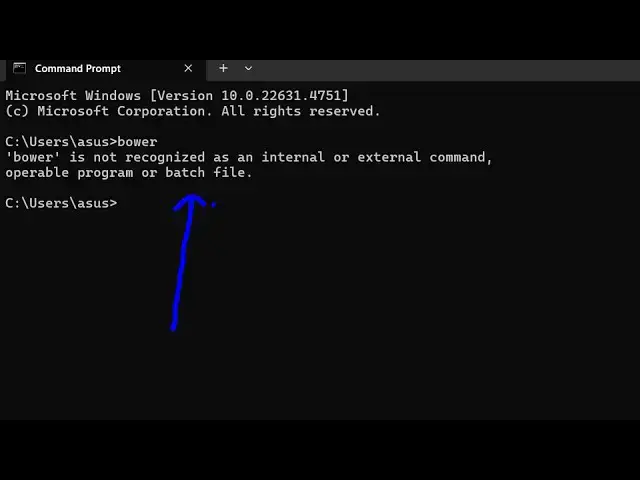
in this video I will show you how to fix
0:04
this error message which comes if you
0:06
write b b is not recognized as an
0:09
internal or external command operable
0:12
program or badge file so this simply
0:14
comes if you haven't installed b b if
0:18
you don't know it's a package famous
0:20
package manager for the web so you can
0:25
out it's similar to Yan V npm so it's a
0:30
very old package manager so just make
0:32
sure that you have nodejs installed I'm
0:35
just using the latest version of nodejs
0:37
which is 22. 13.1 and also you should
0:40
have npm installed because you'll be
0:42
installing power using npm so you should
0:45
have these two things installed and then
0:47
just execute this command mpmi dasg B so
0:55
important this is for we are globally
0:58
installing B in inside the command line
1:01
so that it is accessible in the command
1:03
line so just execute this command so as
1:06
you execute this B package will be added
1:09
globally inside your system and then you
1:12
can access it from your terminal so now
1:15
you can see it has added this one
1:17
package so if you try to access B here
1:19
now you will now see the command will
1:22
perfectly work and in this way you can
1:25
uh fix that error message by globally
1:27
installing Power by the command that I
1:30
showed you so this is will be the
1:33
fix 100% it will fix your problem you
1:37
just need to execute this command npm
1:40
i- before that you should have npm and
1:42
nodejs installed I'm assuming that you
1:45
have these two software and then simply
1:49
this and the command will be successful
1:53
so very simple fix so thank you very
1:55
much for watching this video and also
1:58
check out my website as well free mediat
2:00
tools.com which contains thousands of
2:03
tools regarding audio video and image
2:05
and I will be seeing you in the next