Up next in 10

How to Deploy Static JS & HTML Web App Using Github Pages in Seconds Full Tutorial For Beginners
Feb 12, 2025

Get the full source code of application here:
Hi Join the official discord server to resolve doubts here:
https://discord.gg/cRnjhk6nzW
Visit my Online Free Media Tool Website
https://freemediatools.com/
Buy Premium Scripts and Apps Here:
https://procodestore.com/
Show More Show Less View Video Transcript
0:00
uh hello guys welcome to this video so
0:02
in this video I will show you how to
0:04
deploy a static website in seconds using
0:08
GitHub Pages uh GitHub pages is a great
0:11
uh platform where you can host static
0:14
websites in a matter of time so you need
0:17
a GitHub repo for this and GitHub
0:20
provides this out of the box so this is
0:22
their official website and you can only
0:25
host static website so in this example I
0:28
will take a simple HTML website that I
0:31
will make so let me take a directory
0:35
here create this directory sample
0:40
app and open it inside VSS
0:44
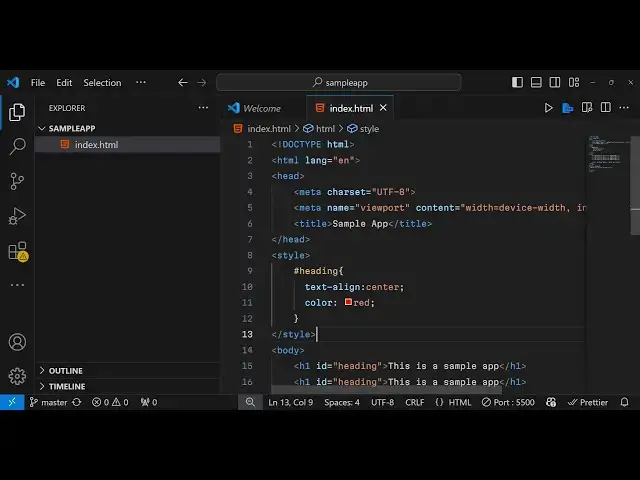
code so for this I will simply take a
0:48
simple index.html file and try to upload
0:51
this into GitHub pages so let me create
0:54
this simple index. HTML
0:58
file and and just write some basic
1:01
content in
1:06
it and let me add a simple heading here
1:09
this is a sample
1:13
app and let me also add some CSS as well
1:16
so
1:19
that me give it an ID here and uh Target
1:26
this and uh
1:30
text align Center and uh let me change
1:35
the color of it to red and let me also
1:39
add some JavaScript as well using the
1:41
script tag and uh we will have a simple
1:45
button click me so as soon as you click
1:48
the button you'll bind in on click
1:51
listener to
1:58
it so we will just do Define this
2:00
function here so as soon as you click
2:02
the button we will simply display alert
2:09
message this is a very simple web
2:12
application uh if I open it
2:15
locally you can simply right click open
2:17
with live server so this is actually the
2:19
application you will see it is running
2:21
locally now I will deploy it using the
2:23
help of GitHub pages so it contains
2:26
JavaScript it contains CSS and it
2:28
contains HTML so this this is a simple
2:30
index.html file uh now to deploy this
2:33
first of all we need to upload this to
2:36
GitHub for uploading it we will
2:38
initialize a simple get
2:41
repository and I will add this commit so
2:46
these are commands here if you know
2:48
GitHub I'm what you I'm talking about
2:50
first of all we initialize the empty
2:52
GitHub repo by get in it then get add
2:55
Dash so to add all the files and then we
2:58
need to commit changes so get commit
3:02
first commit and it will commit these
3:07
files and now what we need to do just go
3:10
to your GitHub create a very simple app
3:13
here new repository and let me name it
3:17
as GitHub Pages
3:20
sample and click on get create repo and
3:23
just copy this link here get remote ad
3:27
origin so paste it now we just need to
3:31
say get push dasu origin master so we
3:36
push all the changes to the master
3:38
Branch by using this command get push
3:40
dasu origin master so just execute this
3:44
command and now your GitHub repo has
3:47
been uploaded so now after you upload
3:49
this GitHub repo you need to go to the
3:52
setting section right here just go to
3:54
click this settings option option and
3:56
then you will find out this Pages
3:58
directory you will see Pages option in
4:00
the menu just click on that and then go
4:04
to the
4:06
branch and here you need to select your
4:09
master Branch here so I have only one
4:12
branch here so select the master branch
4:15
and just select the root by default it
4:16
will be selected and then just click the
4:19
save option so as soon as you click the
4:21
save option your app will be
4:24
uploaded and uh then it will give you
4:27
this address
4:30
so by default https will be enabled now
4:35
your actual application has been
4:39
uploaded and if you try
4:42
to go to the
4:45
GitHub repository page
4:54
here so if you see
5:00
inside the deployment section you will
5:02
see one
5:03
deployment and uh as soon you will see
5:05
it will give you this link right here
5:07
last deployed now and you can go to this
5:11
link and your app has been dis deployed
5:14
successfully you will see that this is
5:17
your GitHub username mine is gotti1
5:20
12356 do github.io and then your GitHub
5:24
repository name so this will be the URL
5:26
of your you can directly share it with
5:29
the third party person they can directly
5:31
go to their browser open this address
5:34
and they can access your website so this
5:36
is a very simple and the most basic way
5:40
GitHub provides you out of the box this
5:42
hosting you can easily deploy the static
5:44
websites you can make it and share with
5:47
others in a matter of seconds you just
5:50
need to first of all deploy this as a
5:52
GitHub repo and then just go to the
5:55
setting section and just select here
5:57
from the pages and select your master
6:00
branch and save it and uh if you make
6:04
let's suppose if I make any sort of
6:06
change
6:08
here let me add another heading
6:12
here so now there are four headings so
6:15
if you refresh your
6:19
page you will not see the change happen
6:22
because we do need to commit those
6:24
changes so what we need to do is that we
6:26
again need to go to get
6:28
commit get add Dash and then commit
6:33
these changes so I will say second
6:36
commit so after you make the change just
6:39
add these commands again get commit
6:42
second
6:43
commit
6:46
and get push dasu origin master so
6:50
that's all so if you refresh now
7:07
so go to the actual repo right
7:20
here so as soon as you make the change
7:22
here you will see it is changed the
7:25
status to so it is reflecting your
7:27
changes so if you basically do this now
7:31
there is a second deployment which has
7:33
happened as you make the change here as
7:35
you make the commit the changes the
7:37
second commit has been active this was
7:40
the first Commit This is now the second
7:42
commit and if you try to open
7:45
this now your changes will be reflected
7:49
back so in this way guys you can
7:51
actually deploy a static it can be your
7:54
block personal block it can be any
7:56
static application which runs without
7:58
any backend you can easily deploy this
8:01
using GitHub pages so this is a very
8:03
simple tutorial on how to get started or
8:06
deploy your web application using GitHub
8:08
pages so thank you very much for
8:10
watching this video and also check out
8:12
my website as well free mediat tools.com
8:15
uh which contains the thousands of tools
8:17
regarding audio video and image and I
8:20
will be seeing you in the next video
#Web Design & Development
#Scripting Languages