Up next in 10


Get the full source code of application here:
Show More Show Less View Video Transcript
0:00
Uh hello guys, welcome to this video. So
0:02
in this video, I'll show you how to
0:03
activate and deactivate uh user account
0:06
control which is a setting inside
0:08
Windows 11. It's security setting. So
0:12
here you need to first of all go to
0:14
control panel
0:16
and then you need to go to system and
0:18
security. This is the thing here. And
0:21
then you need to go to security and
0:23
maintenance. Simply go to this
0:27
and then you will see on the left hand
0:29
side there will be this option appearing
0:31
change user account control settings. So
0:34
on the left hand side and if you just
0:37
click this you will see this uh screen
0:39
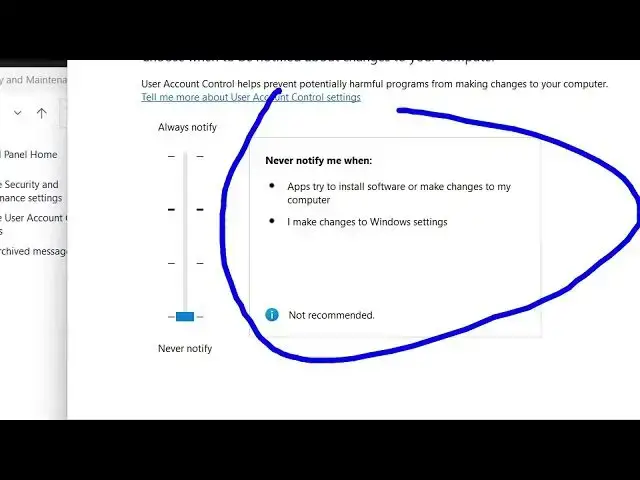
will come right here and by default it
0:41
is set to notify me when apps try to
0:44
make changes to my computer. It's a
0:46
default setting. But uh now if you want
0:49
to disable completely, you can drag down
0:53
at the bottom side
0:55
which is not recommended. It will never
0:58
notify you when any apps or software
1:00
will make change to your computer. I
1:03
will not prefer this setting. This is
1:05
the second setting. Notify me only when
1:07
apps try to make changes to my computer.
1:12
So once you are happy this is the fully
1:15
disabled one. So this will completely
1:17
disable user account control. After
1:19
doing this click on okay. So this will
1:22
completely disable this. After that it
1:24
will have a pop-up screen on this. You
1:26
just need to click yes. So once again if
1:29
you want to un uh again enable this
1:33
change this setting again click on that
1:35
and change it to recommended one or
1:40
change it to fully enable it like this
1:43
as well
1:45
and again just need to click okay
1:50
or change it to recommend it. So just
1:52
it's uh personal pre preference if you
1:55
want to enable or disable it. I will
1:57
prefer it to be recommended setting and
1:59
just click on okay.
2:01
So that's all that we need to do here.
2:04
You can actually disable or enable user
2:06
account control setting in Windows 11.
2:09
And also check out my website
2:11
freemediatools.com
2:13
uh which contains thousands of tools.
#Operating Systems