Up next in 10

Canva Clone SaaS Tutorial: Build & Monetize a Video Editor in Browser Using HTML & Javascript
Mar 3, 2026

Buy the full source code of application here:
https://procodestore.com/index.php/product/canva-clone-saas-tutorial-build-monetize-a-video-editor-in-browser-using-html-javascript/
Show More Show Less View Video Transcript
0:01
Uh hello guys, welcome to this live
0:03
stream. So in this live stream I will
0:05
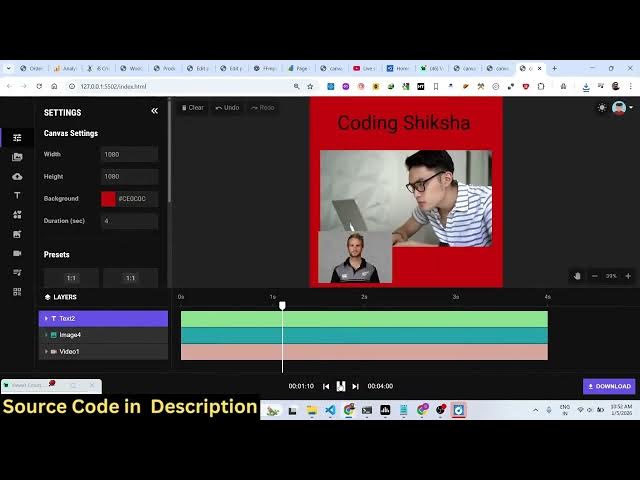
show you I built out a canva clone SAS
0:09
application directly in browser.
0:12
So it actually built in HTML, CSS and
0:15
JavaScript. This is actually the full
0:16
directory structure uh of the full
0:19
project here. If you need the source
0:21
code, I've given the link. You can
0:22
directly purchase it. After purchasing
0:25
it, you will get the source code from
0:26
Google drive. So it's actually a front
0:28
end single page application. So it's
0:31
also very easy for you to run this
0:34
simply open it in VS code and we can
0:37
simply open with live server.
0:41
So this directly opens in the browser
0:43
and you can easily edit your videos
0:45
directly. So you have this upload
0:48
section. So here you can actually
0:53
if you have a video that you want to
0:56
edit you can simply select the video.
0:59
All the processing is directly happening
1:00
in the browser. You add the video and
1:03
inside the timeline section and here you
1:07
can crop the video change the background
1:10
everything you can control here. You can
1:12
just see here
1:14
if you want to add some text here you
1:16
can even do that as well.
1:29
So now you can preview the video right
1:32
here. So it looks something like this.
1:33
You can even add images.
1:36
So
1:38
if you have a local image that you want
1:39
to add.
1:43
So once you add this, the image will
1:45
look
1:49
So here you can place the image.
1:56
So after that you can export this by
1:58
clicking this download button. So it's
2:01
process the video directly in the
2:03
browser. It will render it and once it
2:06
reaches 100% it will download the video.
2:17
So just click start downloading it
2:19
quickly.
2:26
So in this easy way you can edit your
2:28
videos directly.
2:37
You can clear out. It can be used to
2:40
create thumbnails.
2:42
You can resize various pre-made
2:45
templates are also there.
2:50
You also have the templates as well.
2:53
Pre-made templates are also there.
2:58
You can even select your own template as
3:00
well.
3:13
You also have the support for videos
3:16
which are third party videos. You can
3:18
easily
3:23
So it's a fully fresh editor. You can
3:24
even upload your own audio as well.
3:28
So various shapes are also there.
3:31
Emojis, other shapes you can just see
3:34
right here.
3:36
Phones are also there.
3:48
So with a single click you can make a
3:50
vertical video, horizontal video.
3:58
So it will save you a lot of time. Let's
4:00
say Canva loan SAS and you can then
4:03
place advertisement by deploying this to
4:06
a custom domain and putting
4:07
advertisements and earning a lot of
4:10
passive income as well because it's a
4:13
you can even export this to a image file
4:15
as well. So click download and
4:17
automatically it will make you
4:19
thumbnail.
4:21
You can even animate with a GIF file as
4:23
well.
4:25
So it will actually render it out as a
4:27
GIF file.
4:32
So,
4:35
it's an all-in-one Canva clone SAS
4:39
application. You will see it transform
4:41
to a GIF animation or you can export
4:44
this to a video as well. So, here you
4:47
can control the duration of the video.
4:49
So if you want 10 second video
4:51
automatically
4:53
the timeline will there
4:58
can even provide a custom duration
5:01
custom width and height as well.
5:05
So all the options are there guys. Uh
5:07
you can directly purchase it. Then after
5:10
that you will get all the source code.
5:12
It's also very easy for you to customize
5:14
this code.
5:16
So the link is given in the description.