Up next in 10

C# .NET ImageMagick Crash Course to Integrate it in Visual Studio to Build Image & PDF Converter
Jan 9, 2025

C# .NET ImageMagick Crash Course to Integrate it in Visual Studio to Build Image & PDF Converter
Show More Show Less View Video Transcript
0:00
uh hello guys welcome to this video so
0:02
in this video we'll be discussing about
0:04
how to integrate image magic library
0:06
inside your net C application to
0:08
actually carry out conversions such as
0:10
image to PDF PDF to images image to SVG
0:15
all sort of conversions it's a image
0:17
magic if you don't know it's a
0:18
open-source Library work which is
0:21
designed to actually work with images so
0:24
if you just search on Google uh this is
0:26
their official website image magic and
0:30
and uh they also have their own CLI tool
0:32
as well you can install it inside your
0:34
machine and then you can install use it
0:37
on a command line but inside net there
0:40
is a spe separate package which is
0:42
available to actually use this Library
0:45
image magic to now this package is
0:48
really simple I will show you step by
0:50
step and how to integrate this so I have
0:52
this visual studio so first of all you
0:55
need to go to nugget manager which where
0:58
you'll be installing third party
0:59
packages inside your C application
1:01
manage nugget solution so in the browse
1:04
section you need to Simply select uh
1:06
simply search image magic simply type
1:11
and the very first package which comes
1:13
this is actually the P package
1:16
magicnet you can see it has got
1:18
22.6 million downloads so it's a pretty
1:21
popular package and it's a net API for
1:25
the image Magic Image processing library
1:27
for desktop and web so here you can use
1:29
this like library in order to actually
1:31
design applications inside your net or C
1:34
to actually use this library to carry
1:37
out conversion so now to use this we
1:39
will be using this image magic so image
1:42
magic we included this package at the
1:45
very top and we also need the system
1:47
module as well and then we will be
1:50
writing a simple program command line
1:53
program and it will have a static void
1:57
main function
2:01
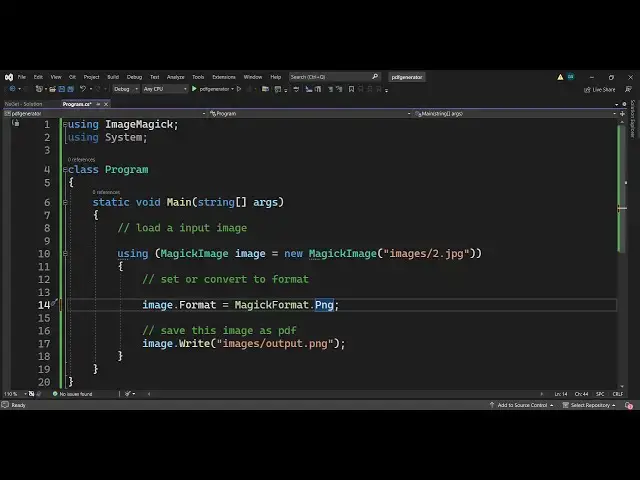
so right here image magic basically is a
2:05
image processing Library first of all
2:07
let me show you very basic example I
2:09
will load a input image which is present
2:12
inside my images directory so what I
2:14
will do I will simply say using Magic
2:18
Image which is actually a class inside
2:21
this package so what this is what this
2:24
will do let me just turn on
2:27
the so Magic Image is a class you can
2:30
see that represents an image Magic Image
2:33
so now to load a image file we will be
2:36
making a Constructor of this and you'll
2:39
be saying new
2:43
Magic Image and here you need to provide
2:47
the location of your image so wherever
2:49
the location is so my image is located
2:52
in
2:53
the images directory like this so what
2:58
we have done guys we have insted iate in
3:00
a new instance of this class Magic Image
3:02
we have provided inside this Constructor
3:05
is the location of the image which we
3:07
are working with so if I show you my
3:10
location it is actually present in my
3:12
root directory
3:15
so so in my project we have this images
3:19
folder if you see inside this images
3:22
folder we are storing this 1. PNG 2. jpg
3:26
so we are working with this image so we
3:28
are referencing this image right here
3:30
images SL one.png after that we need to
3:34
basically set or convert to any format
3:40
let's suppose if I want to convert this
3:41
image to image sorry PDF we can simply
3:44
say image. format and here we can
3:47
initialize magic
3:49
format CL class and it you can see that
3:52
it has various options PNG if you drag
3:55
down basically it has all the options
4:01
PNG you can see all these options are
4:04
there so one such option is for
4:06
PDF so you'll simply say PDF so now we
4:10
can simply save this
4:13
image as PDF so for that we will simply
4:16
say
4:17
image and it has called a function
4:19
called as write so this function will
4:22
allow us to actually convert this to PDF
4:25
so Images slash and then the output file
4:28
that you want to do so output.pdf
4:31
simply semicolon that's all this three
4:34
lines of code guys first of all we load
4:36
the image by using the Magic Image
4:38
Constructor then we changed the format
4:40
to any format that we want we changed it
4:43
to PDF and then lastly we are using the
4:45
right method to actually save this
4:46
location images SL output PDF so if you
4:49
run this
4:51
file so uh nothing happens here but if
4:54
you now see it has created this uh
4:57
output file output PDF if I I try to
5:00
open this you will see my image is
5:01
successfully converted into the image
5:04
you can see that
5:06
so similarly if you want to reference
5:09
the jpg image you will say 2. jpg and
5:14
now it will change that jpg
5:21
image so now it is got the jpg image you
5:24
will see that so it can convert PNG jpg
5:28
each every extension is supported so
5:32
let's suppose if you don't want to
5:33
convert to PDF you can convert this to
5:36
SVG so SVG format you will see that spvg
5:40
format is also there and now you can
5:41
change this to output. SPG and run this
5:45
file so you will basically see it will
5:47
change this image to scalable vector
5:49
graphics you'll see it has created this
5:51
file output.
5:53
SVG so this library is completely free
5:56
guys it is not a paid API most of the
5:58
net net API are paid but this is a free
6:01
library it's a open source Library you
6:03
can just see it has converted this to
6:05
SVG we can you can just see you can
6:08
convert your images to PDF SVG or any
6:11
format let's suppose I want to convert
6:13
this into a different format
6:15
PNG I can select PNG and now I can just
6:19
convert this image to PNG so again run
6:21
this you can make a image converter
6:24
really easily you will see that the my
6:26
image is successfully converted to PNG
6:28
format so if you want to make a image
6:31
converter website image to PDF website
6:33
this library is very helpful you can use
6:36
it inside your net application to build
6:38
web applications as well so it was just
6:41
a mini crash course about this Library
6:43
how to inte integrate this inside your
6:45
net C
6:47
application you can read more about in
6:49
the documentation as well so you can
6:51
just see all these you can also convert
6:54
them into pstd file as well Adobe
6:56
Photoshop bit map so you can just see
7:00
how much uh free methods are available
7:03
you can use these methods to actually
7:05
create websites so I just wanted to show
7:09
you how to get started with this thank
7:11
you very much for watching this video
7:12
and I will be seeing you in the next
7:15
work
#Windows & .NET
#Open Source