live_tv
Livestream Starting Soon
00
Hours
:
00
Minutes
:
00
Seconds
Up next in 10


Get the full source code of application here:
https://gist.github.com/gauti123456/bbef75993286d33c317f0f312b2664b6
Show More Show Less View Video Transcript
0:00
uh hello guys welcome to this video so
0:02
in this video we'll be looking at how to
0:04
build out a very simple YouTube
0:06
thumbnail downloader web application
0:08
inside HTML CSS at JavaScript and we'll
0:12
be using bootstrap for making the user
0:14
interface so you can just see on your
0:16
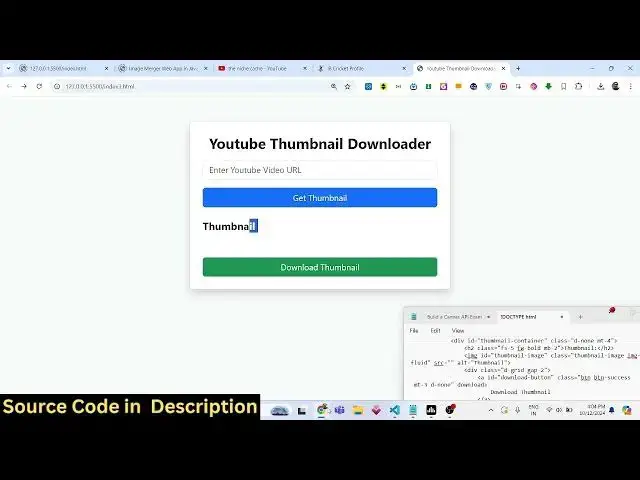
screen this is actually the application
0:18
where we allow the user to actually
0:20
enter the URL of whichever YouTube video
0:22
thumbnail you want to download you will
0:24
simply copy link address and simply
0:27
paste the link of the YouTube video
0:29
Simply in this application and click on
0:31
get thumbnail so as you click the button
0:35
you will actually get the thumbnail of
0:37
the video now you can download the
0:40
thumbnail and you can right click save
0:42
this image inside your computer and uh
0:46
maximum resolution thumbnail is
0:48
successfully downloaded you will see
0:50
that so in this way you can pick any
0:53
video of your
0:54
choice simply copy link address and
0:57
simply paste it and then it will give
1:00
you the thumbnail simply download this
1:03
so we will try to build this application
1:05
in the browser using uh JavaScript HTML
1:09
and CSS so now let's get started all the
1:12
source code that I will be using in this
1:14
video is given in the description of
1:15
this video so to get started we will
1:19
simply make a simple template we'll
1:21
simply say YouTube thumbnail
1:26
downloader and for this we do need to
1:29
include the boot STP
1:33
CD so right here we will copy the CD
1:36
after the title paste it then we need
1:41
to give the body a bootstrap class of
1:45
background
1:47
light E5 padding
1:50
F and then you'll be using the container
1:53
class of bootstrap and we'll be having a
1:55
card like structure in the center of the
1:57
screen MX Auto P4 it will also be having
2:01
some Shadow as
2:03
well so we'll be giving a maximum width
2:09
of 500 pixel so inside this div we will
2:14
have actually a
2:17
heading and this heading will simply say
2:19
that YouTube
2:22
thumbnail
2:24
downloader and uh we give it a class to
2:29
it
2:30
we align this heading in the center
2:32
position so if you refresh your
2:34
application it will look something like
2:36
this so we will also be adjusting the
2:41
phont size which is adjusted by using
2:44
fs3 font size three font weight we will
2:48
make it bold and margin bottom three so
2:51
if you make this change it will look
2:53
something like this so all these classes
2:57
are available in bootstrap then we will
3:00
allow the
3:02
user to actually input the URL so input
3:06
type text Will giving an ID here of
3:09
video URL and this should be required
3:12
and we'll be giving a form control class
3:14
of
3:17
bootstrap so it will look something like
3:19
this this input
3:22
field and it'll be giving a placeholder
3:25
attribute that is enter YouTube video
3:29
URL
3:34
can see that so after this we will
3:38
actually have a button to submit the
3:41
form we will have the
3:45
dgrid class and a gap of
3:50
two inside this you will have a button
3:52
which will simply say get
3:55
thumbnail and we will be giving an ID
3:58
here out to it of fetch thumbnail we
4:01
will be giving a class to it of BTN
4:06
BTN
4:09
primary so you have this button nice
4:12
little full size button get thumbnail so
4:15
if you click this button you can't
4:17
submit the form but because you need to
4:20
submit
4:22
this so after after
4:27
this we also need to to uh have a div
4:32
tag where we will be actually be showing
4:34
the thumbnail so for that we will be
4:36
giving an ID here thumbnail container
4:39
where you'll be showing the thumbnail
4:43
so we will not be displaying this d none
4:46
class will be there margin top four so
4:50
the these all classes are bootstrap
4:52
classes by default this section will not
4:53
be shown to the user whenever you load
4:55
the application for the very first time
4:58
and inside this we will have this font
5:03
size five font weight will be
5:07
bold and we'll simply say this is your
5:10
thumbnail and now to display the
5:13
thumbnail we have this image tag we will
5:15
give it an ID here to it of thumbnail
5:18
image so that we can Target in
5:19
JavaScript we will be giving an class of
5:22
bootstrap thumbnail
5:24
image and image
5:28
fluid to make it
5:32
responsive and after this you will have
5:34
a div
5:37
tag in just below this image we need to
5:41
have a download
5:45
button it will be anchor tag we give it
5:47
an ID here to it of download
5:51
button we're giving a bootstrap class of
5:54
BTN BTN success
6:02
and margin top
6:06
three and it it will also be not
6:08
displayed so D so label of this button
6:12
will be download thumbnail so if I
6:14
remove these classes d none you will
6:17
actually
6:22
see let me also remove the d n class
6:24
from this section so you will actually
6:26
see this section after you click get
6:28
thumbnail you will get this section so
6:31
by default we are not showing this so we
6:33
are applying d none class to both of
6:36
these download thumbnail
6:38
and so now it will not be shown to the
6:41
user at the
6:43
starting this is all the HTML we need to
6:46
now write the JavaScript code for
6:52
this so we'll make a new file script.js
6:55
here we'll be writing the JavaScript
6:57
code so first of all here we need to to
7:00
get the target
7:03
the button which have this text fetch
7:06
thumbnail so when we click that
7:08
button this call back function will
7:11
execute and here first of all we need to
7:13
get access to the URL of the video that
7:16
the user has submitted we can actually
7:18
Target the input field video URL so we
7:21
can get the value what the user has
7:24
entered after that we can extract the
7:26
video ID from the URL by using a simple
7:30
function that we will Define get video
7:32
ID we will pass the video URL as a
7:36
argument so function get video ID and we
7:41
have this video URL
7:46
passed so what this function does it
7:49
actually defines a regular
7:52
expression so we have defined a regular
7:54
expression for YouTube video URLs so
7:59
here we match
8:01
this using the match function url. match
8:04
we will pass this match this using
8:07
regular expression if the match is
8:09
successful in that case you will simply
8:12
uh extract the video ID like
8:17
this if it is not found then you will be
8:19
returning null so from this we will be
8:22
getting this video ID So based upon this
8:25
video ID you will have a if condition
8:27
that if the video ID is successful
8:30
then we need to process and get the
8:32
thumbnail some thumbnail URL can be get
8:35
using the video ID if you all know this
8:38
is the secret formula here get the URL
8:42
of the thumbnail from the
8:44
YouTube video ID so image. youtube.com
8:49
slvi SL and then you need here you need
8:53
to specify the video
8:56
ID and then we have various qualities of
9:00
the uh thumbnail standard quality
9:03
maximum resolution quality we need the
9:05
maximum resolution one so we'll simply
9:07
write
9:08
maxr
9:10
default. jpg so this is actually the
9:13
thumbnail URL that is there now to
9:17
display this we will be defining a
9:19
function for this which is display
9:21
thumbnail and pass the thumbnail URL as
9:25
an argument so we need to Define this
9:28
function which is displayed thumbnail so
9:30
this will have the thumbnail URL passed
9:32
as an argument so right in this
9:35
function
9:37
uh now to Define uh display this on the
9:41
screen on the Dom we need to get
9:43
reference to the thumbnail image so here
9:47
we have given an ID here in the HTML
9:50
which is thumbnail image and also the
9:54
download button reference we need to get
10:03
so if you check basically we have given
10:05
all these
10:09
things this is uh thumbnail image we
10:13
have given this ID to the image tag then
10:15
we have got this download button which
10:18
is the ID that we have given to the
10:20
Anchor element so we are just catching
10:22
all these things in the JavaScript code
10:25
right here getting
10:26
references and uh
10:29
also thumbnail
10:33
container this is actually the root
10:36
element where the thumbnail will be
10:39
shown to the user we also getting this
10:42
reference so thumbnail image. source is
10:44
equal to URL we are just initializing
10:47
the thumbnail image whatever is the
10:49
source right here we are initializing to
10:51
the URL that we got this is a sorry this
10:54
needs to be thumbnail
10:56
URL thumbnail URL sorry
11:00
after this thumbnail image onload
11:04
function will be called automatically
11:06
when the image is loaded
11:08
successfully so in this function what we
11:10
need to do we need to do two things
11:12
first of all we do need to remove the
11:14
display non class that we defined early
11:17
on so thumbnail container do class list
11:21
will will be dynamically be removing
11:23
this class of
11:25
d-none to actually allow the user to see
11:29
the
11:29
section where the dis where the image
11:31
will be displayed because if you see we
11:34
have attached this Denon
11:39
class so by default it is not visible so
11:42
that's why in the JavaScript code we are
11:44
dynamically removing this class by using
11:46
do class list. remove after this we do
11:50
need to download button href whatever is
11:52
the URL you need to Define it to the
11:55
button anchor element download button do
11:59
class last list we also need to show the
12:00
download button as well so again we'll
12:03
be using the remove remove this
12:07
class
12:12
D so if you refresh your application
12:17
now if you click the
12:21
button uh it is saying that URL is not
12:25
defined in line number
12:27
16 okay sorry this is uh I made a
12:31
mistake here this needs to
12:37
be uh let me
12:39
see url.
12:51
match
12:53
uh sorry this needs to be video URL not
12:56
URL
13:04
so now you can see as we are clicking
13:07
this we are getting the thumbnail image
13:10
but we haven't got the download button
13:14
seen
13:16
so we have removed this class right here
13:18
if you see in the index
13:21
HTML we have given this class which is d
13:24
none to this
13:28
button we getting the reference download
13:38
button uh download button we are getting
13:41
the
13:47
reference uh download button let me see
13:50
download
13:56
button dot class list
14:05
you can even download this image by
14:06
right clicking it and saving it inside
14:09
your computer so no need to worry about
14:11
that the application is still working
14:13
you will see that you can directly
14:15
download this image by right clicking
14:18
it or opening it in a new tab you will
14:21
see that so this is overall application
14:24
guys so we paste the URL we get the
14:26
YouTube thumbnail so all source code is
14:29
given in the description of this video
14:31
please hit that like button subscribe
14:33
the channel as well and I will be seeing
14:36
you in the next video and do check out
14:38
my website guys free mediat tools.com I
14:40
add a lot of tools on a daily basis on
14:43
this website so do check out this
14:45
website it's completely free and it
14:47
contains a lot of quality tools so I
14:49
will be seeing you in the next one
#Fun & Trivia
#Flash-Based Entertainment
#Video Sharing