live_tv
Livestream Starting Soon
00
Hours
:
00
Minutes
:
00
Seconds
Up next in 10

Build a Whiteboard Video Editor Using Canvas API to Export Text & Images to MP4 Video in Browser
Jan 9, 2025

Buy the full source code of application here:
https://procodestore.com/index.php/product/build-a-whiteboard-video-editor-using-canvas-api-to-export-text-images-to-mp4-video-in-browser/
Hi Join the official discord server to resolve doubts here:
https://discord.gg/cRnjhk6nzW
Visit my Online Free Media Tool Website
https://freemediatools.com/
Buy Premium Scripts and Apps Here:
https://procodestore.com/
Show More Show Less View Video Transcript
0:00
uh Hello friends welcome to this video
0:03
so in this video we'll be looking at a
0:05
tool that I developed which lets you
0:07
record video using the simple canvas tag
0:12
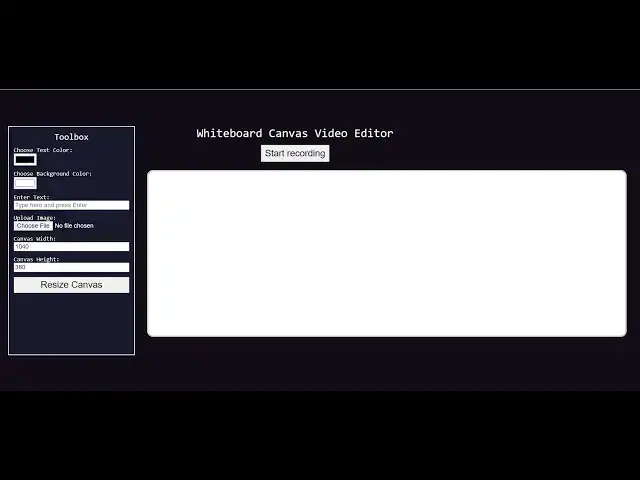
so you can just see it's a whiteboard
0:14
canvas video editor where you can
0:17
actually record a canvas here this is my
0:21
white canvas you can see right here so
0:24
we have a nice little editor right here
0:27
where you can actually choose your text
0:29
color you can choose the background
0:31
color you can choose any color from this
0:34
Color
0:35
Picker after that there is a button out
0:38
there start recording button so you can
0:40
add images you can add text as well so
0:43
if I just click start recording so what
0:45
will happen the recording will start
0:47
right here and now I can simply draw on
0:50
this canvas let me make a digital
0:52
signature and then and recording so now
0:55
you can see a mp4 file will be exported
0:59
and
1:00
you will be able to see whatever
1:03
alongside with the mic as well you will
1:05
also see if I turn on the volume as and
1:09
then add right here and now I can simply
1:12
draw on this canvas let me make a
1:14
digital you can see that guys my voice
1:18
is also recorded with my microphone and
1:21
whatever I typed it has been recorded
1:24
alongside with the voice as well so this
1:27
is actually a wideboard canvas video
1:29
generator you can generate MP4 videos
1:32
right in the browser itself and the nice
1:35
thing is that you can just see how easy
1:38
it is you can make YouTube videos using
1:41
this tool really
1:43
easily a whiteboard explainer videos you
1:46
can make how easy it is see you can make
1:48
YouTube videos using this tool so the
1:52
thing is that uh you just need to click
1:55
this button and uh you can resize the
1:58
canvas as well so if you want to resize
2:00
the canvas there's this option you can
2:02
resize it you can just adjust the height
2:05
as well like
2:09
this you can adjust the width and height
2:12
so now after that you can add images as
2:16
well so after you type this after you
2:19
anything then you can add text as well
2:22
like this by pressing and you can even
2:24
add images so if you want to add images
2:29
you can scroll it by pressing the T
2:31
keyboard on the mouse you can adjust the
2:33
position of the image and using the
2:35
scroll on the mouse you can adjust the
2:37
scale level of the image and then you
2:40
can press again T to switch to the
2:43
drawing mode now you can actually draw
2:47
images and also the text as well and
2:50
then export this into a video file add
2:52
images so you can just see everything
2:54
has been recorded alongside with the m
2:57
you can add volume add by pressing the T
3:00
keyboard on the mouse you can adjust the
3:02
position of the image and using the
3:05
scroll on the mouse you can adjust to
3:08
switch to and actually so this is a
3:11
complete editor guys which works in the
3:13
browser you will actually see I'm
3:14
running this on Local Host and we
3:18
basically are using the JavaScript here
3:21
to actually build this application this
3:23
is a complete file here a single file
3:26
which will be there so if you need this
3:29
source code guys
3:30
uh you can purchase it the link is given
3:32
in the
3:34
description you will get all the source
3:36
code from Google Drive after you
3:38
purchase it you will be redirected to
3:40
Google Drive so the link is given in the
3:42
description if you want the source code
3:45
once you get the source code you can add
3:46
more features on top of it as well you
3:48
can add your web camera I the
3:51
possibilities are endless this is just a
3:54
fun little project that I wanted to make
3:57
such that you can export your canvas so
4:00
whatever you are typing right here
4:01
whatever you are drawing on the canvas
4:03
you can export it to a actual video file
4:06
this is really tremendous your canvas
4:08
whatever you are right beautiful it is
4:11
can export this to a video file
4:14
alongside with the Vault microphone
4:17
whatever you are speaking so you can
4:20
adjust the color here on the fly so if
4:24
you click start recording so you can
4:26
adjust the color here then record it
4:30
you can add one image you can just
4:41
see so everything which will be recorded
4:44
So then record add
4:47
see it totally depends upon you how you
4:50
actually do this process and you can
4:53
adjust the canvas size this is actually
4:55
all these options are present choose
4:57
text color background color enter
5:00
upload image so if you basically get
5:04
this source code you can build more
5:07
functionalities on top of this project
5:09
it's a beginner project that I wanted to
5:11
make but still it's really powerful it
5:15
can be used for various purposes you can
5:17
make digital signature videos short
5:19
little videos you can make if you want
5:22
to it can press your signature alongside
5:25
with the video if you are teaching
5:27
something really short videos you can
5:29
make it whiteboard canvas like this for
5:34
YouTube your blog as well so the
5:36
possibilities are endless short videos
5:38
you can make it whiteboard so we just
5:41
use HTML
5:43
CSS and you can just see so everything
5:47
is
5:48
there so if you need this source code
5:53
the link is given you can go to my
5:55
website proot store.com so purchase the
5:59
uh an and after purchasing it you will
6:01
be redirected to Google Drive where you
6:02
will actually get this awesome video
6:05
editor whiteboard canvas video editor
6:08
where you can actually make videos right
6:10
in the browser itself alongside with the
6:12
voice as well so this is a mini
6:16
editor so thank you very much guys for
6:18
watching this video please hit that like
6:20
button subscribe the channel as well and
6:22
I will be seeing you in the next video
#Flash-Based Entertainment
#Multimedia Software
#Online Goodies
#Clip Art & Animated GIFs
#Animated Films
#Video Sharing