Up next in 10

Build a WebRTC Speech to Text Converter in Various Languages Web App in Browser Using Javascript
Jan 9, 2025

Buy the full source code of application here:
https://procodestore.com/index.php/product/build-a-webrtc-speech-to-text-converter-in-various-languages-web-app-in-browser-using-javascript/
Hi Join the official discord server to resolve doubts here:
https://discord.gg/cRnjhk6nzW
Visit my Online Free Media Tool Website
https://freemediatools.com/
Buy Premium Scripts and Apps Here:
https://procodestore.com/
Show More Show Less View Video Transcript
0:03
uh hello guys welcome to uh coding sixa
0:05
live stream so in this live stream I
0:08
will introduce to a new tool that I
0:11
developed on my website free mediat
0:13
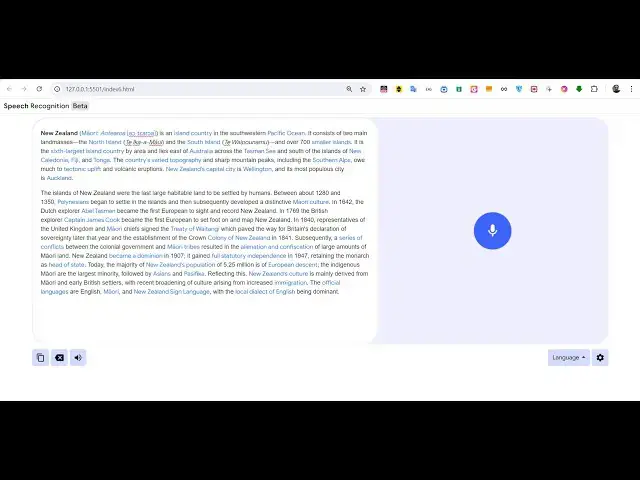
tools.com so this tool actually goes is
0:17
a speech to text recognition tool it's a
0:22
web RTC tool and the primary objective
0:25
of this tool to actually convert your
0:27
voice through your microphone in into
0:30
text automatically so there is this is
0:33
actually the interface right
0:35
here we have this icon of microphone if
0:38
I allow if I click it it will now ask
0:42
for the permission for the microphone
0:44
and now you can see whatever I am
0:46
speaking it is now capturing it and it
0:49
is showing it inside the text area so
0:52
this is actually a very awesome text
0:55
speech to text recognition web
0:57
application that I developed inside the
0:59
van JavaScript and HTML and there is no
1:03
third party dependency which is used in
1:05
this app and you can see it's very
1:07
awesome very easy to use interface and
1:10
you can see how it has been capturing my
1:12
voice and converting this text into the
1:15
text that you can
1:17
see so it is speech to text recognition
1:20
webc full web app which I coded inside
1:24
vanilla JavaScript HTML and CSS and you
1:28
can also see it has a tab for various
1:31
languages you can select English Hindi
1:33
Tamil telu Bengali Punjabi Sanskrit Udu
1:37
so all these languages are there
1:40
so let's suppose if I select any
1:43
Regional language if I select here Hindi
1:46
so now if I speak right here what you
1:49
will see it is automatically translating
1:52
my text whatever I'm speaking into Hindi
1:54
language and you can see that so
1:56
whatever I'm speaking it is now
1:59
converting that text into Hindi language
2:03
so you can just see I can even talk in
2:06
Hindi as well so it will write
2:08
automatically the correct text in Hindi
2:10
as well so let me first of all delete
2:13
this
2:19
everything
2:28
devop H
2:34
language
2:36
language so you can see that guys I just
2:38
speak in some Hindi and it has written
2:41
obviously the Hindi very accurately so
2:44
you can see that I'm speaking English
2:46
and it is also doing the translation as
2:48
well as well as speech to text as well
2:52
so it's allinone application guys you
2:55
can just see you can select Udu language
2:58
as well Udu is is also a very popular
3:01
language around the world so you can see
3:03
that how I speaking English but it is
3:06
translating English to Udu and it is
3:09
actually
3:10
autopilot and I have written this code
3:13
guys inside JavaScript HTML and CSS full
3:17
app and uh if you need to purchase this
3:20
the link is given in the
3:22
description uh you will actually get the
3:24
zip file which will contain the single
3:27
index.html file and you can see this is
3:29
the overall code right
3:32
here you can see how many lines of code
3:36
is there so it's a pretty lengthy app
3:38
but still I developed it from scratch
3:42
and you can just see I just use the
3:44
built-in concepts of JavaScript about 83
3:49
lines of code is there the overall
3:51
application it contains HTML CSS and
3:54
JavaScript and you can easily deploy
3:56
this application and it's very awesome
3:59
it works in the browser no need to
4:01
having a server site code you can build
4:04
a shared hosting you can purchase a
4:06
domain name and then you can deploy this
4:08
tool and earn a lot of re revenue from
4:11
ISO and AdSense as well so you can see
4:13
it's very popular translating as well as
4:17
well as speech to text as well if you
4:20
want to copy this text you can click the
4:22
copy button so the all the text will be
4:24
copied so now you can actually make a
4:27
file right here
4:31
so you can paste that text so you can
4:33
see that everything that we
4:35
pasted you can see
4:38
that this is a
4:40
text and uh it supports all these
4:43
languages but you uh if you purchase the
4:45
source code you can extend that and add
4:48
your own Regional languages if you are
4:51
basically outside India you can have
4:53
your own Regional languages such as
4:55
Spanish if you are living in Europe you
4:58
can have more languages so you can
5:00
extend this drop picker so I just have
5:03
few languages but you can extend it
5:05
support if you have the code if you have
5:08
this source code after you purchase it
5:10
you will get access to this source code
5:12
so inside this file you can add more
5:14
languages so it it has the support you
5:16
just need to add more languages and then
5:18
it will support your Regional language
5:20
as well such as Chinese Japanese any
5:22
language that you speak so this is the
5:25
overall controls and the nice thing is
5:27
that if I let's suppose write something
5:30
right here it's all in one text to
5:32
speech as
5:35
well so right here if I paste some text
5:39
from English language and
5:42
uh let me just stop
5:45
this cancel it so now if I type
5:48
something right here it's English
5:50
language you will see that and if I want
5:52
to speak these words by a speaker so I
5:55
just need to click this
5:57
button and all these words will be New
6:00
Zealand Maori AA at is an island country
6:05
in the southwestern Pacific Ocean it
6:09
consist of two main land masses the
6:11
North Island Thea
6:20
mawii uh I
6:23
think uh let me just see my volume is
6:26
not coming let me fix this I
6:33
think okay this is the headphones
6:37
sorry now I think the volume will come
7:02
so this is actually application guys and
7:04
you can even run this application in
7:06
Local Host as well simply open this if
7:09
you have access to this source code you
7:11
can simply run
7:17
this I think my volume is not working
7:20
guys but if you click this button uh
7:23
before purchasing it you can actually
7:25
see the live demo on my checkout page on
7:28
Pro Cod store the link is given you can
7:31
try this application by visiting free
7:33
mediat tools.com
7:35
speech to text recognition so before
7:37
purchasing it you can try this tool on
7:39
your machine if you are happy then only
7:41
purchase it it has all the features
7:44
Google translate it has features like
7:46
text to speech speech to text as well
7:48
you can even click the settings option
7:50
if you want the application to be in
7:52
dark mode then you can actually see this
7:55
application in dark mode but I prefer
7:58
the light mode so I just
8:01
this mode is better so you can try this
8:06
application the link is given in the
8:09
description if you want to purchase the
8:11
full source code you will get access to
8:14
this full app right here you will get
8:17
this full source code and uh the link is
8:21
given in the description
8:36
so you can turn the microphone and you
8:38
can see that all these things are speak
8:41
spoken and can just Bengali language you
8:45
can
8:50
see goam has you can see if I
8:56
spoke now I'm speaking so it is writing
9:00
Bengali so all if you are belonging to a
9:03
specific region you can add your own
9:05
language after you purchase the source
9:07
code so this now this is Punjabi
9:10
language which is spoken you can see all
9:12
these languages as you spoke it is
9:14
converting those
9:17
to now I am just speaking Hindi so now
9:22
it will actually write Hindi
9:26
language you can see that me goam
9:30
I'm just speaking in English language so
9:33
this is actual speech to text
9:35
recognition guys with Google translate
9:37
as well built in so if you are need this
9:41
full app the link is given in the
9:44
description and also if you click this
9:47
button I think all these words will also
9:49
be spoken but in my machine the volume
9:51
is not working but still it's a very
9:53
good app you can try this before
9:56
purchasing it by going to this free
9:58
media tools and
10:11
just so this is the application guys if
10:14
you are interested the link is given and
10:18
I will be seeing you guys in the next
10:20
one
#Email & Messaging
#Text & Instant Messaging
#Voice & Video Chat
#Scripting Languages
#Intelligent Personal Assistants
#Teleconferencing