live_tv
Livestream Starting Soon
00
Hours
:
00
Minutes
:
00
Seconds
Up next in 10

Build a wangEditor WYSIWYG Rich Text & HTML Editor With Live Preview in Browser Using JavaScript
Jan 9, 2025

Get the full source code of application here:
https://gist.github.com/gauti123456/1c89bb14900009636df4b78168a7f133
Show More Show Less View Video Transcript
0:00
uh hello guys welcome to this video so
0:02
in this video I will show you yet
0:03
another visic Rich text editor with HTML
0:06
live preview so here you will write your
0:09
text and you will see these nice little
0:12
controls Rich Text controls where you
0:14
can change your background color
0:17
everything phone size as well so the
0:20
name of the this package is Vang editor
0:23
it's an open source visic text editor I
0:26
will show you a complete example inside
0:28
JavaScript in browser
0:30
so if you just search for this W NG Wang
0:36
editor so you can create a fully web
0:40
text editor right off out of the box
0:43
simply it's an open source package so
0:46
this is their official website Wang
0:48
edit.com
0:49
and they do offer this complete
0:53
example so step by-step instruction so
0:57
you can see the live demo this is their
1:00
website you can host it live demo so
1:03
first of all what they are telling they
1:05
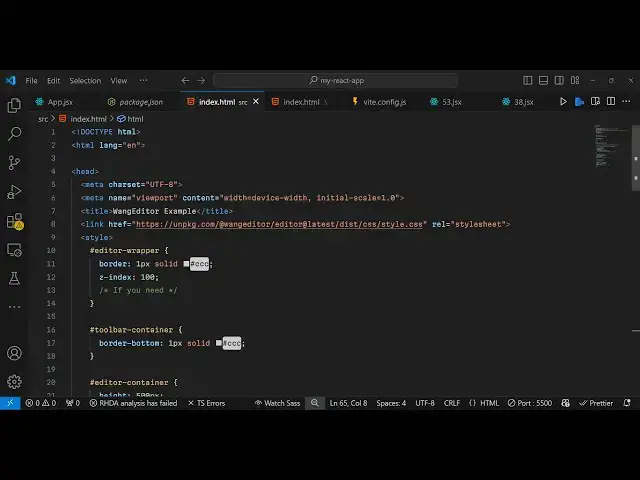
are telling to create a new index. HTML
1:09
file and
1:11
just you need to include this CDN and
1:15
the actual stylesheet code so you just
1:18
need to include this just after the
1:21
title paste
1:24
it so we pasted the CDM of the package
1:29
and we pasted these CSS Styles then they
1:32
told you to copy this HTML so you will
1:36
copy this so this is nothing but two div
1:39
tags which are holding the editor so
1:41
just in the body we paste
1:44
it and after this it is saying that
1:47
import the JavaScript and then create
1:50
the
1:52
editor so what we will do we will copy
1:56
this from their official website and
1:58
then copy and
2:01
paste so paste it so now what happens if
2:05
you
2:06
refresh you will see this fully
2:08
functional R text editor you can cook
2:12
all these controls change background
2:15
change the text color change the phone
2:17
size all these things you can perform it
2:19
right inside your
2:21
browser so this is actually the package
2:24
gu is Wang
2:26
editor so fully functional Rich Text
2:29
Editor I've given all the source code in
2:31
the description of this video so
2:34
essentially we are creating this editor
2:36
passing it the selector HTML config
2:39
object and the mode and then creating
2:42
that
2:43
toolbar having all these options it's an
2:45
open source editor and having all these
2:49
controls so thank you very much guys for
2:52
watching this video and do check out my
2:54
website as well free mediat tools.com uh
2:57
which contains thousands of tools
2:59
regarding audio video and image and I
3:02
will be seeing you guys in the next
3:04
video
#Open Source