Up next in 10

Build a Vue.js HTML to PDF Converter in Browser Using HTML2PDF.js Library in Javascript
Jan 9, 2025

Build a Vue.js HTML to PDF Converter in Browser Using HTML2PDF.js Library in Javascript
Show More Show Less View Video Transcript
0:00
uh Hello friends welcome to this video
0:02
so in this video we will look at a
0:04
library inside
0:06
vuejs which is how to convert HTML to
0:09
PDF with a template so this is actually
0:12
the demo application we'll be building
0:15
so we have some uh
0:17
text we have a paragraph We have a
0:20
heading we have a image and then we have
0:22
a button right here export to PDF so if
0:24
I hit this button you will see it will
0:27
actually convert everything to PDF so
0:30
everything which is there in the HTML
0:31
the images the text The Heading with all
0:34
the formatting you will see that so we
0:37
are actually using this Library which is
0:39
html2
0:41
pdf.js this is their GitHub page
0:45
official website and it actually uses
0:47
pure JavaScript client site HTML to PDF
0:50
rendering and uh you can even use it as
0:53
a CDN but we will be using it how to
0:55
implement this inside vuejs so vuejs is
0:59
as you know it's a progressive
1:01
JavaScript framework so you'll be using
1:03
this the latest version and now to get
1:06
started you need to initialize your VJs
1:10
project I've already done that and then
1:12
you need to install this package npmi
1:15
html2 PDF JS just install this by
1:19
invoking this command npmi html2 PDF JS
1:22
I've already installed it so what I will
1:25
do I will start my development server
1:28
so I will start from scratch so this is
1:31
my basic vuejs project we are having
1:34
this app. view file so now to get
1:37
started we will first of all make the
1:40
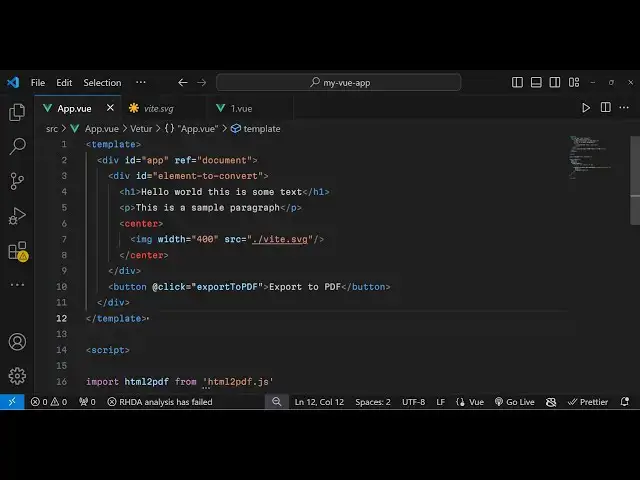
template so as you see inside vuejs
1:43
application we have a template tag
1:46
inside the template tag we actually
1:47
write the HTML which is required so
1:50
inside the HTML we will have a div tag
1:52
we will give it give it an ID to this so
1:55
that we can Target in the JavaScript we
1:57
need also need to give it a reference
2:00
attribute I will give it as
2:03
document and inside this we will have
2:06
actually the element that we want to
2:08
Target so for that element we'll give it
2:11
an ID we simply say element to convert
2:16
so whatever element that you want to
2:17
convert to PDF you first of all give an
2:19
ID to it so we have given this ID right
2:22
here so now inside this we will give the
2:25
HTML so we will have a heading right
2:28
here hello word this is some text and
2:31
then we will have a paragraph We will
2:33
simply say this is a sample
2:36
paragraph so here you can mention all
2:39
the HTML elements that you want to
2:40
convert to PDF and then we will have a
2:43
simple
2:44
image SVG image I will be giving a width
2:48
to this image of 100 or 400 and the
2:53
source of this
2:55
image it is located in the same folder
2:58
we have this V logo
3:01
SVG so we are actually loading this
3:03
image here v logo and just v.svg you can
3:08
even take PNG jpg any image files you
3:11
can
3:11
take and after that guys we will simply
3:15
have a button after
3:17
this this button will actually allow
3:20
export to PDF so when we click this
3:22
button we will execute a function so we
3:25
can bind a onclick listener to this in
3:27
vuejs while add the rate click event
3:30
handler so here we'll be mentioning the
3:31
function that we want to execute so we
3:34
will be executing this function which is
3:36
export to PDF so now it is showing the
3:39
red line because this function is not
3:41
defined we need to Define this function
3:43
in the JavaScript so now in VI JS we
3:46
actually write the JavaScript in the
3:48
script tag and here you mention all your
3:50
JavaScript codes so now in the script
3:53
tag we first of all need to import the
3:55
library HTML to PDF so we need to import
3:58
this as it is and after this we need to
4:02
Simply tell vuejs where to write this
4:05
function so we will have export default
4:07
and here you need to specify the name
4:10
attribute so what name you need to give
4:13
to your app so we'll be giving
4:15
app so
4:17
whatever so name is equal to app and
4:20
then we need to mention the methods here
4:23
you mention the methods in VJs so
4:25
whatever methods that you want to tell
4:27
so we need to execute this method which
4:29
is X ort to PDF so we will Define this
4:32
function right here
4:34
export
4:35
to
4:39
PDF so inside this
4:43
function we will actually render out or
4:47
export the HTML template to PDF so for
4:52
this we will initialize the html2 PDF
4:55
library and inside this we will pass the
4:57
reference of that element so we we have
5:00
given the ID so element to convert so if
5:03
you see we have copy pasting the same ID
5:05
that we have given to the HTML element
5:07
if you see element to convert so we have
5:10
given this ID and we are just
5:11
referencing it and after that the second
5:15
argument is takes the object which
5:17
contains additional properties about the
5:20
element uh PDF which is the margin and
5:23
what file name that you want to give so
5:25
this file name result. PDF let me give
5:27
it so now that's all that you need to do
5:31
and if you now refresh the application
5:33
you will actually see this template
5:35
appearing The Heading the text paragraph
5:37
the image and now we have a button right
5:40
here if you see export to PDF if you
5:42
click this button you will see result.
5:44
PDF will get downloaded if you open this
5:47
now you will see all the text that you
5:49
mentioned plus the image has been
5:50
successfully exported to PDF document so
5:53
in this way in vuejs you can integrate
5:56
the HTML to pdf.js library in order to
5:59
convert your HTML to PDF in client site
6:03
in VJs so I shown you complete example
6:07
of how to create a PDF document from
6:09
text and images using this HTML to
6:12
pdf.js library so thank you very much
6:15
guys for watching this video please hit
6:17
that like button subscribe the channel
6:18
as well and do check out my website as
6:21
well free mediat tools.com which
6:23
contains thousands of free tools
6:24
regarding audio video and
6:26
image and I will be seeing you in the
6:28
next video
#Programming
#Software
#Web Services