live_tv
Livestream Starting Soon
00
Hours
:
00
Minutes
:
00
Seconds
Up next in 10

Build a Vue.js 3 vue-sound Example to Build Audio Player With Controls & Image Preview in Browser
Jan 17, 2025

Get the full source code of application here:
https://codingshiksha.com/vue/build-a-vue-js-3-vue-sound-example-to-build-audio-player-with-controls-image-preview-in-browser/
Hi Join the official discord server to resolve doubts here:
https://discord.gg/cRnjhk6nzW
Visit my Online Free Media Tool Website
https://freemediatools.com/
Buy Premium Scripts and Apps Here:
https://procodestore.com/
Show More Show Less View Video Transcript
0:00
uh hello guys welcome to this video so
0:02
in this video I will show you a vuejs
0:04
package which allows you to play your
0:07
audio files right in the browser itself
0:10
using a nice little audio editor audio
0:12
player so I just shown a simple example
0:15
here we have a choose file button where
0:18
we allow the user to Simply select any
0:21
audio file all extensions are supported
0:23
MP3
0:25
Avi so as I choose the file here you
0:28
will see I will simply select the MP3
0:31
file and now
0:33
the let me turn on the volume so that
0:35
you can hear it if all these controls
0:38
are available we can play the audio file
0:40
this is your
0:42
timeline and we have the audio control
0:45
as well we have a download button as
0:46
well so this is actually the length of
0:48
the audio which is 7 minutes 35 second
0:51
as I play this uh hello guys welcome to
0:53
this video so this video so there is a
0:56
simply go to your likely mention this so
0:59
now if you so in this way you can simply
1:01
play the audio file with all these
1:03
controls I have this report as soon as
1:06
you click if you also want to you can go
1:08
forward go backward as well by clicking
1:10
these two buttons right your
1:13
us and then we also have the button to
1:16
control the
1:19
volume more
1:21
buttons so similarly you will you can
1:25
give it then we also have this download
1:28
H as you click the download button the
1:31
you can download the file inside your
1:33
local machine as well so and also you
1:35
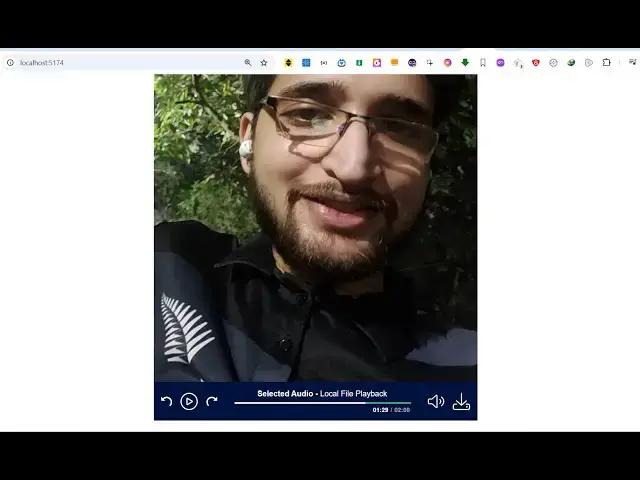
can see the image is also showing right
1:37
here so in the background you can even
1:40
show a custom image while you are
1:42
playing the audio file so this actually
1:44
is a very handy module inside vuejs if
1:48
you simply go to npmjs.com
1:51
uh just search for this module which is
1:54
view sound this is an open-source module
1:58
specifically built for vuejs application
2:01
audio
2:03
player so the command is very simple you
2:06
install it and it's compatible with the
2:09
latest version of vue.js which is three
2:13
so it's almost got 92 weekly downloads a
2:16
pretty popular package but a new package
2:20
so I will now show you the full example
2:24
all the source code that I'm using is
2:25
given in the description of this video
2:28
so inside your app. view you first of
2:31
all need to write the template here
2:33
you'll be writing the HTML code and then
2:36
inside your script section here we will
2:38
write the typescript code so first of
2:40
all we'll require the package by using
2:43
the import statement so we simply import
2:45
the package like this using the package
2:49
name view sound and we are importing
2:52
this package view sound and then we also
2:55
need to import the CSS file of this
2:58
package which is located in inside view
3:00
sound
3:02
style.css and then we need to Simply
3:04
register it export default the name of
3:08
you can give any name let me say audio
3:10
player
3:12
app and then we need to pass this
3:15
component that we imported which is this
3:19
view sound so we are directly passing it
3:22
so this is actually the registration
3:24
code that is required to register this
3:27
module inside your VJs now we need to
3:30
declare some variables because we will
3:32
be expecting the user to provide a
3:35
custom file so inside your data you will
3:39
provide some variables first of all the
3:41
audio file which will be null by
3:46
default so now allow the user to Simply
3:49
select an audio file from their local
3:51
file system for this we have declared a
3:53
variable which is currently null now we
3:56
come to the template part so right here
3:59
we give it a diff a class here so that
4:02
we can Target in style JS to style It
4:05
audio player
4:08
container and then inside this S2 tag
4:11
we'll simply say view Sound audio
4:16
player so after this we will have this
4:18
input field where we allow the user to
4:22
input type is equal to
4:25
file and we'll only be accepting audio
4:28
files we'll be binding the this
4:30
attribute so only put audio slst star
4:34
only be
4:40
accepting so it is saying audio
4:47
slash sorry this add theate symbol is
4:50
not required for this it's a attribute
4:52
we'll also be binding this change event
4:55
handler so whenever you change the file
4:59
whenever the user selects some file this
5:02
on change function will execute so I
5:04
binded this custom on change function on
5:07
audio file
5:08
change and we also be giving a class
5:12
here which will be file
5:16
input so now we need to just Define this
5:18
function on audio file change right
5:21
inside our method section
5:24
so just Define your methods right here
5:27
so on audio file change so this event
5:31
will trigger and we will get access to
5:34
the file here by using event.
5:37
target. files so once you get the access
5:41
to the file we can directly play it so
5:44
you say if the file is valid then in
5:46
that case inside this variable Store It
5:50
this. audio file and we'll simply read
5:52
this file by the buil-in function url.
5:56
create object URL and it will simply
5:58
pass the file name
6:00
so this will create a base 64
6:03
URL to whatever audio file the user has
6:06
selected and then it this will store it
6:08
in this reference of audio file so what
6:11
you will now see as I refresh the
6:13
application you will see a input field
6:16
being added
6:19
and it is saying that unexpected token
6:32
uh what unexpected to token here I think
6:36
I made some kind of typo
6:43
mistake just refresh
6:45
now so now you can see now it refreshes
6:48
and now you will choose see this choose
6:50
file button and now you need to Simply
6:52
select this audio file
6:57
so so now we have success F read this
7:00
audio file now we need to display it
7:02
inside the audio player so now after
7:05
this input field we will display the
7:08
component here view sound and it
7:10
actually takes some parameters first of
7:12
all it takes a v if directive I will
7:15
bind it that only execute this code if
7:18
this audio file is available to us so
7:21
this will return true this if this file
7:24
is
7:25
existing so we binded this directive so
7:29
now the file here you will bind the file
7:31
here which is created which is audio
7:34
files you're passing the actual file
7:36
input
7:37
file and then we can give it a title to
7:41
this audio file let's suppose selected
7:45
audio you can change the title then we
7:48
can even give it a details as well so I
7:51
will say local file
7:54
playback and if you want to show the
7:56
download button inside the audio player
7:59
you can put this attribute show download
8:01
so this will actually make sure that the
8:03
download button will appear so now if
8:06
you refresh your application and choose
8:08
your audio file to play and as soon as
8:11
you click the select the audio file you
8:14
will see this mini player appearing in
8:16
the browser and you will be able to play
8:18
your audio file very easily so there is
8:21
this play and stop button appearing uh
8:24
hello guys welcome and then display
8:26
these buttons inside your website so I
8:28
will show you step by step in this
8:30
so I have given tag now you will see
8:32
this directed to this page where you can
8:34
able to Fork the repo so now if you want
8:38
also want to display a custom image in
8:40
the background so I already have this
8:43
image available in my assets directory
8:45
so this is my own image so what I will
8:48
do first of all I will simply import
8:51
this image using the import statement in
8:53
the typescript so we simply import this
8:57
file which is located in the assets
9:00
directory and then we simply return it
9:03
right here so in the images in the
9:06
variables that we are using for the
9:08
template so we now you can directly use
9:12
this variable in the image so what image
9:16
you are providing we are providing this
9:18
image
9:19
variable so if you refresh now and
9:22
choose your audio file now you will see
9:26
the audio the image will display in the
9:28
background and you will be able hello
9:30
guys welcome to this video view
9:32
file so this is actually the thing and
9:37
what you can even do you can add some
9:39
custom
9:41
styles to make it little bit perfect in
9:44
terms of formatting so just add this
9:47
stylesheet I've given all the source
9:49
code in the description so just It
9:52
Centers it and now it looks pretty good
9:56
you will see that hello guys welcome to
9:58
this Direct
9:59
so in this way guys you can play audio
10:01
files directly in the browser using this
10:03
vuejs plugin that I show hello guys so
10:07
which have all these controls available
10:09
so thank you very much for watching this
10:11
video and do check out my website as
10:13
well uh free mediat tools.com uh which
10:17
contains thousands of tools regarding
10:19
audio video and MH and I will be seeing
10:22
you guys in the next video
#Music Equipment & Technology
#Multimedia Software