Up next in 10

Build a Vue.js 3 vue-simple-context-menu Example to Build Context Menu on Click in Browser Using TS
Jan 13, 2025

Get the full source code of application here:
https://codingshiksha.com/vue/build-a-vue-js-3-vue-simple-context-menu-example-to-build-context-menu-on-click-in-browser-using-ts/
Show More Show Less View Video Transcript
0:00
uh hello guys welcome to this video so
0:02
in this video I will show you how to add
0:06
the context menu inside your vuejs
0:08
application so you have a list of items
0:11
we are displaying it if you see and if I
0:14
uh left click it you will see this
0:16
context menu will open then it will have
0:18
a series of options right here we can
0:20
select here and there is a specific
0:23
module in V which allows you to Simply
0:25
make this context menu whenever user
0:28
clicks on any of the individual items
0:30
you can have this context menu right
0:33
right here there is a specific module
0:35
which is there in VJs so we'll be using
0:37
that module so the module name is view
0:41
simple context menu so if you just go to
0:43
npmjs.com
0:46
so just search for this module view
0:49
simple context menu so actually this is
0:53
the name of the module here
0:56
uh and it's compatible with the latest
0:58
version of view which is View V3 so we
1:01
are using view3 so let me just open my
1:04
zoomit tool so just
1:08
to zoom it on the elements in the web
1:12
page so now this is actually the command
1:15
I've already installed it
1:17
so just install this uh using this
1:21
command and it's almost got 5,000 weekly
1:23
downloads so now to get started uh we
1:26
just need to first of all create inside
1:30
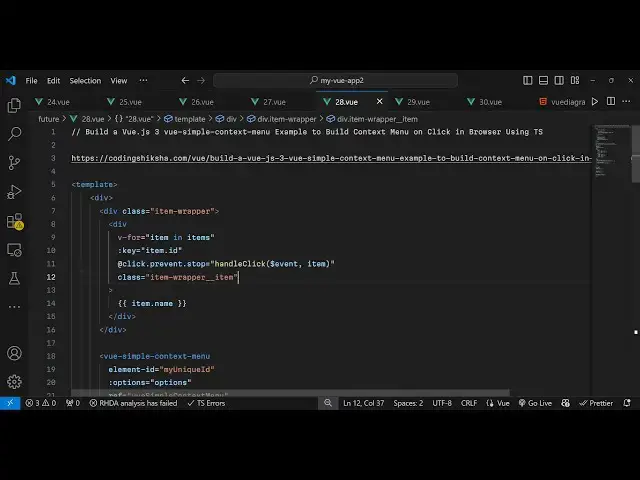
your app. viw file this is our brand new
1:33
project just go to this file app. view
1:36
and here you need to write the code so
1:40
inside our template we will write the
1:42
HTML code right here and inside this we
1:45
will display the series of items so this
1:49
can be anything it can you can display
1:52
images as well but for the sake of this
1:55
example I'm just looping through an
1:57
array of items so for doing
2:00
that inside our script we using the
2:04
types script right here so we will first
2:08
of all import the module so we simply
2:10
say view
2:12
simple context menu and this will be
2:15
coming from this package which is view
2:19
simple context menu so in this way you
2:22
need to first of all import this package
2:25
by using the import statement and then
2:27
you just need to also import the CSS
2:30
file of this package as well view simple
2:33
context menu it is located inside the
2:35
disc folder and then view simple context
2:41
menu do CSS so we import the CSS file as
2:46
well alongside with the
2:47
module and after this we
2:51
will have some variables to pass to this
2:53
template export default the name of the
2:56
component will be app then the series of
3:00
components that we need to pass so we
3:02
will simply say we need to pass this
3:05
component which will be view simple
3:08
context menu alongside with the data so
3:11
what data that you want to pass so you
3:13
simply say
3:15
data and in this way we can pass data
3:18
through template so you'll have a series
3:20
of
3:22
uh items right here this is an array of
3:25
items each item will have these two
3:29
properties
3:30
ID and a name so let's suppose I say
3:33
item one and then we will repeat this
3:37
process two more times id2 name this
3:40
will be item
3:43
two then
3:46
ID3 and name will be item three so now
3:51
we have a series of this is actually our
3:54
items array three objects are there
3:57
having two properties each ID and name
3:59
so if you want to Loop through
4:01
it we will simply go to the template
4:04
right here
4:05
and we will just first of all Loop
4:08
through these items so just we'll use
4:11
this V4 Loop V4 is a directive in vue.js
4:14
so we say item in this items array and
4:18
here we need
4:20
to just inside double query brackets we
4:24
just need to Loop through the name of
4:26
the item we can even attach the key
4:29
parameter which will be located inside
4:31
item. ID so if you just refresh your
4:34
application you will see this series of
4:37
items will be displayed item one item
4:39
two item three so when I now click it no
4:42
context menu is opened but now to
4:44
trigger this we now need to bind an
4:47
onclick listener to this so whenever we
4:49
click on any of these individual items
4:51
so you'll simply prevent Auto submission
4:54
and we will bind this onclick listener
4:57
handle click and we will pass this event
5:00
alongside with the item so you can see
5:03
we binding this on click listener and we
5:06
are binding this custom function that we
5:07
will Define it so now we go to
5:12
the typescript code
5:15
and after we declared these items this
5:18
array we will have another options array
5:23
and this will be the context
5:28
menu menu it items which will be
5:31
there so option
5:36
two option
5:38
three so these are will be the items
5:41
which will be shown in the context menu
5:43
so you can be anything it can be
5:44
anything you can customize it
5:47
accordingly then you can even provide an
5:50
divider as well which will be a
5:53
horizontal line or which will be there
5:56
in between the items and then we'll be
5:58
having the option option five so now we
6:02
have defined the items and just after
6:04
this data function which is now we need
6:09
to define the methods right here so we
6:12
have binded this method which is handle
6:14
click so here we need to pass the event
6:18
and the
6:21
item then first of all this and then we
6:24
simply
6:28
say
6:58
for
7:28
e
7:58
e
8:28
e
8:58
e e
#Other