Up next in 10

Build a Vue.js 3 Popup Modal Social Sharing Buttons in Browser Using vue-social -sharing in TS
Jan 13, 2025

Get the full source code of application here:
https://codingshiksha.com/vue/build-a-vue-js-qrcode-generator-from-text-with-logo-watermark-using-vue-qrcode-in-ts/
Show More Show Less View Video Transcript
0:00
uh hello guys welcome to this video so
0:02
in this video I will show you a vuejs
0:05
plugin which offers to social sharing
0:08
buttons of various websites such as
0:10
Facebook Twitter Reddit WhatsApp you can
0:14
see these buttons appear on this and as
0:16
soon as the user clicks on the button
0:18
this popup window will open and you will
0:20
be able to post on your timeline
0:22
Facebook timeline automatically the
0:24
message will be typed in you just need
0:26
to click the share button same goes with
0:29
the Twitter timeline as well so if you
0:31
click this button the Twitter will open
0:33
and automatically you you'll able to log
0:37
in and tweet about this and same goes
0:40
with LinkedIn WhatsApp as well this
0:42
WhatsApp chat window will open and same
0:44
goes with Reddit as well so these are
0:47
the social sharing buttons plug-in I
0:49
will show you how to integrate this
0:50
inside vuejs
0:52
3 and if you go to the npmjs website
0:56
there is this plugin out there that you
0:58
need to install uh the name name of the
1:00
plugin is view social sharing this is
1:04
actually the name of the plug-in uh it
1:08
offers pre-build buttons out there which
1:11
you can integrate inside your vuejs 3
1:14
application so the size is pretty
1:16
minimalistic you will see 2.5 kilobytes
1:19
and you can see these are the networks
1:21
it supports all the major networks and
1:25
the command is simple I've already
1:27
installed it so just install this
1:29
package and it's almost having 26,000
1:32
weekly downloads so now to integrate
1:34
this I have given all the source code in
1:37
the description of this video so first
1:39
of all you need to go to your main.ts
1:41
file the typescript file so here you
1:44
need to register this plug-in first of
1:45
all so we will first of all import this
1:49
plugin by writing this code so import
1:52
view social
1:55
sharing and then we it will be coming
1:58
from this View
2:00
social sharing so you import this
2:03
package so the size is you can see 37
2:05
kilobytes and then we register it by
2:08
simply using this line which
2:11
is app.use and we simply pass the name
2:15
view social sharing so in this way we
2:18
import this and then we register it so
2:21
now you can close this file and open
2:24
your app. viw file which is your main
2:28
vuejs component so here we will write
2:31
this component from scratch so first of
2:34
all inside your
2:36
template we will
2:38
write the HTML code right here so but
2:42
before that inside your typescript code
2:45
we do need to import and the module
2:48
first of all
2:51
so Define component will be coming from
2:54
the base vuejs package and then we'll be
2:57
importing this view social sharing
3:01
like this we are importing it and then
3:04
we need to export this so we simply say
3:07
export
3:08
default Define component and here we
3:10
need to pass the name of the component
3:13
secondly we need to pass the
3:16
component that we are integrating so
3:20
share the name of
3:23
the package so it will be share Network
3:31
view social
3:33
sharing and it contains this share
3:36
Network so in this way you can integrate
3:38
this that's all that we need to do just
3:41
write these code right here to register
3:43
this inside typescript so now we go to
3:46
the template so we can easily render
3:50
these social uh sharing buttons so I
3:53
will show you first of all a very simple
3:56
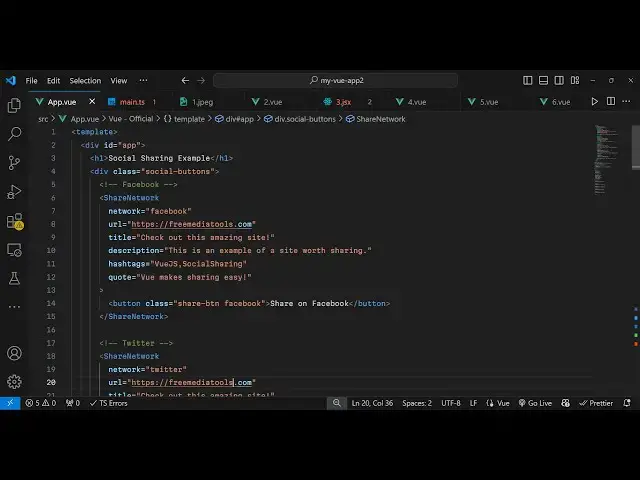
example of Facebook so now for
4:01
rendering this Facebook sharing button
4:04
we use the component right here which
4:08
is the name of the component is share
4:11
Network and it actually takes some
4:13
options so the first of all the network
4:15
option so which network you are
4:17
integrating it so in my case we are
4:19
integrating Facebook so we just write
4:22
the network to be Facebook and whichever
4:24
URL that you are sharing this is the
4:27
second attribute so I'm just sharing my
4:29
my website which is free mediat
4:32
tools.com
4:33
and then you give it a title as well so
4:37
you can just say check out this amazing
4:40
website can give a title and
4:51
description then you can even put
4:54
hashtags as well
5:00
then you can even write a simple quote
5:02
as
5:04
well so all these attributes are
5:07
supported the title description hashtags
5:10
quote this is these are the two
5:12
mandatory ones because you need to
5:14
provide the network and the URL that you
5:16
are
5:17
sharing and uh inside this inside the
5:21
share Network you close this and inside
5:25
this we have this button and we will
5:28
simply need to attach the pre-build
5:31
classes which is available in this
5:33
plugin so we will attach this class
5:36
which is
5:37
share button and then it's a Facebook
5:41
share buttons that's why we attach these
5:43
two classes share button is the common
5:45
class and then Facebook is the class for
5:47
styling so if you just refresh your
5:49
browser you will see this button sharing
5:52
Facebook sharing button will be there
5:55
but it will not be styled but as you
5:59
click this button your Facebook timeline
6:01
will open automatically and that message
6:03
will be typed out so now if you want to
6:06
style it you just need to write some CSS
6:10
code for this so just write style here
6:13
and you can Target this
6:16
uh I have given all the stylesheet
6:19
code in the description you can just
6:23
see here we are just targeting each
6:26
class that we have
6:28
given and just changing the background
6:30
color so for Facebook this is actually
6:33
the color we are targeting this custom
6:36
class that we have given to this button
6:39
this Facebook so now if you refresh it
6:42
the background color will change to
6:44
Facebook color so in this way this is
6:47
for Facebook and now for integrating
6:50
other networks you will use the same
6:54
code but you will change this time the
6:57
network will be
6:59
Twitter so you just say network is
7:02
Twitter and the class here will change
7:04
to Twitter so if you refresh now there
7:07
will be a second button added and now
7:10
the Twitter timeline will open so in
7:12
this way you can integrate all the
7:19
networks so this time this will be
7:23
Reddit
7:30
this one will be
7:32
WhatsApp so all these networks are
7:35
supported you can check out their
7:37
documentation and then it can be
7:44
LinkedIn so if you refresh you can see
7:47
all these buttons are appearing so I
7:50
just forgot to change the text now it
7:52
opens Reddit this opens Facebook this
7:55
opens LinkedIn so in this way you can
7:58
use this package View social sharing to
8:00
integrate the social sharing media
8:02
buttons on your website so thank you
8:05
very much for watching this video and do
8:07
check out my website as well uh free
8:09
mediat tools.com uh which contains
8:12
thousands of tools regarding audio video
8:14
and image and I will be seeing you guys
8:17
in the next video
#Online Goodies
#Social Network Apps & Add-Ons