live_tv
Livestream Starting Soon
00
Hours
:
00
Minutes
:
00
Seconds
Up next in 10

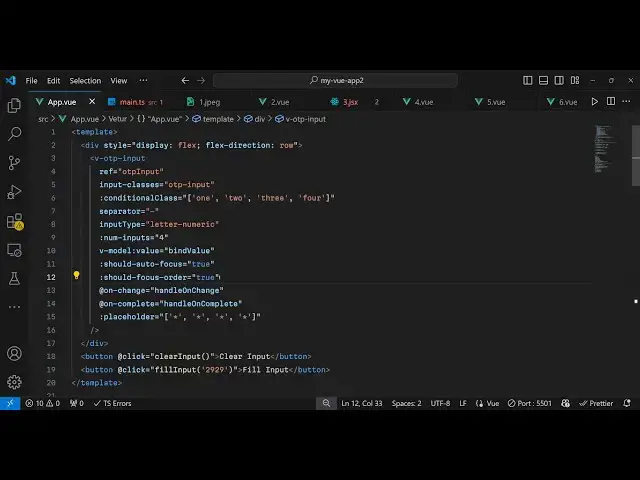
Build a Vue.js 3 OTP Code Form Input Field Component Using vue3-otp-input in TS
Jan 17, 2025

Get the full source code of application here:
https://codingshiksha.com/vue/build-a-vue-js-3-otp-code-form-input-field-component-using-vue3-otp-input-in-ts/
Show More Show Less View Video Transcript
0:00
[Music]
0:00
uh hello guys welcome to this video so
0:02
in this video I will show you a vs3
0:05
component which allows you
0:07
to have this form input field which
0:10
receives otps one time password so if
0:14
you want your application to receive OTP
0:16
codes you can use this package so you
0:19
can design it to receive four digigit or
0:22
three digigit you can configure this in
0:24
the code and then fill out these OTP
0:27
codes so we have this component right
0:29
here I will show you in this video how
0:31
to integrate this component so the name
0:33
of the package is view3 OTP input so if
0:37
you just go to npmjs.com
0:40
so just search for this package which is
0:44
view3 OTP input so this is actually the
0:48
package right
0:49
here for integrating this so command is
0:53
simple you install it and then it's
0:57
almost got 16,000 weekly downloads so
1:00
they do offer a nice little demo on
1:02
their npm page so you can style it using
1:05
CSS change these colors as well
1:10
so I think they offer this demo right
1:14
here so now to get started I've given
1:16
all the source code in the description
1:18
of this video so if you need the source
1:19
code you can go to the description so
1:22
inside your template you will write your
1:23
HTML code and then inside your
1:25
typescript you will write the inside
1:28
your script section so first first of
1:30
all we need to import this module so we
1:32
will
1:34
say first of all we require the
1:36
necessary packages using the import
1:38
statement so this will be in typescript
1:41
so we can explicitly mention this
1:43
language attribute typescript and also
1:46
attach
1:48
setup so then we need to import this
1:51
third party package view
1:58
OTP and and it will be coming from this
2:01
view3 OTP
2:08
input
2:10
and then we need to Define uh some
2:12
variables that we will be
2:19
using so inside this VJs app
2:25
so we need two variables here first of
2:29
all OTP input and then the second is
2:31
bind value so we declare it like this
2:35
and
2:37
uh then we come to the template
2:40
here we if you want to renter this
2:47
input we will be just be having this
2:50
simple diff this display property to
2:55
flex and flex direction to be row and
2:59
inside this is will be rendering this
3:00
component view OTP
3:06
input and this actually take some
3:08
options here first of all the reference
3:10
here uh this acts like a ID you can
3:13
attach a reference and then whatever
3:15
classes that you want to attach so for
3:18
this we will be attaching the OTP
3:20
input and conditional classes there's an
3:24
attribute here also conditional class
3:30
so this will be acting how many digit of
3:34
OTP that you want to accept so we need
3:36
to digit accept four digigit OTP code so
3:40
you provide 1 2 3 4 so in this way you
3:43
can control
3:46
it and then the separator
3:49
here separator will be Dash you can even
3:52
customize that as well so then we also
3:55
have input type here you can control if
3:58
your OTP will contain digits or numbers
4:01
so it will contain both so here we
4:03
mention it can even contain letters and
4:06
numbers as well so then how many digit
4:09
of OTP that you want to accept here you
4:11
can control this using this attribute so
4:13
I will say
4:15
four then at the next attribute is the
4:18
actual value that you need to
4:21
bind so should autofocus then it's a
4:24
Boolean parameter so I will say to true
4:33
so these last five parameters this is
4:36
for autofocus you can see that autofocus
4:41
Focus order true on change when the OTP
4:43
changes when the OTP is complete these
4:46
call back functions and the placeholder
4:49
you can even customize the placeholder
4:51
as well
4:55
so then after this we'll be having two
4:58
buttons the first first button will be
5:00
for clearing input if you want to reset
5:03
the values and the second one is for
5:06
filling the
5:09
input and we will just bind this on
5:13
click function to both these
5:16
buttons so when you click the clear
5:18
input we'll be Bing this clear input
5:21
function and fill input will be
5:22
responsible for filling the inputs
5:24
automatically so now we come if you just
5:27
refresh your application obviously you
5:29
will see this
5:31
error that you haven't
5:33
defined the functions right here so we
5:36
go to the typescript
5:38
code and Define all these four
5:42
functions so when your OTP will be
5:44
completed so this handle on complete
5:47
will occur the value will be of typ
5:53
string so here it will be simply console
5:55
locking a simple message that OTP
5:58
completed and whatever is the value
6:01
we'll be rendering
6:06
it and the next function when the OTP
6:09
the user is entering the change event
6:11
will occur so it will be contain the OTP
6:17
value so you can console log a simple
6:19
which is OTP
6:21
changed and whatever is the
6:25
value and the next two functions uh this
6:28
function will be responsible for
6:30
clearing or resetting the
6:33
input so here you simply say OTP input
6:37
do value clear
6:40
input and last but not least for filling
6:43
the
6:45
input
6:56
automatically say OTP input value
6:59
question mark. fill
7:03
input so these two functions are
7:05
available here clear input fill input so
7:08
which will do the job if you refresh now
7:10
uh what happens is
7:12
that I've given all the source code guys
7:15
in the description of this video so you
7:17
can even attach your custom CSS as well
7:20
right here so now it will style it
7:24
accordingly it will have this
7:26
placeholder so it will add this gray
7:28
background color as well so you can
7:31
refer the description of this video so
7:35
now let's suppose I say I only want to
7:37
receive three I Chang it to three so now
7:41
what happens it changes to three so here
7:44
you can control it how many digit of OTP
7:46
that you want to accept fill
7:53
input so in this way you can actually
7:59
integrate the OTP input in vuejs 3 so
8:03
thank you very much for watching this
8:05
video and also check out my website as
8:07
well uh free mediat tools.com uh which
8:11
contains thousands of tools regarding
8:13
audio video and image and I will be
8:16
seeing you guys in the next video
#Programming
#Internet & Telecom