Up next in 10

Build a Vue.js 3 Markdown Files Parser Viewer & Renderer in Browser Using markdown-it Library
Jan 13, 2025

Get the full source code of application here:
https://codingshiksha.com/vue/build-a-vue-js-3-markdown-files-viewer-renderer-in-browser-using-markdown-it-library/
Show More Show Less View Video Transcript
0:00
uh hello guys welcome to this video so
0:02
in this video I will show you a vuejs 3
0:06
package which allows you to render your
0:08
markdown
0:09
files uh so there is a package here uh
0:12
let me show you the demo so we have a
0:14
choose file Button as soon as you click
0:16
the button you need to select uh
0:19
actually your markdown file so you can
0:22
see we have this markdown file as soon
0:25
as I select this file you will see the
0:27
markdown file will get successfully
0:29
rendered
0:30
and you can actually see the content uh
0:33
inside the markdown file in the browser
0:36
itself so with full formatting if you
0:39
see this is a simple unordered list this
0:42
is the markdown file we are rendering it
0:44
in the browser uh so that we can
0:47
directly see and read so there is a
0:49
package here if you go to npmjs.com uh
0:52
just search for this package which
0:55
is atate f3v
1:00
slash view
1:02
markdown it so this is actually the
1:07
package markdown it is a very popular
1:10
package for rendering markdown files so
1:14
this person has made this package
1:16
available for vuejs 3 specifically so
1:19
it's compatible with the latest version
1:21
so this is actually the command I
1:24
already installed this package it's
1:25
almost having 570 weekly
1:28
downloads so this Library I'm talking
1:31
about markdown it so this is actually
1:34
the library markdown
1:37
parsel open source this is the actual
1:41
background library that we are using it
1:43
so this is their official documentation
1:46
they don't also have this tool available
1:48
where they rent a
1:50
markdown so now to integrate this inside
1:53
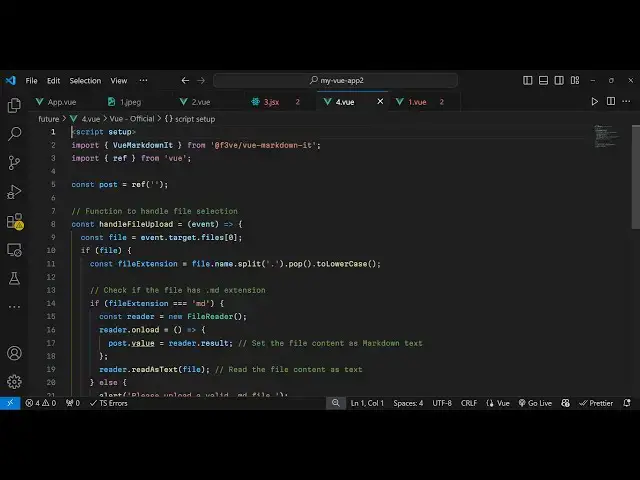
this application you come to your app.
1:56
view and just write the script section
1:59
and
2:01
just add setup right here and here we
2:04
import this package by the import
2:06
statement view
2:09
markdown it and this package will be
2:13
coming from
2:18
this so as soon as you require it now we
2:21
also need to require the reference which
2:23
will be coming from
2:28
view so then we just need need to
2:30
declare a variable post make it a
2:34
reference and then we come to the
2:38
template here you'll write the HTML code
2:41
right here you'll have the simple input
2:44
type
2:46
file this is template so here we write
2:49
your HTML code so input type is file so
2:54
here we allow the user
2:56
to select any markdown file so we only
2:59
be accepting markdown file and we just
3:02
bind this on change event handler as
3:05
soon
3:06
as they select the file this function
3:08
will execute handle file upload we
3:11
binded this on change event handler so
3:14
now we just need to Define this function
3:16
so we simply go to the typescript
3:18
section and here we Define the function
3:21
handle file upload so here we will be
3:24
having this e parameter so here we get
3:27
access to the file here which we can
3:29
easily get by using e. target. files so
3:33
after getting access to the file now we
3:35
can simply compare that if the file is
3:39
valid then we need to extract the
3:42
extension to get the extension we use
3:45
the split
3:46
method and then we use the pop
3:50
method all these methods are JavaScript
3:54
so two lower
3:56
case just converting it to lower case so
3:59
after getting the extension we will
4:00
simply check that if the file extension
4:04
is equal to markdown or not so if it's a
4:08
markdown file then we'll read the
4:11
file so using the file reader
4:16
package so you'll read this file as a
4:20
text file so there is a method here
4:22
which will say reader. read as text and
4:27
pass this actual file and this will
4:29
actually
4:32
load a method here onload function so
4:36
when the file is successfully loaded so
4:39
this function will execute and post.
4:41
value you will get the reader.
4:48
result so that's all so if you just now
4:52
refresh it
5:00
so after getting this now we just need
5:02
to go to our after reading the file now
5:05
we mention this package view mark down
5:08
it and here we provide the source which
5:11
will be equal
5:13
to the post
5:16
variable so whatever we are reading it
5:18
we are showing this inside this uh view
5:22
markdown it we read this markdown file
5:25
convert to text and just pass it right
5:28
here so if you just refresh now so now
5:31
what happens if you select any markdown
5:34
file so that file will be displayed if
5:36
you see with full formatting it will
5:40
convert that markdown into HTML and then
5:42
the HTML is rendered in the browser so
5:44
this is actually the open source package
5:46
we using it so all the source code if
5:48
you need is given in the description of
5:50
this video so thank you very much for
5:53
watching this video and do check out my
5:55
website as well uh free mediat tools.com
5:59
uh which contains thousands of tools
6:01
regarding audio video and image and I
6:05
will be seeing you guys in the next
6:07
video
#Other
#Other