live_tv
Livestream Starting Soon
00
Hours
:
00
Minutes
:
00
Seconds
Up next in 10

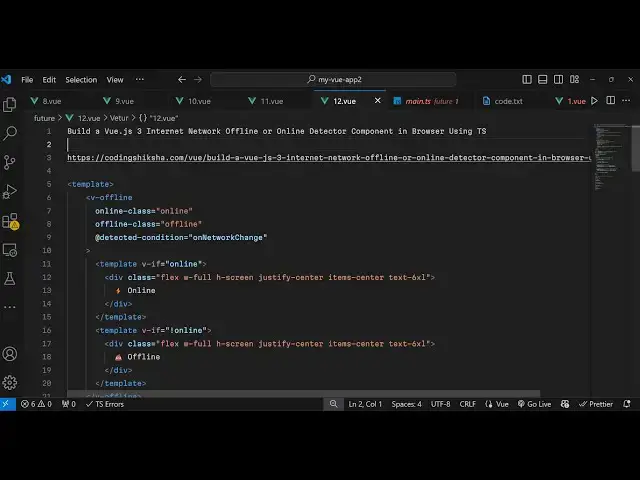
Build a Vue.js 3 Internet Network Offline or Online Detector Component in Browser Using TS
Jan 17, 2025

Get the full source code of application here:
https://codingshiksha.com/vue/build-a-vue-js-3-internet-network-offline-or-online-detector-component-in-browser-using-ts/
Show More Show Less View Video Transcript
0:00
uh Hello friends welcome to this video
0:02
so in this video I will show you a
0:05
package in vuejs which allows you to
0:08
detect changes whenever your app goes
0:10
offline or online so on your screen
0:13
right here you will see the status of my
0:15
internet connection it is currently
0:17
online and it is actually showing it is
0:19
online with this nice little icon as
0:22
soon as I change my network if I let's
0:26
suppose I turn off my internet
0:28
connection so as soon as I did this
0:30
without page refresh it will
0:32
automatically detect and then it will go
0:34
to offline so you will see that and
0:37
again if I turn back the internet
0:39
connection the Wi-Fi if I turn on the
0:41
Wi-Fi you will see automatically it will
0:43
change to online I'm not refreshing the
0:47
page it automatically detected Network
0:49
change event and automatically adjust
0:52
itself and shows the message so it's a
0:55
VJs package which allows you to do this
0:58
I will show you in this video it's
1:00
compatible with the latest version of
1:02
vuejs 3 so just go to npmjs.com and you
1:06
just need to search for this package
1:08
which is uh in the search bar v- offline
1:12
so if you just search for this package
1:15
v- offline this is a network detector
1:20
component and the command is simple I've
1:22
already installed it and it's almost
1:25
having 1,000 weekly downloads so now to
1:28
get started you go to your app . view
1:30
file this is your main file of your
1:33
project and all the source code I have
1:36
given in the description of this video
1:37
so now to get started you will write
1:40
your HTML code in your template and then
1:42
the types script code in the script
1:44
section
1:46
so first of all I will require this
1:48
module so for requiring it first of all
1:52
in the script here I will mention
1:54
explicitly that we are using typescript
1:56
so language attribute typescript and now
1:59
using theut statement we will require
2:01
the necessary packages so first of all
2:04
the built-in packages Define component
2:07
reference unmounted method
2:11
unmounted so these are life cycle
2:14
methods so we just need to import this
2:15
from The View base
2:18
package and also
2:22
this type reference from the and then
2:27
the this third party package we need to
2:30
import it so which is called as V
2:39
offline and this will be coming from
2:41
this package V offline
2:43
so in this way you import
2:47
this and then we need to export default
2:51
Define we need to use it
2:53
and include and register it like this
3:00
and after registering it we will
3:03
actually in the setup function in UJS 3
3:07
need to declare some variables so first
3:09
of all we will be declaring a Boolean
3:11
type of a
3:13
variable so this will actually keep
3:16
track of whether you are online or
3:18
offline and for this we'll be using the
3:20
Navigator API which will return the
3:23
status of our internet connection
3:25
whether you are actually logged in or
3:27
not so
3:37
so it will return the status in this
3:38
variable online so we'll be using this
3:40
variable in our
3:42
template so now we go to the template
3:45
right here where we write
3:52
our HTML code so right in the template
3:55
will be using this component V offline
4:00
and it actually takes some parameters
4:02
first of all it takes the online class
4:06
which will be online and then the
4:08
offline
4:10
class these are built-in classes for
4:12
this component and then there is this
4:14
important event handler detected
4:17
condition so this call back function
4:20
whenever your network change this call
4:22
back function will execute and here we
4:23
need to bind an on network change uh
4:27
method the name can be anything I'm just
4:30
binding this call back function so when
4:33
your network connection changes then we
4:36
will be executing this function on
4:38
network change so now we go to
4:43
the right here in the setup
4:48
function we will Define this after this
4:52
this function which is called as on
4:54
network change so basically this
4:57
function will return the status of your
4:59
internet connection whether it's logged
5:01
in or not and we'll be manipulating this
5:03
online value to the status like this so
5:08
just see this function is returning the
5:10
status right here it's a Boolean
5:13
parameter either true or false whether
5:14
you are online or offline and we are
5:17
putting this value
5:19
inside like this now we just need to
5:22
export this method so that we can use it
5:25
inside our template so just after this
5:29
we simply say we need to return on
5:32
network
5:37
change I think this needs to be there in
5:41
inside
5:44
sorry we need to return on network
5:50
change and this online function so we
5:53
need to use both these things this
5:55
function and this variable so we need to
5:57
add this return statement so that we can
5:59
can use it inside our template so now
6:02
using this function using this uh
6:04
variable online we will be inside our
6:09
template in this component we will
6:13
use a simple if condition so we have in
6:17
vuejs V if so it's a directive so
6:21
depending upon whether it's true now you
6:23
are online so it'll be showing a simple
6:26
message you are online
6:30
and if you are not online then another
6:33
template
6:38
so so this will be if the value of
6:42
online is
6:43
false then here will will say that you
6:47
are
6:49
offline so if you refresh your browser
6:52
go to your
6:53
application so now you see you are
6:55
online because my internet connection is
6:58
on so now now if I turn it on without
7:01
page refresh what happens I think it
7:03
will change to so you can see now it is
7:07
not changing we need to refresh the page
7:09
now the status is you are offline but we
7:12
don't want to refresh the page we need
7:15
to automatically the application should
7:18
detect the network change without page
7:20
refresh so if you don't want the page
7:22
refresh then you need to use the life
7:25
cycle method which is these two methods
7:27
on mounted and on unmounted
7:30
these are the life cycle methods for
7:32
vuejs components so right here we will
7:35
use this on mounted event so as soon as
7:38
your network changes this life cycle
7:41
method you'll
7:43
B event listener which is an online
7:47
event and he'll bind this function here
7:50
update online
7:52
status and same we'll be adding another
7:55
event for offline event so these uh
7:59
events are built in in
8:02
browser so I'm not using this third
8:05
party library for this so these are part
8:07
of the browser these events whenever
8:09
your network goes online or offline and
8:12
using this we can solve the problem of
8:15
page refresh so now we can Define both
8:18
these
8:19
methods we calling the same function for
8:22
updating the online status we'll Define
8:25
this function so again we are getting
8:27
the Navigator API we using the Navigator
8:30
API built-in browser to return the
8:32
online status like this so now what
8:35
happens uh if you refresh it as soon as
8:37
I changed the network connection without
8:40
page
8:43
refresh so now you can see without page
8:46
refresh it changed to offline and once
8:48
again if I turn it
8:51
back it will detect and it will change
8:54
to ur are
8:57
online so
9:00
now to add some styling uh I have given
9:03
all the source code in the description
9:05
so you can just style
9:07
it so once you style it basically it
9:11
will look something like this so the
9:13
rest of the functionality Remains the
9:15
Same so in this way guys you can build
9:18
out the simple application offline and
9:21
online detector in vuejs 3 with this
9:24
nice little package so thank you very
9:26
much for watching this video and do
9:28
check out my website it as well uh free
9:31
mediat tools.com uh which contains
9:34
thousands of tools regarding audio video
9:36
and image and I will be seeing you guys
9:39
in the next video
#Internet Software