Up next in 10


Get the full source code of application here:
Show More Show Less View Video Transcript
0:00
uh hello guys welcome to this video so
0:02
in this video I will show you this Zoom
0:04
or magnifier component in vue.js 3 if
0:07
you have a image that you want to zoom
0:09
in or magnify you can use this
0:12
component so to zoom your images at
0:17
particular sections you have the zoom
0:19
level or magnifier component so the name
0:22
of the package is uh if you go to
0:25
npmjs.com just search for this package I
0:28
will show you
0:33
so simply go to this
0:35
npmjs website just search for this
0:41
package it's compatible with the latest
0:43
version of vuejs so now just install
0:47
this by executing this command I've
0:50
already installed it and it's almost got
0:52
787 weekly download
0:55
so now to get started
1:00
we first of
1:01
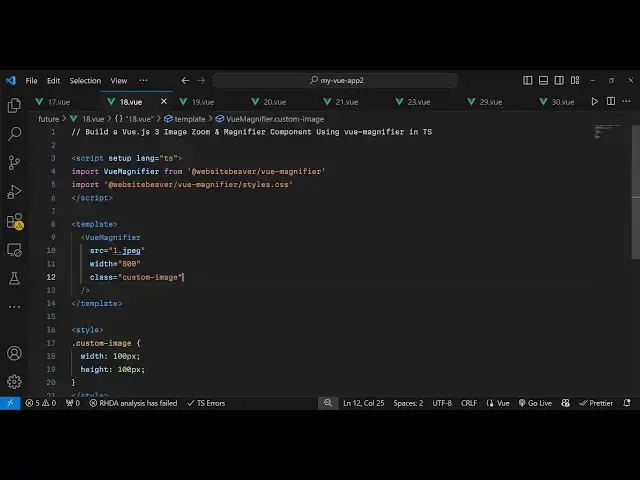
all import this package using typescript
1:06
so we will make mention this is the
1:09
setup file and we'll change the language
1:12
to typescript so here we import the
1:14
module which is view
1:21
magnifier and it will be coming from
1:24
this
1:26
package so after this we also need to
1:29
import it CSS file as
1:33
well which is located
1:39
inside so in this way we also imported
1:43
the CSS so first of all we imported the
1:46
module and then the CSS file of this
1:48
module so now we write the actual
1:53
template in the HTML so we simply render
1:56
out this component view magnifier
2:02
and then it actually takes the source
2:04
parameter so which image you want to
2:06
magnify or Zoom so my image is already
2:09
present in the public directory so we
2:11
are simply taking this one dot you can
2:14
directly write it because it's present
2:17
in the public directory the second
2:19
option is take is the width I will set
2:21
it to
2:27
800 and you can even attach a custom
2:30
class to it as well so that for
2:33
customization so you can just give it a
2:35
class your Custom Image these two
2:37
options are important the source and the
2:39
image so if you refresh now you will see
2:43
your image will get displayed
3:00
so just wait I
3:06
think yeah we do need to add this custom
3:09
style
3:10
here just add a width and the height to
3:13
the
3:20
image so all the source code is given in
3:22
the description so if you refresh now
3:26
you will see the image will display and
3:28
you will see this magnifier component
3:30
which will be able to zoom images
3:32
magnify images at certain locations so
3:34
you can use this package so thank you
3:37
very much for watching this video and do
3:39
check out my website as well free mediat
3:42
tools.com uh which contains thousands of
3:45
tools regarding audio video and image
3:48
and I will be seeing you guys in the
3:50
next video
#Other