live_tv
Livestream Starting Soon
00
Hours
:
00
Minutes
:
00
Seconds
Up next in 10

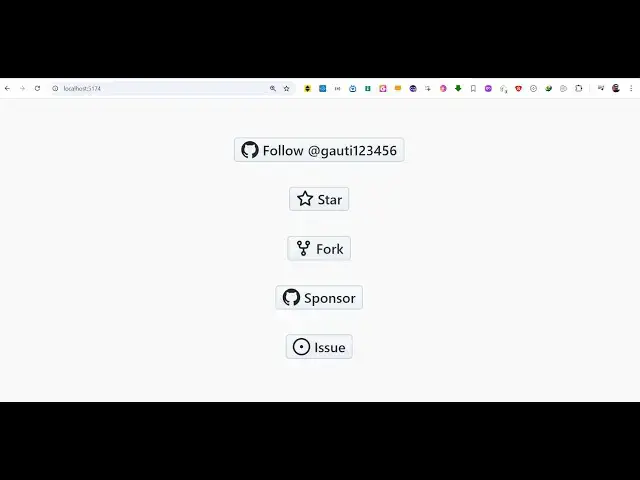
Build a Vue Github API Example to Embed Buttons to Fork,Star & Follow User Using vue-github-button
Jan 17, 2025

Get the full source code of application here:
https://codingshiksha.com/vue/build-a-vue-js-github-api-example-to-embed-buttons-to-forkstar-follow-user-using-vue-github-button-in-ts/
Hi Join the official discord server to resolve doubts here:
https://discord.gg/cRnjhk6nzW
Visit my Online Free Media Tool Website
https://freemediatools.com/
Buy Premium Scripts and Apps Here:
https://procodestore.com/
Show More Show Less View Video Transcript
0:00
uh hello guys welcome to this video so
0:02
in this video I will show you how to use
0:05
a module inside vuejs if you want to
0:08
show GitHub buttons on your website
0:11
where the user can directly follow you
0:13
or Star inside your repository or Fork
0:17
your repository or directly sponsor you
0:19
issue so all these buttons provided by
0:22
GitHub there is a specific module inside
0:25
vuejs 3 that you can use it install it
0:28
and then display these buttons inside
0:30
your website so I will show you step by
0:32
step in this video so I've given all the
0:34
source code in the description of this
0:36
video so there is a module right here if
0:39
you just go to npmjs.com
0:41
and just search for this module uh the
0:44
module name is view GitHub button so
0:48
this is actually the module if you
0:50
directly type here uh simply search it
0:54
here so this is actually the module here
0:57
GitHub button component for specifically
0:59
View is and it directly communicates
1:02
with the GitHub API and display these
1:04
buttons inside your website so command
1:06
is simple you install this first of all
1:09
and uh 20,000 weekly downloads are there
1:12
so it's a very popular module so they do
1:14
have a official website as well where
1:17
they provide this live demo buttons.
1:20
github.io and all these types GitHub
1:22
buttons are supported they can follow
1:25
you sponsor watch star F issue so now to
1:29
get started inside your vuejs project
1:32
simply go to your file here which is
1:34
app. view file and here you need to edit
1:37
this file and simply first of all what I
1:39
will do I will write all the HTML code
1:43
in the
1:44
template and then we will write the
1:46
typescript code in the script tag
1:50
so so first of all we will import this
1:53
package so inside your script we will
1:56
just write a simple import statement and
1:59
we will import this
2:01
GitHub button component which will be
2:03
coming from this package which is view
2:07
GitHub button you first of all import
2:10
this package like this we use the import
2:13
statement and we are importing this
2:14
package and then we just register this
2:17
we simply say export default and then
2:20
inside your
2:22
components we likely mention this
2:25
directly pass it GitHub button so in
2:27
this way we can register this using this
2:30
Ty typescript code now now we move to
2:33
our template where we need to show these
2:36
buttons so inside a div I will give it
2:40
an ID here so that we can Target and
2:42
style it and also give it a class as
2:45
well which is button container so here
2:47
inside this D we will show all the
2:49
buttons so now to use this component we
2:52
simply say GitHub button and this
2:54
actually takes some parameters first of
2:56
all HF which the profile URL of your
3:00
GitHub account
3:02
so I will paste my address here
3:05
github.com
3:07
1 2 3 4 5 6 so here you need to paste
3:11
your full
3:13
URL and whenever user tries to follows
3:16
you they will be redirected to this link
3:18
so if you refresh your application uh
3:21
Let me refresh and now you will see this
3:24
GitHub logo on this button the gray
3:27
button so as soon as I click this I will
3:29
be redirected to my GitHub profile and
3:32
now the user CL click the follow button
3:34
to follow you on GitHub this is the
3:37
follow button and similarly we have more
3:40
buttons so similarly you will you can
3:44
give it a label as well so if you want
3:46
to give it a label you can simply say
3:48
here follow and then you can give it
3:51
your
3:53
username so now if you refresh you will
3:55
see the user will clearly see the uh
3:58
this follow here button right here and
4:00
they can clearly see when they click it
4:03
they will be able to follow you and
4:05
similarly we will have more buttons so
4:08
use you use the same component here
4:11
GitHub component GitHub button and this
4:15
time this button will be
4:17
for let's suppose you have a GitHub
4:20
repository that you want to the user to
4:23
like it so for this you will paste your
4:25
repository full URL
4:32
so I have this repo here which is
4:35
available so I will
4:38
simply give it
4:40
a star so it's a star button so if you
4:44
also want to if you refresh now you will
4:47
see this star button now as soon as you
4:49
click the user clicks this button they
4:51
will be redirected to the repository
4:54
page where they can start the repository
4:57
by clicking this button
5:01
so this is the second button
5:04
and if you also want to show an icon
5:07
there is also an attribute here data
5:10
icon that you can
5:16
provide so using this attribute you can
5:19
change the icon here so what icon that
5:21
appears so you have changed the star
5:23
icon so in this way you can even provide
5:26
a custom attribute data icon and
5:29
similarly we have more buttons If you
5:32
want to
5:33
Fork the repository so someone wants to
5:37
share your repository there will be this
5:39
GitHub
5:40
button again you paste a full URL of
5:43
your upo followed by/
5:46
fork and if you refresh now you will see
5:49
this Fork Button as soon as the user
5:51
clicks it they will be redirected to
5:53
this so you need to paste the correct
5:55
address of your GitHub repo
6:00
so I will just paste this address this
6:03
is the GitHub repo and followed by SL
6:07
Fork so now what happens as I click it I
6:11
will be able to create a new Fork of
6:13
this a fork is nothing but a copy of the
6:15
repo
6:17
repo so you will be redirected to this
6:20
page where you can able to Fork the repo
6:23
and then lastly if you want to create a
6:26
issue related to any repo that
6:30
the user has you
6:32
can make this button as well so using
6:34
the same component GitHub button this
6:37
time this will be the issue button so we
6:39
are providing this data icon
6:42
here so now you have the issue button
6:45
right here so if you want some kind of
6:48
problem here then you can create a issue
6:50
related to this so these are the buttons
6:52
you can provided by this component very
6:55
easily in Vue js3
6:57
application and you can use this
7:00
uh and I just need to paste the CSS code
7:04
here which actually Styles it just
7:06
appears it in the center of the screen
7:08
the buttons you can find out the full
7:10
source code of this example code which
7:12
is given in the description of this
7:14
video so you can use this package guys
7:16
in ugs to display GitHub buttons to
7:19
actually perform all these operations so
7:22
thank you very much for watching this
7:23
video and do check out my website as
7:25
well uh free mediat tools.com uh which
7:29
contains the thousands of tools
7:30
regarding audio video and image and I
7:33
will be seeing you guys in the next
7:35
video